

DMTR (Daily Material Transaction Report): User Depot Module
DMTR is summary of list of all the finalized transactions on a particular day. Here is the User Manual for viewing/printing DMTR report on UDM Module of Indian Railways.
- Download DMTR: User Manual for UDM Module (in PDF)
3.1 Open DMTR Tab
On clicking DMTR Tab on Left side Panel, following Screen will open:

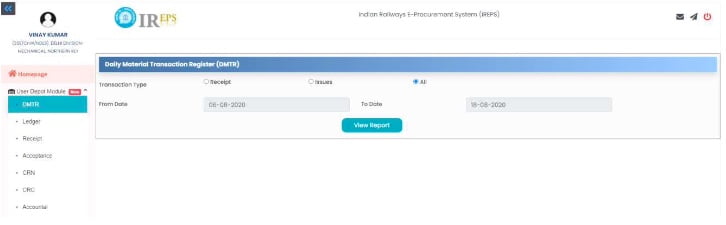
3.2 Viewing DMTR reports
User may select Transaction Type and the Time Period for which DMTR is required as per his requirement. We have set default Transaction Type as All and the Time Period as last three days from the current date. On clicking View Report, following DMTR will get opened:

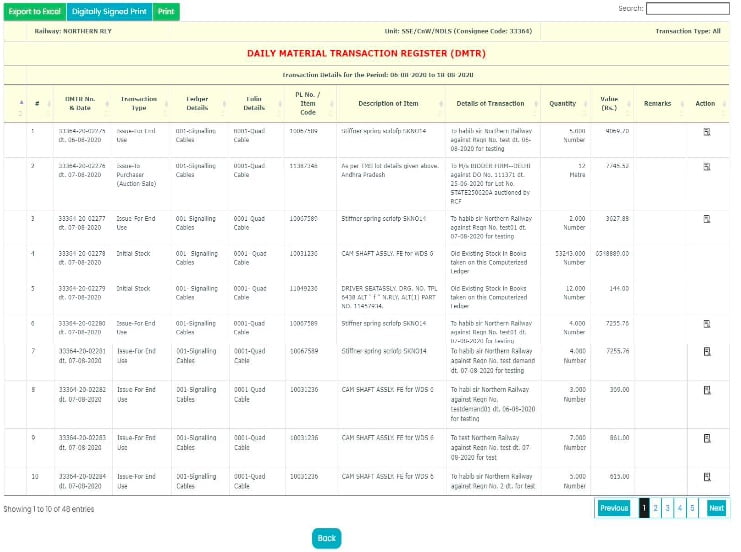
3.3 Search & Print facility of DMTR
Search facility can be used to search a particular transaction. Hyperlinks have been provided to view various types of documents. Also, by clicking icon available under Action Header, User can view further details / documents. Facility to take Print / Digitally signed Print / Export to Excel the DMTR is also there using the Tabs available at top Left Hand side of Page.
Also Read…
full manual in PDF format is required
How to find the status of material indent?
how to create id ,password
hi please my e-pass create
what, if consignee mapped to wrong post, how too unmapp?
How to take a prnt of e-Book : UDM manual