
HRMS for Retired Railway Employees
Retired Railway Employees can register on HRMS portal of Indian Railway and can take advantage of online modules of HRMS. For registration on HRMS, retired Railway Employees to know their HRMS ID first.
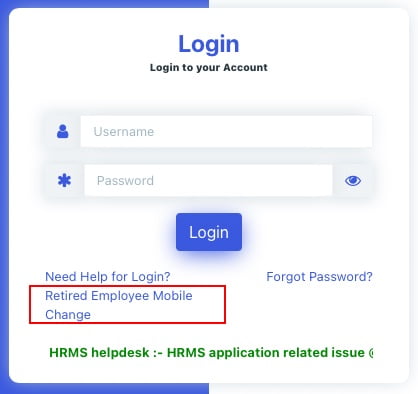
Step:1- Open the HRMS webpage in any web browser and then Click on the link “Retired Employee Mobile Change”.
Step:2- Enter your PPO Number, Date of Birth & Name and click on ‘Go’ button to check your details

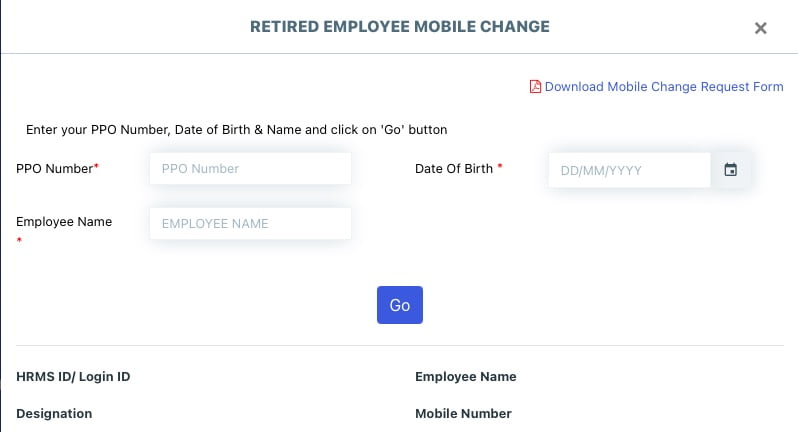
Step:3- If mobile number is not correct, click on ‘Change Mobile’.
Step:4- Download the Mobile Change Request from below link, fill it and upload its image to submit your request

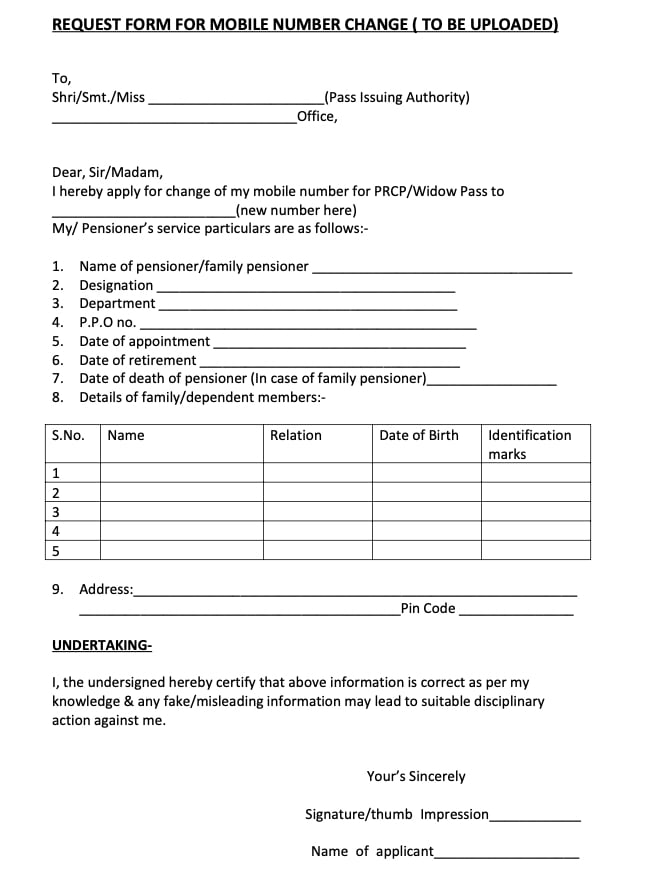
Note: Any one of these photo identity cards may be uploaded: Pensioner photo ID card, Aadhar card, Driving license, Voter ID card, Passport, Umid card, PAN card.
Once your mobile number is updated on HRMS portal, and you know your HRMS ID, you will be able to take advantages of HRMS portal.
HRMS application will be single window communication system between Railway employees and Administration.
From ‘January 1st, 2021’ retired railway employees will also be able to use e-Pass module.
Why HRMS for Retired Railway Employees?
Human Resource Management System (HRMS) will allow Railway employees to view their details related to their Increments, Promotions, Awards, Transfers, Postings, Leave, Training, and composition of Family as per records and Nominations for retirement benefits. This information is not readily available to employee at present. It brings transparency to administration.
HRMS Manuals and Guidelines are very helpful in understanding the use of HRMS portal.
To which addressee, the form to be uploaded?
HRMS portal for retired rly. employee not very friendly. After registration on login no details are showing except my name. now no way to rectify or add my details in format.
HRMS portal is in its development phase. After few months or years it will be very useful for railway employees.
WHERE THE MOBILECHANGE FORM SHOULD BE UPLOADED? THERE IS NO INFORMATION
Sir only retired request form download is available in retired employee registration. There is no provision for uploading the retired request form. Please specify with example how to upload retired request form in HRMS site
how to change mobile the otp goes to old mobile which is not in use
Request form for change of Mobile number is in pdf which can’t be filled in. It should be in DOC file for easy filling up.
Hello Admin,
please address my query ASAP.
I have already filled and uploaded the mobile number change application form and its been almost 3 days but the number hasn`t been updated. Can you please tell me how much time will it take fot the mobile number to get updated!
HOW U CAN UPOAD CAN U EXPAIN
the hrms website is not opening, have been trying for 3 days
Is the change mobile number option for retired employees no longer available?
I too don’t find “Retired Employees Mobile Change” in Log in page.
Please help me to change my mobile number. My present Mobile number : 9717393280.
My previous mobile number was: 9830617660 . I need to get this old number changed to 9717393280. Please help me in this regards.
Sir, I have already registered in HRMS and why again asking mobile no. Change when there is no change in the mobile No.. please guide. Retired railway employee
I have to change my mobile no from 9771482768 to 8340351022 when I loged to hrms it is showing already registered then how to change phone no
how do retired employee can change his mobile number
There is none to help us to change our mobile number. CRIS people uploaded this form for comments. But none to guide us.
I registered me in HRMS. But can’t change my mobile number.
IS SE GATIA SITE NAHI BAN SAKTI WHICH IDIOT HAS MADE IT TOTAL ILL INFORMED
my hrms portal ppo no incorrect i can not registration please solve it ppo no 20167020700106
i am Gallantry medal holder i have a railway pass how can i do reservation through onlline tell me please any one
After retirement change’ the mobile number