
HRMS: One Stop Single Window System for Indian Railway Employees
HRMS application will be single window communication system between Railway employees and Administration.
This Human Resource Management System (HRMS) will allow Railway employees to view their details related to their Increments, Promotions, Awards, Transfers, Postings, Leave, Training, and composition of Family as per records and Nominations for retirement benefits. This information is not readily available to employee at present. It brings transparency to administration.
Scanned copies of their Physical Service Record are also available on HRMS. It is an important milestone in computerization of HR related functionalities in Indian Railways.
Want to Login on HRMS? Here is the complete Step by Step Guide to Login on HRMS module.
Step by Step Guide for first time Login on HRMS module
1. Access the HRMS website or Mobile app with below link
- On Desktop or Laptop open link https://hrms.indianrail.gov.in/HRMS/
- On Mobile Download HRMS Mobile App
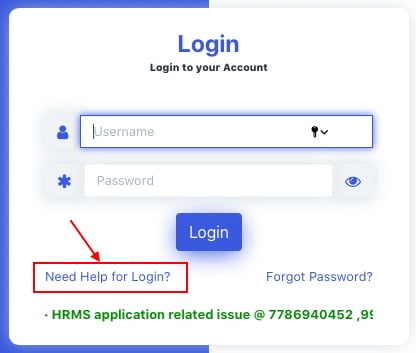
2. For first time login on HRMS, Click on ‘Need Help for Login?’.
3. Enter 11 digit PF/Employee number as IPAS ID and click ‘Go’.
IPAS ID is your PF number or Employee number, which is available on salary slip. Same can be asked from Account section also.
Enter your IPAS ID in the box, and click on the button “Go“.

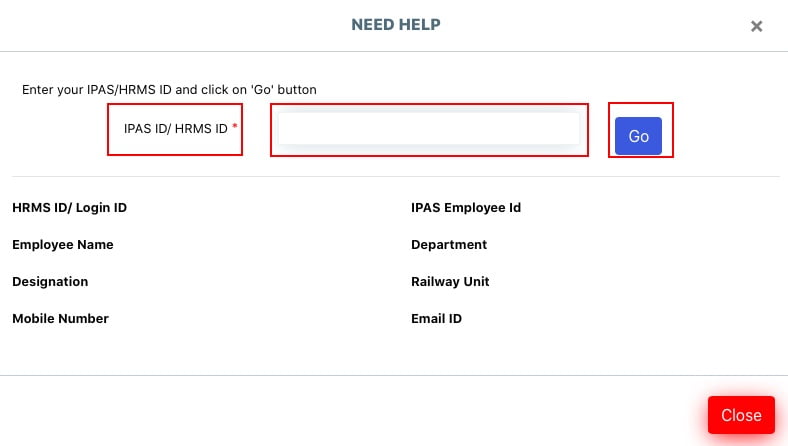
4. Know your HRMS ID and Registered Mobile Number.
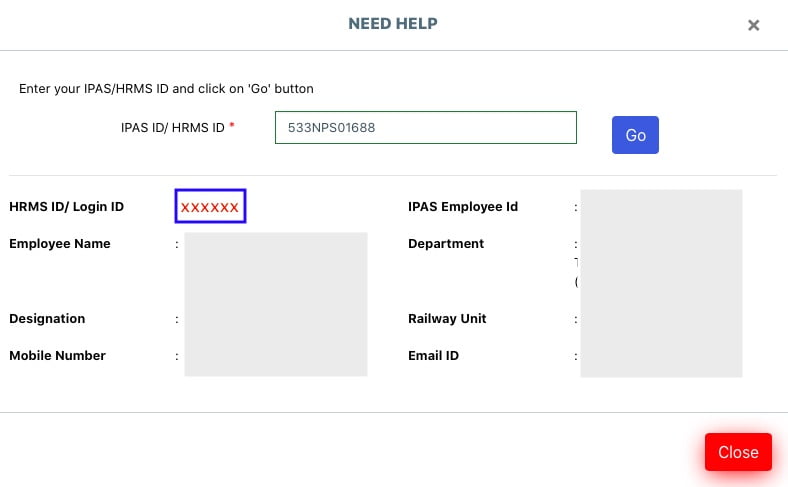
After clicking button “Go“, details like HRMS ID, Employee Name, Designation, Registered Mobile Number, Department, Railway Unit and Email ID will be displayed as shown in below image.
Copy or remember the HRMS ID/Login ID, for further use of login as Username.

If your details are not available on HRMS portal, then Contact Personnel Branch Dealing Clerk (DC of Bill Section).
5. Login with HRMS ID as user ID and default password “Test@123”.
Enter HRMS ID as Username, and first time user will have default password as “Test@123“. Enter Username and Password, and click the button “Login“.

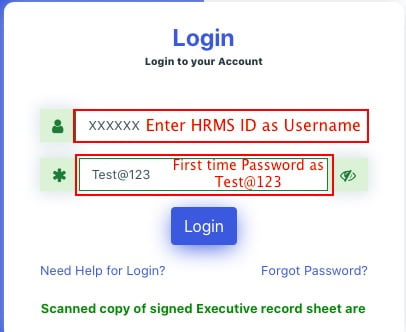
On clicking “Login” button, an OTP will be send on Registered mobile number. Received OTP on the registered mobile number will have validity for one week.
6. Enter the OTP.

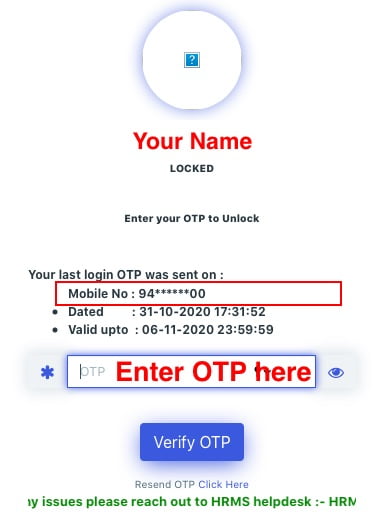
If OTP is not received on your mobile number, check the registered mobile number again. If mobile number is correct, then click on the link “Resend OTP Click Here”, below the button ” Verify OTP”.
Hey God, this is also not working for me, please help me, then call HRMS help desk numbers 7267910583, 9953780947 for OTP.
7. After successful verification of OTP, Employees can login to HRMS portal.
Congratulations, You have logged on HRMS portal.
If you know your HRMS ID, and have forgotten HRMS Password, then read…
–How to reset HRMS Password for Indian Railway Employees?
Employees will be directed to change the password after first login. Change your password and remember for future use.
In case of any issues please reach out to HRMS helpdesk
- HRMS application related issue @ 7786940452 ,9971535534,7982542883
- For OTP @ 7267910583,9953780947
- For ePass related enquiry @ 9891643886,9069161539,9971168228 or
- Write to us at irhrms@cris.org.in
User Manuals for other modules of HRMS
- Step by Step- User Manual for use of HRMS application
- Manual for APAR of Non-Gazetted employees of Indian Railways-
- Master Circular No. 28– Confidential Reports of Non-gazetted Railway servants
- What is APAR module?
- APAR user manual
- Step by step flow on APAR module
- IR HRMS APAR TRAINING VIDEO in ENGLISH
- IR-HRMS APAR TRAINING VIDEO in HINDI
- Manual for Office orders
- IR HRMS presentation– From Entry, Transfer, Promotion & Exit
- IR HRMS- Office Order User Manual
- Manual for use of DSC (Digital Signatures)
Also read- Online E-Pass & PTO for Railway Employees under HRMS project
Source: HRMS Indian Railways
Thanks to CRIS for creating HRMS for railway employees.
Employees can now avail facilities as epass sitting at home instead of going to Office to get their passes.
After downloading HRMS either on mobile or laptop the employee can apply for epass and after feeding the inputs the employee can download the epass.
I have an issue regarding HRMS I’d. I try to contact CRIS / HRMS through mail but there is no response from their end?
How it is going to resolve until you didn’t reply the mail?
The HRMS help desk number for Bihar is 0923-9147361. The help desk is available Monday through Saturday from 9:30 AM to 6 PM, excluding holidays. You can also email the HRMS help desk at […].
HRMS is a database and application software that allows government employees to conduct personnel transactions online. HRMS is a database and application software that allows government employees to conduct personnel transactions online.
What about retired employees
Retired railway employee will get HRMS facility after this year. Right now Railway is updating records.
I want hrms id
I save my family details as draft, now can’t submit my family and update all details documents. Pls help me
Not good totally harsment all , work pending
Follow the below link to know HRMS ID for retired railway employee…. and then register on HRMS…
http://railministry.com/how-to-change-mobile-number-on-hrms-retired-railway-employees/
My HRMS ID -SLHRZD
I have applied for spouse transfer request to Metro Rail kolkata from Solapur division Central Railway.
My application has been forwaded from my unit but the same application is not showing to other unit. There is some problem in the hrms website. Kindly help.
HOW TO CHANG MOBILE NUMER TO REGESTED IN PPO.
Apar otp nahi aa raha h
YOU HAVE STATED ..GO TO hrms.indianrail,gov.in/HRMS
CLICK ON LINK “Retired Employee Mobile CHANGE. NOTHING IS AVAILABLE SIR
HOW TO REGISTER AND LOGIN SIR…….
Download the Mobile Number Registration form and Submit the application. https://drive.google.com/file/d/19YJ6xir3vOIBlCaPFfBEcrt_gDhnPGU2/view?usp=sharing
Then follow the Link “Retired Employee Mobile CHANGE” for registration of retired Railway employee…
Sir, where to submit downloaded phone number change form for mobile no change in HRMS retired employee
Sir, retired employee where to upload scanned documents?
These has to be submitted in the office from where you have retired.
Please contact your office.
I made a reservation in train no 05160 through railway epass.confirm ticket has been allocated.
But due to some journey date issue I cancelled the ticket.after this I went to railway reservation counter for reservation but system shows you have completed your journey.so I want to know is my epass cancelled or not
Is this also available for retired railway employees
Yes, HRMS modules are available for retired railway employees as well.
But first step for retired railway employees is to register on HRMS website. Please follow the below link to register on HRMS with Mobile Number…
http://railministry.com/how-to-change-mobile-number-on-hrms-retired-railway-employees/
Jarurat per ye site hi nhi chalti h, bekar h ye
Dear Someone!
Abhi HRMS website development phase mei hai… Daily kuch na kuch improvement ho rha hai, nye modules add ho rhe hain. Kuch time baad, ye bahut helpful website hogi Railway Employees ke liye.
Kab tak chalegi site
In case of any issues please reach out to HRMS helpdesk…
HRMS application related issue @ 7786940452 ,9971535534,7982542883
For OTP @ 7267910583,9953780947
For ePass related enquiry @ 9891643886,9069161539,9971168228 or
Write to us at irhrms@cris.org.in
Please let us know if you are facing any difficulty in using HRMS. We will provide you latest HRMS Manuals and Guidelines
Sir after downloading retired request form the guidelines says fill up and upload the document in retired request form update. But there is no provision in the site. Cris help desk not responding inspite of series of emails on the subject. Asking to submit to dealing clerk at this corona time for senior citizens is not advisable. Please.
HRMS epass related helpdesk no. पे कोई काल नहीं उठा रहा अब क्या करें?
मैंने गलती से privilege pass में split submit कर दिया है अब मैं उसको cancilकरना चाहता हूँ मेरे ऑफिस से भी कोई मदद नहीं मिल रहा है मैं क्या करूं?
In case of any issues please reach out to HRMS helpdesk…
HRMS application related issue @ 7786940452 ,9971535534,7982542883
For OTP @ 7267910583,9953780947
For ePass related enquiry @ 9891643886,9069161539,9971168228 or
Write to us at irhrms@cris.org.in
Please let us know if you are facing any difficulty in using HRMS. We will provide you latest HRMS Manuals and Guidelines
Not responding on helpline no..
Plz how can i change old no…
7011514941
I am unable to apply for an epass
जरूरत पर ये साइट चलती hi नहीं h, जैसे आज मैं सुबह से परेशान हूं. बेकार है ये सिस्टम बिल्कुल फैल
In case of any issues please reach out to HRMS helpdesk…
HRMS application related issue @ 7786940452 ,9971535534,7982542883
For OTP @ 7267910583,9953780947
For ePass related enquiry @ 9891643886,9069161539,9971168228 or
Write to us at irhrms@cris.org.in
Please let us know if you are facing any difficulty in using HRMS. We will provide you latest HRMS Manuals and Guidelines
Most of these mobile numbers are not working, please check current mobile on official webside of HRMS https://hrms.indianrail.gov.in/HRMS/
HRMS कब से पुनः सुरु होगा।।??
In case of any issues please reach out to HRMS helpdesk…
HRMS application related issue @ 7786940452 ,9971535534,7982542883
For OTP @ 7267910583,9953780947
For ePass related enquiry @ 9891643886,9069161539,9971168228 or
Write to us at irhrms@cris.org.in
Please let us know if you are facing any difficulty in using HRMS. We will provide you latest HRMS Manuals and Guidelines
All the helpdesk no. Is not responding.. I am facing a problem of otp not receiving on my mobile no. Since last 2 days…and did every possible thing from my end…I need urgently a reservation. Why such numbers are given there… Totally waste…do some needful things to solve my problem as soon as possible… If I won’t get my reservation and something wrong happens all responsibility is of railway authority for making such a waste help desk which didn’t respond on time…
Railway Audit staff have not been included in HRMS and unable to get epass and apply for PF
Railway Audit staff have not been included in HRMS and unable to get epass and apply for PF
the pf loan application 2021012709577 has been sanctioned 27-01-2021.But till date I have received please.where i have to enquired
till date not received MY PF NO;24409509318
unable to re-book ticket from irctc through e pass after cancel the first ticket booked via e pass.
Dear Sirji, I am retired from RPF/Railways . AFTER FEW ATTEMPTS, ON MY PPO NUMBER AND DATE OF BIRTH SUBMISSION, MY NAME – V. SESHSADRI APPEARED AND OTHER DETAILS AS N/A and GIVEN REGISTERED FOR E PASS VIDE MY HRMS ID/LOGIN ID:
ZBJGQJ with Test@123 login for login. but my efforts failed.
in website, except for railway employees, I could not fin for RETIRED RAILWAY EMPLOYEES
KINDLY HELP
A GREAT RELIEF FOR THE RETIRED RAILWAY EMPLOYEES.
BUT MY EFFORTS TO LOGIN AND CHANGE MY PASS WORD AND TO SUBMIT MY FURTHER DETAILS FAILED
KINDLY HELP
Hrms is very useful sight, I Received my PF loan within two week, thanks cris from girish kumar.
How to apply HRMS epass in pensioner
अपना पीपीओ नंबर, जन्म तिथि और नाम दर्ज करें और अपने विवरण की जांच करने के लिए button गो ’बटन पर क्लिक करें
यदि उपयोगकर्ता HRMS में पंजीकृत नहीं है और मोबाइल नंबर सही नहीं है:
‘मोबाइल बदलें’ पर क्लिक करें
ऊपर दिए गए लिंक से मोबाइल चेंज रिक्वेस्ट डाउनलोड करें, इसे भरें और अपना अनुरोध सबमिट करने के लिए इसकी छवि अपलोड करें
इनमें से कोई भी एक फोटो पहचान पत्र अपलोड किया जा सकता है: पेंशनर फोटो पहचान पत्र, आधार कार्ड, ड्राइविंग लाइसेंस, वोटर आईडी कार्ड, पासपोर्ट, उम्मेद कार्ड, पैन कार्ड
यदि उपयोगकर्ता HRMS में पंजीकृत नहीं है और मोबाइल नंबर सही है:
‘रजिस्टर’ बटन पर क्लिक करें
आपके मोबाइल नंबर पर एक ओटीपी भेजा जाएगा, उस ओटीपी को एचआरएमएस में खुद को पंजीकृत करने के लिए दर्ज करें
NOTE- ALL RAILWAY RETAIRMENT EMPLOYEE ABOVE INSTRUCTION KO FOLLOW KARKE APNA REGISTRATION HRMS MEIN KAR SAKTE HAI ,
Access the HRMS website or Mobile app with below link
On Desktop or Laptop open link https://hrms.indianrail.gov.in/HRMS/
On Mobile Download HRMS Mobile App
NOTE- HRMS KO GOOGLE PAR SEARCH KARNE KE LIYEIN ABOVE LINK KO FOLLOW KAREIN.
I was unable to access ” Apply e pass” for applying new pass after logging into HRMS. Then I had to approach Epass dealing clerk to reset my old HRMS password and it is intimated that if an employee has not logged in for longer period and become inactive for considerable period of time then his old password has to be reset.
Please explain in detail if so.
There is no clear guide line available in the app.The site is not minimum standard.This is nothing but to make people fool.
I am retired employee,cannot cancel e pass as DPWL 10 showing for the required train for the required date.
if i not go need a help option for the first time what will be happen?
if i not go to need a help option for the first time what will be happen?
I have lost old mobile number, what can I do for change mobile number.
मेरे मोबाइल नंबर 840 500 7900 पर ओटीपी नहीं आ रहा है मैंने हेल्पडेस्क नंबर 99 537 80 947 पर शाम 5:00 बजे से 6:00 बजे तक फोन कर संपर्क करने का प्रयास किया परंतु किसी ने फोन नहीं उठाया । मुझे अपने इमप्लाई को पास जारी करना है।
I AM NOT ABLE TO MAKE RESERVATION, EVERY TIME I AM TRYING TO DO RESERVATION IT IS SAYING CANNOT ABLE TO CONNECT TO HRMS. CONTACT HELPDESK, WHEN I AM TRYING TO CONNECT TO HELPDESK THE NUMBER IS NOT REACHABLE
How to register an retired railway employee in HRMS.
What is the helpdesk no for Ajmer division NWR…and HQ NWR Jaipur….and for central office Delhi…..and what is the helpdesk no for transfer module in HRMS which is the most important self portal system for an employee….I have tried 250-300 times for new transfer application but it’s not submitted and at last step error occurred….many problems are there in transfer module. Please resolve ASAP. Thanks
Sir Tried to raise change request in Initial Appointment but after filling not able click the submit button change request always saved in draft mode not able apply new or delete also
kindly help sir
HRMS E-SR Initial appointment tab is not working & also clicking on agree also in that tab is not working what can we do if it happens please send the solution.