Notice: Function WP_Scripts::localize was called incorrectly. The $l10n parameter must be an array. To pass arbitrary data to scripts, use the wp_add_inline_script() function instead. Please see Debugging in WordPress for more information. (This message was added in version 5.7.0.) in /home4/railmu7v/public_html/wp-includes/functions.php on line 6170
Notice: Function WP_Scripts::localize was called incorrectly. The $l10n parameter must be an array. To pass arbitrary data to scripts, use the wp_add_inline_script() function instead. Please see Debugging in WordPress for more information. (This message was added in version 5.7.0.) in /home4/railmu7v/public_html/wp-includes/functions.php on line 6170
Notice: Function WP_Scripts::localize was called incorrectly. The $l10n parameter must be an array. To pass arbitrary data to scripts, use the wp_add_inline_script() function instead. Please see Debugging in WordPress for more information. (This message was added in version 5.7.0.) in /home4/railmu7v/public_html/wp-includes/functions.php on line 6170
Notice: Function WP_Scripts::localize was called incorrectly. The $l10n parameter must be an array. To pass arbitrary data to scripts, use the wp_add_inline_script() function instead. Please see Debugging in WordPress for more information. (This message was added in version 5.7.0.) in /home4/railmu7v/public_html/wp-includes/functions.php on line 6170
Skip to content
With more than 12 lakh on roll manpower, Indian Railways is one of the largest public enterprises under single management in the world. Human resource management of such a large manpower, especially deployed in 24×7 operational activities is a challenge in itself.
In the last 10 years, it may be very well observed that on the one hand the overall manpower has a decreasing trend, the productivity of Indian Railways has improved in terms of freight loading and passengers carried. This has been possible due to improved productivity of manpower as a result of extensive training and skilling of manpower. Manpower planning in Indian Railways is a continuous process which involves review of manpower keeping in view upgradation of technology and change of work practices. By this exercise, we do intake of skilled staff reducing unskilled and semi-skilled categories.
Here’s a summary of All India Leave Travel Concession (AILTC) rules for railway employees (i.e. for Indian Railways officers and staff), covering what it means, who’s eligible, how it works, and key conditions.
In this blog post all rules regarding All India Leave Travel Concession (AILTC) for Railway Employees are explained with clarifications
What is AILTC?
AILTC is an optional All India Leave Travel Concession scheme — allowing eligible railway employees to travel anywhere in India with leave-travel benefits under the terms of Central Civil Services (Leave Travel Concession) Rules, 1988 (CCS (LTC) Rules).
It was introduced for railway employees pursuant to a decision by the Ministry of Railways under RBE 130/2018 (dated 10-Sept-2018).
Under AILTC, employees surrender their usual railway “Privilege Passes” for the calendar year and instead avail leave-travel concession — effectively replacing passes with LTC for that year.
Who is eligible for AILTC?
AILTC applies to:
Railway servants entitled to Privilege Passes (PP).
Other government-department officials on deputation in Railways who are entitled to PPs.
Officials of Railway Audit Department (if eligible for PPs).
Staff/officers working in Railway’s Board Office (subject to conditions, e.g. minimum service of 4 years for Board staff).
Not eligible:
Those undergoing a minor penalty which includes stoppage of even a single Privilege Pass at the time of application.
Hometown-LTC / “Home Town LTC or Home-Town converted LTC” is not admissible under AILTC for railway employees.
When & How Often – Block Period?
AILTC can be availed once in a block of four years. The blocks began from 2018–2021 onward.
It is purely optional — employees are free to choose it (i.e. they are not forced to pick AILTC instead of passes) in any block.
If an employee avails AILTC in a given calendar year, they surrender their PPs for that year; they are then excluded from pass benefits for that year.
Procedure to Avail AILTC?
To avail AILTC:
The employee must submit an application opting for AILTC for a particular calendar year.
They must surrender all Privilege Passes (PPs) admissible to them for that calendar year. On surrendering, they get a document called “Privilege Pass Surrender Certificate (PPSC)” — a prerequisite for availing AILTC.
Then apply for leave (of any type) and submit an advance-intimation/declaration letter along with the PPSC to the Establishment / relevant HR/ERB branch.
If needed, AILTC advance (travel advance) may also be requested per procedure.
How to Book Flight Tickets for AILTC
If You Are Traveling by Air, You MUST book flight tickets only through:
Book through MakeMyTrip, Yatra, Cleartrip, or private agents
Book “cheap” airfare directly from airline unless DGCA fare rules allow it & office permits
For claims reimbursement, keep:
Air ticket
Boarding pass
Invoice from authorised agent
RBE No. 130/2018 – Scheme of Optional AILTC
Scheme of optional ‘All India Leave Travel Concession’ (AILTC) facility, once in a block of four years (i.e. 2018-2021 onwards) on surrender of Privilege Passes (PP).
Key Provision: This circular officially allowed Railway employees to opt for the “All India LTC” scheme (governed by CCS LTC Rules, 1988) purely on an optional basis.
Condition: To avail of this, the employee must surrender their Privilege Passes (PP) for that specific calendar year.
Frequency: Permitted once in a block of four years (starting with the 2018–2021 block).
RBE No. 74/2020 – Unblocking of Privilege Pass Account
Modification in the ‘All India Leave Travel Concession’ (AILTC) Scheme to facilitate unblocking of Privilege Pass Account in exceptional circumstances!!!
Clarification: Request for cancellation of PPSC and re-opening of PPA will be entertained only in exceptional cases. In such case, the applicant will submit an application to PIA, explaining the reasons for non-availing of AILTC with supporting documents, if any. The application must accompany the original PPSC and a Certificate to the effect that ‘the applicant has not drawn any LTC Advance or returned the advance drawn in full in accordance with the Rules regarding grant of LTC advance and adjustment thereof, as contained in CCS (LTC) Rules, 1988’ from the Section handling LTC Claims.
A decision on the request will be taken on the grounds whether the circumstances stated by the applicant are beyond his/her control or otherwise and by an officer of SAG level in the Personnel Department overseeing the Pass Section as Competent Authority. If approved by the Competent Authority, the PPSC as well as CN (wherever applicable), may be treated as ‘cancelled’ and PPA unblocked/reopened for the respective year.
RBE No. 83/2021 – Carry over of AILTC
Clarification regarding carry over of All India Leave Travel Concession (AILTC) of a block of four years to the first year of next block?
Ref: Railway Board’s letter No. E(W)2020/PS5-1/3 dated 11.11.2021.
Clarification: Clarified that if an employee did not avail of the AILTC during the 4-year block (e.g., 2018–2021), they could carry it forward to the first year of the next block (i.e., 2022), consistent with general Central Government LTC rules.
RBE No. 84/2021 – Competent authority for sanctioning of AILTC?
Clarification: The Authorities stipulated therein and in the relevant SOPs as competent to sanction advances, etc. as per Railway Travelling Allowance (TA) Rules, shall be Competent Authorities also for all matters connected with AILTC
Special Provision for N.F. Railway
Surrender of one extra pass for N.F. Railway staff?
Clarification: Employees serving in the Northeast Frontier (N.F.) Railway are typically entitled to one additional set of Privilege Passes. This circular clarified that to avail of AILTC, these employees do not need to surrender the additional extra set. They only need to surrender the standard entitlement of passes applicable to all railway employees.
Clarification: Clarified that while the outward journey must commence within the valid calendar year/block, the return journey can be performed in the next calendar year, provided the trip is continuous and completed within a reasonable timeframe (as per CCS LTC Rules).
RBE No. 165/2022 – Advance issue of PPSC for availing AILTC in the next Calendar Year
Clarification: A PPSC for the upcoming calendar year can be issued up to 2 months in advance (i.e., from 1st November of the current year), enabling employees to book tickets early for travel in the new year.
Family pension under OPS on death of Railway Employee covered under UPS
Railway board vide RBE No.76/2025, dated 29.07.2025 issued revised guidelines regarding Options to avail benefits under old pension scheme on death of Government servant during service or his discharge from Government service on account of invalidation or disability for Central Government servants covered under Unified Pension Scheme.
When a Government servant dies while in service, the family is entitled to benefits as per the Old Pension Scheme, even if the employee was covered under UPS.
Revised rule under UPS issued by Ministry of Personnel, P.G. and Pensions on 18.07.2025.
Subject: Options to avail benefits under old pension scheme on death of Government servant during service or his discharge from Government service on account of invalidation or disability for Central Government servants covered under Unified Pension Scheme
The undersigned is directed to refer to the Ministry of Finance, Department of Financial Service’s Notification No. FS-1/3/2023-PR dated 24.01.2025 regarding introduction of the Unified Pension Scheme (UPS) as an option under NPS for the recruits to the Central Government civil service w.e.f. 01.04.2025 giving one time option to the Central Government employees covered under the National Pension System (NPS) for inclusion under the UPS.
The Department of Pension and Pensioner’ Welfare had notified the CCS (Implementation of National Pension System) Rules, 2021 to regulate service related matters of Central Government employees covered under NPS. Rule 10 of these rules provides for the option to be exercised by every Central Government employee covered under NPS for availing benefits under NPS or Old Pension Scheme (OPS) in the event of death of Government servant during service or his discharge on the ground of invalidation or disablement.
UPS has been notified as an option under the NPS. Therefore, it has been decided that the Central Government civil employees who opt for UPS under NPS shall also be eligible for option for availing benefits under UPS or the CCS (Pension) Rules, 2021 or the CSS (Extraordinary Pension) Rules, 2023 in the event of death of the Government servant during service or his discharge on the ground of invalidation or disablement.
Every Central Government servant covered who opts for Unified Pension Scheme under the National Pension System shall, at the time of joining Government service, exercise an option in Form 1 for availing benefits under the UPS or under the CCS (Pension) Rules, 2021 or the CCS (Extraordinary Pension) Rules, 2023 in the event of his/her death or boarding out on account of disablement or retirement on invalidation. Existing Government servants, who have opted for the Unified Pension Scheme under the National Pension System, shall also exercise such option as soon as possible after the notification of these clarifications.
The option shall be exercised to the Head of Office who will accept the same after verifying all the facts submitted therein and place it in the service book. A copy of the option shall be forwarded by the Head of Office to the Central Recordkeeping Agency through the Drawing and Disbursing Officer and the Pay and Accounts Officer for their record. The Pay and Accounts Officer shall also make suitable entry in the online system indicating the details regarding the option exercised by the Government servant.
Every Government servant shall, along with the option in Form 1, also submit details of family in Form 2 to the Head of Office. The Head of Office shall, on receipt of the Form 2, acknowledge receipt of the Form 2 and all further communications received from the Government servant in this behalf, countersign it indicating the date of receipt and get it pasted on the service book of the Government servant concerned. The Head of Office on receipt of communication from the Government servant regarding any change in the size of family shall also incorporate such a change in Form 2.
The option exercised may be revised at any number of times by the Government servant before his retirement by making a fresh option intimating his revised option to the Head of Office. On receipt of the revised option, the Head of Office and the Pay and Accounts Officer shall take further action as mentioned above.
A Government servant who is discharged on invalidation or disability shall be given an opportunity to submit a fresh option at the time of such discharge. Where such Government servant does not exercise a fresh option or is not in a position to exercise fresh option at the time of discharge, the option already exercised by the Government servant shall become operative. Where no option was exercised by the Government servant and the Government servant is not in a position to exercise an option at the time of discharge, his case will be regulated in accordance with para 11 below.
In the case of death of a Government servant while in service, the last option exercised by the deceased Government servant before his death shall be treated as final and the family shall have no right to revise the option.
Where a Government servant who did not exercise an option and dies before completion of service of fifteen years, his family will be granted family pension in accordance with the provisions of the CCS (Pension) Rules, 2021 or the CCS (Extraordinary Pension) Rules, 2023, as the case may be, as a default option.
Where a Government servant is discharged from Government service on account of invalidation or disability before completion of service of fifteen years without exercising an option, and is also not in a position to exercise an option at the time of discharge, he will be granted invalid pension or disability pension in accordance with the provisions of the CCS (Pension) Rules, 2021 or the CCS (Extraordinary Pension) Rules, 2023 as the case may be, as default option;
In all other cases, where no option was exercised by the Government servant, the claim of the Government servant on discharge from the service and that of the family on death of the Government servant, shall be regulated in accordance with the regulations to be framed in this regard.
In cases where the option exercised by the deceased Subscriber or the default option for benefit under the CCS (Pension) Rules or the CCS (Extraordinary Pension) Rules becomes infructuous on account of non-availability of an eligible member of the family for grant of family pension under the CCS (Pension) Rules, 2021 or the CCS (Extraordinary Pension) Rules, 2023 such option would be deemed to have become invalid and the benefits admissible under the Unified Pension Scheme shall be granted in accordance with the regulations to be framed in this regard.
A Government servant, who had exercised option or in whose case the default option is for availing benefits under the CCS (Pension) Rules, 2021 or CCS (Extraordinary Pension) Rules, 2023 on death of Government servant during service or his discharge from service on account of invalidation or disablement, as the case may be, further action will be taken by the Head of Office for disbursement of benefits in accordance with the provisions of the CCS (Pension) Rules, 2021. Where the death or disablement of the Government servant is attributable to Government service, further action will be taken by the Head of Office for disbursement of benefits in accordance with the CCS (Extraordinary Pension) Rules, 2023 subject to fulfillment of all the conditions for grant of benefits under those rules.
If on death of the Government servant during service or his discharge from service on account of invalidation or disablement, benefits are payable under the CCS (Extraordinary Pension) Rules, 2023 or the CCS (Pension) Rules, 2021, the Government contribution and returns thereon in the accumulated pension corpus of the Government servant shall be transferred to Government account. The remaining accumulated pension corpus shall be paid in lump sum in accordance with the regulations to be framed in this regard.
In the case of death of a Government servant during service or his discharge from service on account of invalidation or disablement, who had exercised option or in whose case the default option is for availing benefits under the UPS, such benefits may be granted in accordance with the regulations to be framed in this regard.
Copy of Form 1 and Form 2 are also enclosed.
This issues in consultation with of Ministry of Finance, Department of Expenditure vide ID Note No. 1(18)/EV/2024 ( part 2) dated 16.06.2025.
In so far as the persons serving in the Indian Audit and Accounts Department are concerned, these orders are issued in consultation with Comptroller and Auditor General of India, as mandated under Article 148(5) of the Constitution of India.
⚠️ Key Clarification
These OPS-type benefits on death apply only if the death occurs during service.
On retirement or resignation, UPS continues under NPS-based exit rules unless notified otherwise.
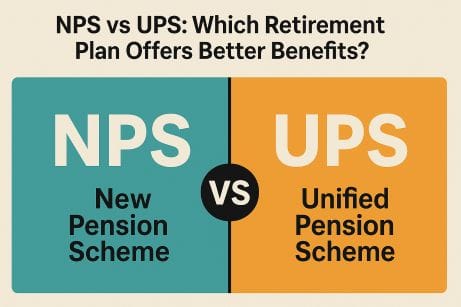
Confused Between Unified Pension Scheme (UPS) and New Pension Scheme (NPS)?
Here’s What You Need to Know
Should I opt for the new Unified Pension Scheme (UPS) or stick with the existing New Pension Scheme (NPS)?
Which one offers better retirement benefits? Is UPS really a game-changer, or just a rebranded version of NPS?
Don’t worry. In this article, we answer all your questions about the Unified Pension Scheme (UPS), how it compares with NPS, and what it means for your financial future.
1. What is Unified Pension Scheme (UPS)?
The Unified Pension Scheme (UPS) is introduced by the Central Government as an option under the National Pension System (NPS) for Central Government employees with effect from 1st April 2025. The UPS provides assured pay-out based on the prescribed conditions.
2. Whether existing central government employee is eligible to opt for UPS?
Yes, an existing Central Government employee in service as of 1 April 2025, who are covered under National Pension System (NPS) is eligible to opt for UPS.
3. Whether newly recruited Central government employee is eligible to opt for UPS?
Yes, a newly recruited Central Government employees joining service on or after 1 April 2025 is eligible to opt for UPS.
4. Whether Central government employee retired prior to 31 March 2025 is eligible to opt for UPS?
Yes, a Central Government employee who was covered under NPS retired on or before 31st March 2025 and who meets prescribed conditions i.e.
Who has superannuated after minimum 10 years of qualifying service or
Has retired under Fundamental Rules 56(j) (which is not treated as penalty under Central Civil Services (Classification, Control and Appeal) Rules, 1965), on or before 31st March 2025, or
The legally wedded spouse as on date of superannuation/retirement of deceased subscriber eligible under UPS.
5. What are the forms to be filled by eligible Central Government employee to opt for UPS?
Name of Form
Eligibility to opt UPS
Form A1
Newly recruited Central Government employees joining service on or after 1st April 2025.
Form A2
Exercise of Option by an eligible Central Government employee presently subscribed to National Pension System (NPS) for being covered under Unified Pension Scheme (UPS).
6. From where the forms for enrollment under UPS can be obtained?
The forms A1, A2, along with the instructions and list of documents to be attached can be downloaded from the website of the Protean CRA at, www.npscra.nsdl.co.in/ups.php
7. What are timelines to exercise the option of UPS under NPS by an eligible existing (as on 31.03.2025) Central Govt employee?
Option has to be exercised within three (03) months from 1st April 2025, or within such extended timelines if any, allowed by the Central Government.
8. What are timelines to exercise the option of UPS under NPS by an eligible retired (as on 31.03.2025) Central Govt employee?
Option has to be exercised within three (03) months from 1st April 2025, or within such extended timelines if any, allowed by the Central Government.
9. What are timelines to exercise the option of UPS under NPS by the legally wedded spouse as on date of superannuation/retirement in case of a subscriber who has superannuated or retired and has demised prior to exercising the option for UPS.?
Option has to be exercised within three (03) months from 1st April 2025, or within such extended timelines if any, allowed by the Central Government.
10. What are timelines to exercise the option of UPS under NPS by new recruit to the Central Govt services joining on or after 1st April 2025?
Option has to be exercised within thirty (30) days from the date of joining Central Government services or within such extended timelines, if any, allowed by the Central Government.
11. Can the option of UPS be changed subsequently?
No, once exercised, the option to choose UPS is final and irrevocable.
12. What happens if the employee fails to opt for UPS within the specified time period?
An eligible person, who does not exercise the UPS option under NPS within the timelines laid down shall be deemed to have opted to continue under NPS without UPS option.
13. What is Permanent Retirement Account Number (PRAN) under UPS?
PRAN is a Permanent Retirement Account Number allocated to subscriber opening/opting for UPS, and under which all the transactions are recorded by the CRA system.
14. What are the proofs of Identity and address documents required in form for opening UPS account?
Identity and address proof are the key KYC documents. Any one of the following to be submitted:
Passport
Driving License
Voter ID Card
CKYC Number
National Population Register
Proof of possession of Aadhaar
15. Where the option form/ account opening forms under UPS is to be submitted by the subscriber?
The form can be submitted online or physically to the Head of Office / DDO where the subscriber is employed. Subscribers are advised to retain the acknowledgement slip signed/stamped by the designated respective nodal office where they submit the application
16. Whether there is online process for enrolment under UPS?
Yes, subscriber can submit their request for enrolment online by filing required forms through CRA website. Once it is submitted, the form goes to the DDO and then to PAO for verification.
17. What are the details to be filled by Nodal Office in the account opening form for UPS?
Employment Details (At the time of exercise of UPS option)
Date of joining
Date of Superannuation
Date of commencement of qualifying service
Employee Code/ID
Basic Pay
Pay Scale (Optional)
Name of the office
Department
Ministry
DDO Registration Number
PAO / CDDO / Pr.AO Registration Number.
18. What is qualifying service under UPS?
Qualifying service shall be the completed months for which UPS subscriber has rendered regular services under the Central Government, determined by the Head of Office, in terms of Regulation 13 of the PFRDA (Operationalization of Unified Pension Scheme under National Pension System) Regulations, 2025.
19. Where the forms are to be submitted/processed by the nodal office?
Through the online system of the CRA.
20. How the subscriber can obtain the status of his/her application?
The Subscriber can obtain the status of his/her application from CRA and respective Nodal Office.
21. Will UPS subscribers still be able to open/maintain/hold voluntary NPS Tier-I/II accounts?
Yes, subscribers of UPS can voluntarily maintain NPS Tier-I and Tier-II accounts under “All Citizen Model” along with UPS as a separate account within same PRAN number.
FAQs related to Contributions under UPS
22. How much is monthly contribution under UPS?
The monthly contribution of employee will be 10% of (basic pay + DA) along with matching contribution by employer, is to be credited to each employee’s PRAN through the concerned nodal office.
Further, an estimated 8.5%contribution towards Pool Corpus shall be paid by Central Government, on aggregate basis.
23. What will happen to my existing corpus on migration from NPS to UPS?
On migration from NPS to UPS, the corpus of the subscriber will get transferred to the PRAN tagged to UPS.
24. On migration from NPS to UPS, whether new PRAN will be issued?
On migration from NPS to UPS, the subscriber shall be identified by the erstwhile PRAN tagged to UPS.
25. What is Individual Corpus and Benchmark Corpus?
Individual Corpus means the value of corpus available in the PRAN of a subscriber under UPS.
Benchmark Corpus is a notional value computed by CRA for comparison with individual corpus. It is based on NAV of the default investment. (For more details, Regulation 12 and Illustrations in Schedules to the Regulations, may be referred).
26. What are the timelines to be followed by the govt nodal offices for processing and remittance of contributions under UPS?
Particulars
TATs
DDO shall deduct the contribution from the salary of the Central Government employee and send the bill to the PAO or Cheque Drawing and Disbursing Officer (CDDO) as the case maybe along with the details of contribution deducted in respect of each UPS Subscriber
on or before the twentieth (20th) day of each month.
The PAO or the CDDO as the case may be shall prepare and upload a Subscriber Contribution File (SCF) and generate transaction ID in the system of the CRA,
on or before the twenty fifth (25th) day of each month.
The PAO or the CDDO as the case may be, shall remit the employee contribution and matching co-contribution by the Central Government to the trustee bank through the accredited bank
by the last working day of each month. for the month of March, shall be remitted on the first (1st) working day of the month of April.
First contribution of a newly recruited Central Government employee shall be credited to the individual PRAN
within twenty (20) days from the date of submission of application or by the last date of the month in which the Central Government employee joined whichever is later.
27. What is Pool Corpus under UPS?
The government contributes an estimated 8.5% towards a Pool Corpus based on aggregate employee data.
The Pool Corpus shall comprise of: –
additional Central Government contribution at an estimated eight and half percent of Basic Pay (including non-practicing allowance, wherever applicable) plus Dearness Allowance, on aggregate basis of all employees who have chosen the UPS option;
transfer of balance from the individual corpus of a subscriber as per regulation 19 (3); and
any other contribution defined by the Central Government.
28. How is the Pool Corpus managed?
The Pool Corpus shall be allocated to such pension fund(s) as determined by the Central Government, who shall invest the funds in accordance with the investment pattern and related aspects thereto, as approved by the Central Government.
FAQs related to Investment of Contributions
29. Can an employee select the pension fund and investment pattern under UPS?
Yes, employees can choose from registered pension funds and investment patterns, including default patterns defined by PFRDA.
30. What happens if an employee does not choose a pension fund?
In such cases, the employee will be assigned the default pension fund and investment pattern defined by PFRDA.
31. What are the options of investment choices for individual corpus other that default pattern?
Option to invest hundred percent of the funds in Government securities (Scheme G); or
Option of any one of the following Life Cycle based schemes:
Conservative Life Cycle Fund with maximum exposure to equity capped at twenty- five percent. LC-25; or
Moderate Life Cycle Fund with maximum exposure to equity capped at fifty percent. LC-50.
32. How many times the choice of pension fund and investment choice can be exercised in a financial year?
UPS Subscriber shall have an option to change
the choice of pension fund once in a financial year and
investment choice twice in a financial year.
33. How Benchmark Corpus is calculated?
Benchmark corpus shall be computed in the following manner:
Partial withdrawals made out of individual corpus and voluntary contributions made into the individual corpus shall not be considered in the computation.
For contributions received prior to 1st April, 2025: monthly contributions shall be considered as and when they have been received and be valued on default pattern.
For contributions received on or after 1st April, 2025:
monthly contributions which are to be received in that month, shall be considered as and when received during the month and valued on default pattern.
In the event of any missing contribution in any month, value shall be based on the weighted average NAV of default pattern as on the last working day of the month applied to monthly contributions of previous full month.
Contributions arising from arrears, such as arrears of Dearness Allowance shall be considered and valued on the default pattern as and when they are received.
34. Will the subscriber be informed of corpus value updates?
Yes, CRA will provide details of the individual corpus and benchmark corpus in the PRAN account statement periodically.
FAQs related to Benefits under UPS
35. How is the assured payout calculated under UPS?
The rate of full assured payout will be @50% of 12 monthly average basic pay, immediately prior to superannuation, payable after a minimum 25 years of qualifying service.
In case of lesser qualifying service period, proportionate payout would be admissible.
A minimum guaranteed payout of Rs. 10,000 per month shall be assured in case superannuation is after 10 years or more of qualifying service subject to timely and regular credit of contributions and no withdrawals.
In cases of voluntary retirement after a minimum 25 years of qualifying service, assured payout will commence from the date on which the employee would have superannuated if he had continued in service.
Assured Payout = (½ of P) × (Q/300)
P = Average of Basic Pay for the last 12 months before retirement.
Q = Number of qualifying service months.
If Q is:
Less than 120 months → UPS benefits do not apply.
More than 300 months → Q is capped at 300 months.
36. When will the payout commence in case of voluntary retirement?
In cases of voluntary retirement after a minimum 25 years of qualifying service, assured payout will commence from the date on which the employee would have superannuated if he had continued in service.
37. What is the amount of minimum guaranteed payout under UPS?
A minimum guaranteed payout of Rs. 10,000 per month is guaranteed after completing 10 years of service.
38. Will the assured payout under UPS reduce in case of reduction in qualifying service?
Yes, in case of Qualifying service period of ten years or more, but less than twenty-five years, proportionate payout shall be payable.
39. Under what conditions shall the assured payout reduce?
Assured payout shall be proportionately reduced in any or both of the following cases –
Individual corpus is less than the benchmark corpus as on the date of superannuation or voluntary retirement or retirement under Fundamental Rules 56(j), as may be applicable;
Final withdrawal not exceeding sixty percent of the individual corpus, as opted by a subscriber. The assured payout so proportionately reduced shall be payable as admissible payout.
40. What is Admissible Payout?
The assured payout so proportionately reduced shall be payable as admissible payout. The formula for calculating admissible payout is as under:
Admissible Payout = Assured Payout x IC/BC x (1-FW%), where, IC= value of Individual
Corpus, BC= value of Benchmark Corpus, with condition of IC ≤ BC
FW= Final withdrawal in percentage points (maximum upto sixty percent of IC or BC, whichever is lower).
41. What is Family Payout under UPS?
Upon demise of a UPS Subscriber who was receiving admissible payout or top-up amount, as the case may be, the legally wedded spouse as on date of superannuation/retirement of such deceased subscriber shall receive for life, family pay out of sixty percent of the amount of the admissible payout or top-up amount drawn by the subscriber immediately prior to the demise.
42. Subscriber who was eligible to receive UPS benefits but has not claimed any benefits prior to demise, whether spouse of such deceased UPS subscriber is eligible to receive UPS benefits?
Yes, the legally wedded spouse shall be eligible to receive the benefits payable to deceased subscriber till the date of his/her demise. Thereafter, the spouse shall be eligible for family pay out of sixty percent of the amount eligible to be received by such subscriber immediately prior to the demise.
43. What are the benefits available under UPS, to superannuated or retired employees covered under National Pension System on or before 31st March 2025?
Employee who complies with the requirements under regulation 4 and regulation 19 shall be eligible to receive the following benefits –
lumpsum payment;
monthly top-up amounts payable immediately after the date of superannuation or retirement;
applicable dearness relief; and
simple interest as per applicable Public Provident Fund rates on arrears with respect to above benefits for the past period from the month after superannuation up to the month preceding the submission of claim forms.
Further, no interest shall be payable for the period beyond the last date of submission of option or claim as per clause (ii) of regulation 3.
The benefits specified under sub-regulation (1) shall be in addition to the benefits availed or accrued to such employee under NPS including annuity, if any under NPS.
44. How the monthly top-up amount is calculated for employees already retired on or before 31st March 2025 and receiving annuity under NPS?
Such employees will receive monthly top-up amount, which will be calculated as follows: Monthly top-up = (Admissible Payout + Dearness Relief on Admissible Payout)- Representative Annuity amount
45. What is Representative Annuity rate & amount?
Representative Annuity rates for the period from January 2014 to March 2025 are provided under Schedule VI of PFRDA (Operationalization of Unified Pension Scheme under National Pension System) Regulations, 2025.
Representative annuity amount= (IC) x (1-FW%) *(Representative Annuity Rate)/ (12*100). In case IC is greater than BC, IC shall be taken as equal to BC.
What benefits available and when payable under UPS to subscriber/Spouse?
Table- 1 (UPS subscriber who superannuated/retired on or before 31/03/2025)
By spouse (deceasedsubscriberalreadyavailed benefits)
Byspouse(deceasedsubscribernot availed benefits)
Claim Forms
B2
B4
B6
Lumpsum payout (1/10thof last drawn basic pay + DA) for every completed 06 months
Upon submission of claim form and its authorization by PAO, payable as on date o superannuation/retireme nt, along with interest.
Not applicable
Upon submission of claim form and its authorization by PAO, payable as on date of superannuation/retirement, along with interest.
Final withdrawa amount (maximum 60% of IC or BC whichever is lower)
Not applicable, as already settled under NPS.
Not applicable, as already settled under NPS.
Not applicable, as already settled under NPS.
Monthly Top-up amount (including DR)
Upon submission of claim form and its authorization by PAO, payable immediately after date of superannuation/retireme nt, along with arear and interest.
Upon submission of claim form and its authorization by PAO, Monthly Family Pay out (60 % of top-up amoun payable to subscriber) payable immediately after demise of subscriber. Adjustment of excess monthly top up paid for subscriber upto the date of commencement of family payout, if any, shall be made
Upon submission of claim form and its authorization by PAO, Monthly Family Pay- out (60 % of top-up amount payable to subscriber), payable immediately after demise of subscriber. Arrears upto date of commencement of Family Payout (including arrears of monthly top up payout payable to subscriber)
Table- 2 (UPS subscriber who superannuated/retired on or after 01/04/2025)
By spouse (deceasedsubscriber already availed benefits)
Byspouse(deceasedsubscriber not availed benefits)
Claim Forms
B1
B3
B5
Lumpsum payout (1/10thof las drawn basic pay + DA) for every completed 06 months
Upon submission of claim form and its authorization by PAO, payable as on date of superannuation/retirement
Not applicable
Upon submission of claim form and its authorization by PAO payable as on date o superannuation/retirement.
Final withdrawal amount (maximum 60% of IC or BC whichever is lower)
Upon submission of claim form and its authorization by PAO, payable as on date of superannuation/retirement .
Not applicable
Upon submission of claim form and its authorization by PAO payable as on date of superannuation/retirement.
Monthly Admissible Payout
Upon submission of claim form and its authorization by PAO, payable immediately after date of superannuation/retirement under FR 56 (j). In case o voluntary retirement payable from the deemed date of superannuation.
Upon submission of claim form and its authorization by PAO, Monthly Family Pay-out (60 % of monthly payout to subscriber) payable immediately after demise of subscriber. Adjustment of excess monthly top up paid for subscriber upto the date o commencement of family payout, if any, shall be made
Upon submission of claim form and its authorization by PAO Monthly Family Pay-out (60 % o monthly payout payable to subscriber), payable immediately after demise of subscriber. Arrears upto date of commencement of Family Payout (including arrears of monthly payout payable to subscriber)
Excess, if any, of Individual Corpus vis-a-vis Benchmark Corpus
Upon submission of claim form and its authorization by PAO, payable as on date of superannuation /retirement.
Not applicable
Upon submission of claim form and its authorization by PAO payable as on date of superannuation /retirement.
47. Who are eligible to receive assured payouts under UPS?
Assured Payout shall be available only in the following cases, namely: –
In case of an employee superannuating after qualifying service of 10 years, from the date of superannuation;
In case of the Government retiring an employee under the provisions of FR 56 (j) (which is not a penalty under Central Civil Services (Classification, Control and Appeal) Rules, 1965) from the date of such retirement; and
In case of voluntary retirement after a minimum qualifying service period of 25 years, from the date such employee would have superannuated, if the service period had continued to superannuation.
48. Who can claim family payout under UPS?
Only the legally wedded spouse as on date of superannuation/retirement of the deceased UPS subscriber whose name appears as such in the service records as on the date of superannuation or voluntary retirement or retirement under Fundamental Rules 56(j), as may be applicable, and who is surviving the deceased subscriber is eligible for claiming family payout under UPS.
49. Whether the spouse of the subscriber married after the date of superannuation, is eligible for family payout?
No, only the legally wedded spouse as on date of superannuation/retirement is eligible for family payout.
50. Is there any provision for lump-sum payment under UPS?
Yes, a lump-sum amount equivalent to one-tenth of the last drawn basic pay (plus NPA and DA) is paid for every completed 6-month period of qualifying service.
Lumpsum Payment = (E/10) x L, where; Emoluments (E) = {Basic Pay (including non-practicing allowance, if applicable) + DA}
Length of service (L) = number of completed six months of qualifying service as certified by Head of Office.
Explanation: For the purpose of calculation of every completed six months of qualifying service, any period less than six months shall not be considered.
51. Is there any option to withdraw an amount under UPS at the time of retirement and to what extent?
Yes, UPS Subscriber shall have an option of final withdrawal for an amount not exceeding sixty percent (60%) of the individual corpus or benchmark corpus, whichever is lower, available in the PRAN tagged to UPS as on the date of superannuation or voluntary retirement or retirement, subject to proportionate reduction in the assured payout payable to such UPS Subscriber.
52. What and how much is final withdrawal percentage?
UPS Subscriber shall also have an option to withdraw an amount not exceeding sixty percentage of the individual corpus or benchmark corpus, whichever is lower, available in the PRAN tagged to UPS as on the date of superannuation or voluntary retirement or retirement under Fundamental Rules 56(j), as may be applicable subject to proportionate reduction in the assured payout payable to such UPS Subscriber.
53. How the final withdrawal amount shall be calculated in case Individual Corpus is more than the benchmark corpus?
Final withdrawal of up to 60% of the individual corpus or benchmark corpus (whichever is lower) is allowed as on date of Superannuation or Voluntary retirement or retirement under 56(j).
54. When will final withdrawal be admissible?
Such final withdrawal shall be admissible on the date of superannuation or voluntary retirement or retirement under Fundamental Rules 56(j).
55. How is Dearness Relief applied under UPS?
Dearness Relief as declared by the Central Government from time to time, will be applicable on admissible payout and family payout. Dearness Relief shall be payable only when admissible payout commences.
56. Whether benefits under UPS are receivable if the employee has been removed or dismissed or has resigned from the service?
No, Assured Payout shall not be available in case of removal or dismissal from service or resignation of the employee. In such cases, the Unified Pension Scheme option shall not apply.
57. Can a subscriber make partial withdrawals during the service period?
Yes, partial withdrawals up to 25% of self-contribution (excluding returns) are allowed after completion of lock-in period of three years from the date of enrolment under UPS or NPS whichever is earlier, for specified purposes.
58. What purposes are allowed for partial withdrawal under UPS?
Higher education of children, marriage of children, purchase/construction of residential house, medical emergencies, disability-related expenses, and skill development.
59. How many times can partial withdrawals be made under UPS?
A maximum of three times, including withdrawals made under NPS before opting for UPS.
60. Is there any option to replenish the partial withdrawal made under UPS?
Yes, the subscriber has the option to replenish the partially withdrawn amount before retirement.
FAQs related to operational issues on Payment of Benefits under UPS
61. How are UPS benefits claimed after retirement/death of the subscriber?
The subscriber or legally wedded spouse as on date of superannuation/retirement of the subscriber, as the case may be, must submit the relevant application forms to the Head of Office or DDO.
To be Submitted by
FormNo.
Conditions to apply
Subscriber
B1
who superannuated or retired on or after 1st April 2025
Subscriber
B2
who superannuated or retired on or before 1st April 2025
In case of Death of the subscriber
Spouse of the deceased subscriber
B3
who superannuated or retired on or after 1st April 2025 and eligible for UPS benefits and subscriber had already availed benefits under UPS
Spouse of the deceased subscriber
B4
who superannuated or retired on or before 31st March 2025 and eligible for UPS benefits and subscriber had already availed benefits under UPS
Spouse of the deceased subscriber
B5
who superannuated or retired on or after 1st April 2025and eligible for UPS benefits and subscriber had not availed benefits under UPS
Spouse of the deceased subscriber
B6
Who superannuated or retired on or before 31st March 2025 and eligible for UPS benefits and subscriber had not availed benefits under UPS
62. What is UPS Payout Order (UPO)?
The UPS Payout order contains the details of the benefits payable to a UPS Subscriber.
63. Who will authorize UPS payout order?
The UPO shall be authorized by the respective PAO and sent to the National Pension System Trust through CRA.
A copy of such UPS Payout Order shall simultaneously be made available to the UPS Subscriber or the legally wedded spouse as on date of superannuation/retirement, as the case may be.
Upon receipt of UPS Payout Order by National Pension System Trust together with option of final withdrawal if any by the UPS subscriber, the National Pension System Trust shall authorize the release of UPS benefits as specified under these regulations and authorise the transfer of the balance in the individual corpus to pool corpus.
The National Pension System Trust shall ensure payment of monthly payout from the Pool Corpus to the bank account of the UPS subscriber and periodic release of applicable dearness relief. For this purpose, CRA shall intimate to the pension fund to effect redemption from the Pool Corpus for payment of such payout to the subscriber.
64. What details are covered in UPS Payout Order (UPO)?
requisite details of UPS Subscriber including particulars of legally wedded spouse as on date of superannuation/retirement of such subscriber as appearing in the service records,
the period of qualifying service;
Details of joint bank account of the UPS Subscriber and legally wedded spouse as on date of superannuation/retirement;
Percentage of final withdrawal upto sixty percent of individual corpus or benchmark corpus, whichever is lower, as opted by UPS Subscriber;
Details of benefits applicable under UPS as specified under these regulations, such as:
lumpsum payment;
excess, if any, of individual corpus vis-à-vis benchmark corpus
assured payout;
admissible payout;
Top-up amount (applicable for retirees on or after 31.03.2025)
family payout;
applicable dearness relief.
the date of commencement of admissible payout to subscriber.
65. How UPS Payout Order and monthly payouts shall be processed?
NPS Trust shall authorize release of benefits upon receipt of UPS Payout Order.
Further, the NPS Trust shall ensure payment of monthly payout from the Pool Corpus to the bank account of the UPS Subscriber and periodic release of applicable dearness relief.
66. What is the role of nodal offices and the CRA in processing of claims under UPS?
The CRA shall make available the details of partial withdrawals made if any, by superannuated or retired employee, and value of individual corpus and benchmark corpus as on the date of superannuation or retirement to DDO and PAO in their CRA system login.
The DDO shall update the records in CRA system after obtaining necessary details, if required from Head of Office and forward the same to PAO for its authorization in such system.
Based on the verification of subscriber details by Head of Office, the PAO shall issue a UPS Payout order, as per Form B1, B3 or B5, as applicable, containing details as specified under regulation 20.
Upon receipt of UPS Payout Order by National Pension System Trust together with option of final withdrawal if any by the UPS subscriber, the National Pension System Trust shall authorise the release of UPS benefits as specified under these regulations and authorise the transfer of the balance in the individual corpus to pool corpus.
The National Pension System Trust shall ensure payment of monthly payout from the Pool Corpus to the bank account of the UPS subscriber and periodic release of applicable dearness relief. For this purpose, CRA shall intimate to the pension fund to effect redemption from the Pool Corpus for payment of such payout to the subscriber.
Disclaimer:
This FAQ document is intended solely for informational and reference purposes based on the PFRDA (Operationalisation of UPS under NPS) Regulations, 2025. While every effort has been made to ensure the accuracy of the information provided, it should not be treated as a legal interpretation or a substitute for official regulations, circulars, or notifications issued by the Pension Fund Regulatory and Development Authority (PFRDA) or the Government of India. Users are advised to consult the relevant statutory documents and seek professional guidance, if required, for any specific queries or decisions.
Indian Railways has digitized its entire HR ecosystem through the IR-HRMS (Human Resource Management System) platform, streamlining services like e-pass, leave, service records, salary slips, transfers, and family details. But many railway employees still face confusion when trying to use these online services.
This blog is your go-to guide for all IR-HRMS User Manuals & official Helpdesk Contacts Numbers for the IR-HRMS platform.
? What is IR-HRMS?
IR-HRMS is an integrated digital platform developed by CRIS (Centre for Railway Information Systems) to manage the full lifecycle of an employee in Indian Railways—from appointment to retirement.
Key Modules:
E-Pass & PTO
Leave Management
Service Record
Transfers
Family Details
PF & Salary Information
e-APAR & e-SR
E-Office & Grievance Redressal
?? Official HRMS User Manuals – Where to Find?
The HRMS portal hosts official user guides for all major modules.
Password reset not working or mobile not registered
E-Pass errors
Data mismatch or entitlement issues
Family member update
ESS update not reflecting / stuck in approval
Transfer/Promotion not updated
Changes not reflecting after office order
Leave/Salary/APAR errors
Wrong records or data missing in modules
? Divisional HRMS Coordinators
Each Railway Zone & Division has designated HRMS Coordinators or Bill Clerks. For faster resolution:
✅ First contact your division/unit coordinator
✅ Escalate unresolved issues to the CRIS Helpdesk
Tip: HRMS Coordinator list is often pinned on local notice boards or official WhatsApp groups.
? What to Include in Your Email/Call?
When contacting support, mention:
? Employee ID
? Registered Mobile Number
? Module Affected (e.g., E-Pass, Leave)
? Screenshot of the issue (if possible)
? Browser/device used (for tech issues)
IR-HRMS User Manuals & Helpdesk
The IR-HRMS system is built to simplify your railway work life—but it can be overwhelming at first. Whether you’re applying for an e-pass or checking your promotion status, the manuals, helpdesk, and video guides can make your journey smoother.
Bookmark this blog and share it with your colleagues who may need it!
Stay updated with the latest rules and procedures for Railway E-Pass and Privilege Ticket Orders (PTO) via Indian Railways’ HRMS platform. Here are the frequently asked questions (FAQs) and answers on Privilege Pass and PTO module of HRMS…
❓ Q1: What is the objective of the Railway Privilege Pass and PTO module?
✅ The goal is to let serving railway employees apply for and use E-Pass or E-PTO online via the HRMS portal and book tickets either through counters or online platforms like IRCTC.
Apply from anywhere — no need to visit the pass clerk.
Book tickets online (IRCTC) or at counters.
Family details auto-verified via HRMS.
Supports digital convenience and paperless travel.
❓ Q3: My name/family member’s name is longer than 16 characters. What should I do?
✅ Enter only the first 16 characters, exactly as per HRMS records (including spaces). ❌ Do not use initials or punctuation unless shown in HRMS. ✔️ Example: Amaresh Kumar Srivastava → Amaresh Kumar Sr
❓ Q4: How long is the OTP valid for pass booking?
✅ OTP is valid for 60 minutes (1 hour).
❓ Q5: My OTP expired due to a long queue. What should I do?
✅ You can regenerate OTP via HRMS, even from your smartphone browser.
❓ Q6: Why is OTP needed if I already have the pass number?
✅ OTP adds an extra layer of security — only you have access to your registered mobile.
❓ Q7: I’m getting errors during ticket booking. What’s the solution?
✅ Check the error message carefully. Common issues include:
? Name/Age/Gender mismatch – Match HRMS exactly.
? Expired OTP
? Entitlement issues – Booking class/train not allowed.
? Return journey already completed
? Break station not on train route
? More passengers or berths than entitled
? Journey dates not valid
If unresolved, contact your HRMS coordinator.
❓ Q8: Why must family be updated in HRMS and not just told to the pass clerk?
✅ HRMS family data is used for:
Pass issuance
SBF scholarships
CGA
Child Education Allowance (CEA)
That’s why data must be correct and approved in HRMS first.
❓ Q9: A child was born / a family member passed away. What to do?
✅ Update the HRMS family section via ESS module, then resubmit family declaration.
❓ Q10: I’ve been medically decategorized or transferred and need 1st Class Pass. How to update it?
✅ In Pass Declaration Menu, upload supporting documents (transfer/medical) and send to Pass Clerk → PIA → Approval.
❓ Q11: I opted out of widow pass before 30.06.1987. Can I get 6 PTO sets?
✅ Yes, upload your written option document in the Pass Declaration Menu for verification and approval.
❓ Q12: Why can’t I apply for break journey on a PTO?
❌ PRS currently does not support group or break journey on PTOs.
❓ Q13: I want to cancel and rebook a PTO ticket. How?
❌ Rebooking on PTO is not allowed. ✔️ Modification only possible at booking counters.
❓ Q14: Can I cancel a Privilege Pass?
✅ Only in exceptional cases (e.g., natural disaster, leave not sanctioned). ? Submit documentary proof for cancellation.
❓ Q15: I’m in Pay Level 1–4. How to apply for an upgraded pass?
✅ While applying, select the checkbox for “Upgraded Pass” during application.
❓ Q16: How to add an attendant to the pass?
✅ Tick the “Attendant” checkbox during ticket booking.
❓ Q17: Where can I learn the full working of the pass module?
RESS Portal FAQs: Answers to the Most Common Questions [2025 Edition]
The Railway Employee Self Service (RESS) Portal is a powerful tool provided by the Indian Railways to help employees manage their personal and professional details online. From viewing salary slips to checking PF balances, the RESS portal offers everything in one place. However, many users still have common doubts about using it effectively.
In this post, we’ve compiled and answered the most frequently asked questions (FAQs) about the RESS portal and app.
1. What is the RESS Portal?
Answer: RESS stands for Railway Employee Self Service. It’s a web and mobile platform launched by CRIS (Centre for Railway Information Systems) that allows railway employees to:
Answer: All serving employees of Indian Railways with a valid 11-digit Employee Number/PF Number and registered mobile number in AIMS can use the RESS platform.
4. How do I register for the RESS portal?
Answer:
Visit the RESS section on the AIMS website or use the app.
Enter your Employee Number, Date of Birth, and Mobile Number.
Answer: You must visit your Divisional Personnel Department and request them to update your mobile number in the AIMS database.
6. I forgot my RESS password. What should I do?
Answer: Click on “Forgot Password” on the RESS login page or app. Enter your Employee Number and registered mobile number, then reset your password using the OTP sent to you. ? Full guide here →
7. Can I use RESS on an iPhone?
Answer: Yes, iPhone users can access the RESS services on an iPhone.
Answer: Login to the RESS portal or app > Go to “Payslip” section > Choose the month and year > Tap on “Download” or “View”.
9. Can I view my Provident Fund (PF) statement on RESS?
Answer: Yes, under the “PF Ledger” section in the app or website, you can view year-wise and month-wise PF contributions.
10. Is RESS the same as the AIMS portal?
Answer: Not exactly. The AIMS portal is the broader system for Indian Railways accounts and personnel data. RESS is a service under AIMS that is designed specifically for employees to access personal services.
11. I’m retired. Can I use RESS?
Answer: No. The RESS portal is only for currently serving employees. Retired employees must use pension-specific portals.
12. What should I do if the RESS app is not working?
Answer:
Clear cache or reinstall the app
Check for the latest updates
If the problem persists, contact your IT department or CRIS helpdesk
13. How secure is the RESS Portal?
Answer: RESS uses OTP-based login, secure encryption, and session timeouts to protect your data. However, users should never share passwords or OTPs with anyone.
The RESS portal is a game-changer for Indian Railways employees. It saves time, simplifies HR processes, and puts all essential employee data at your fingertips. If you’re not using it yet, now’s the time to get started.
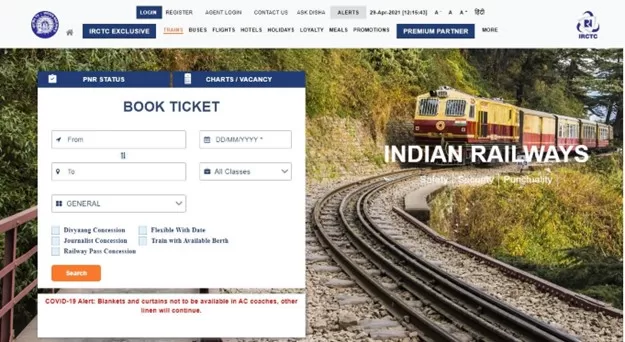
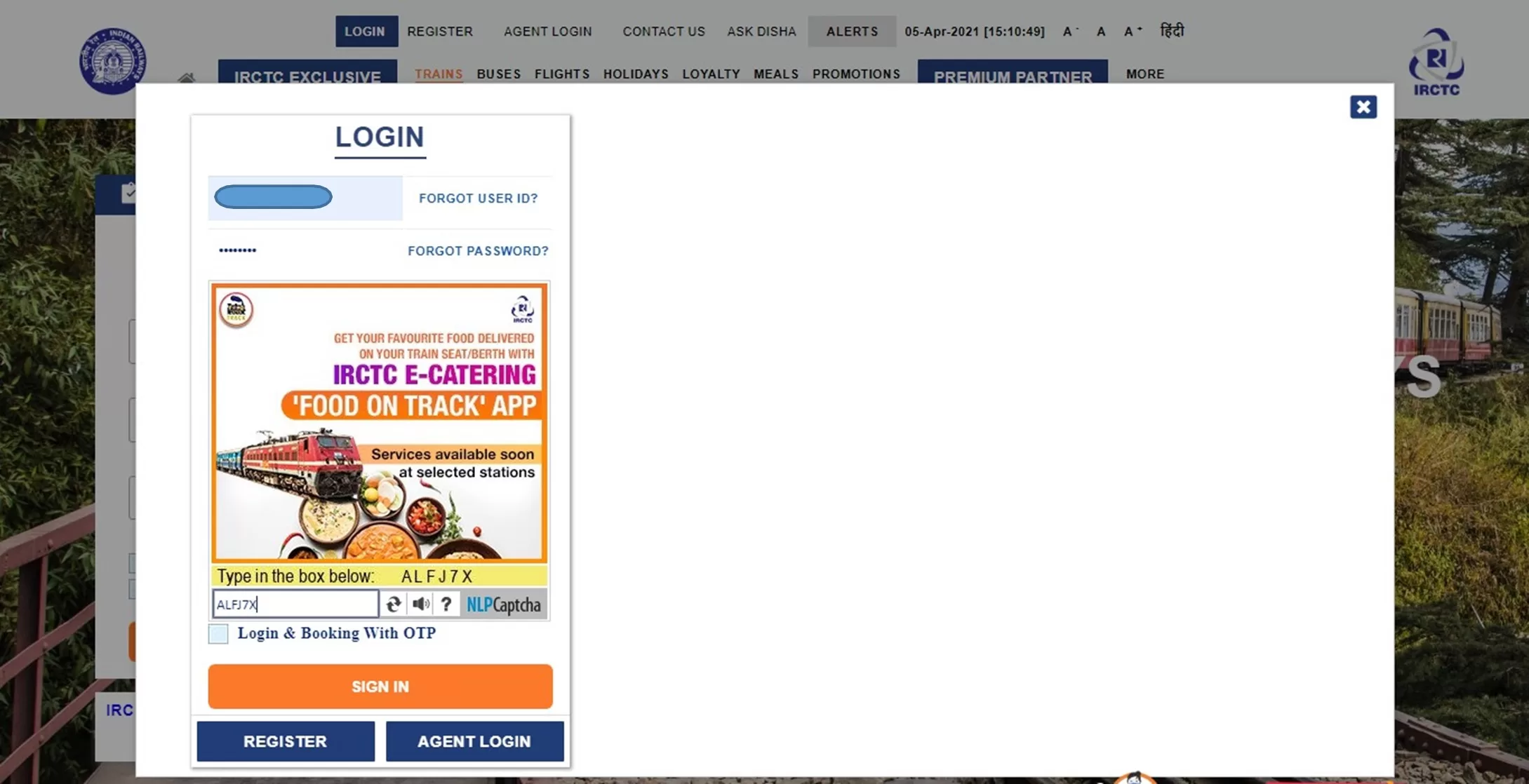
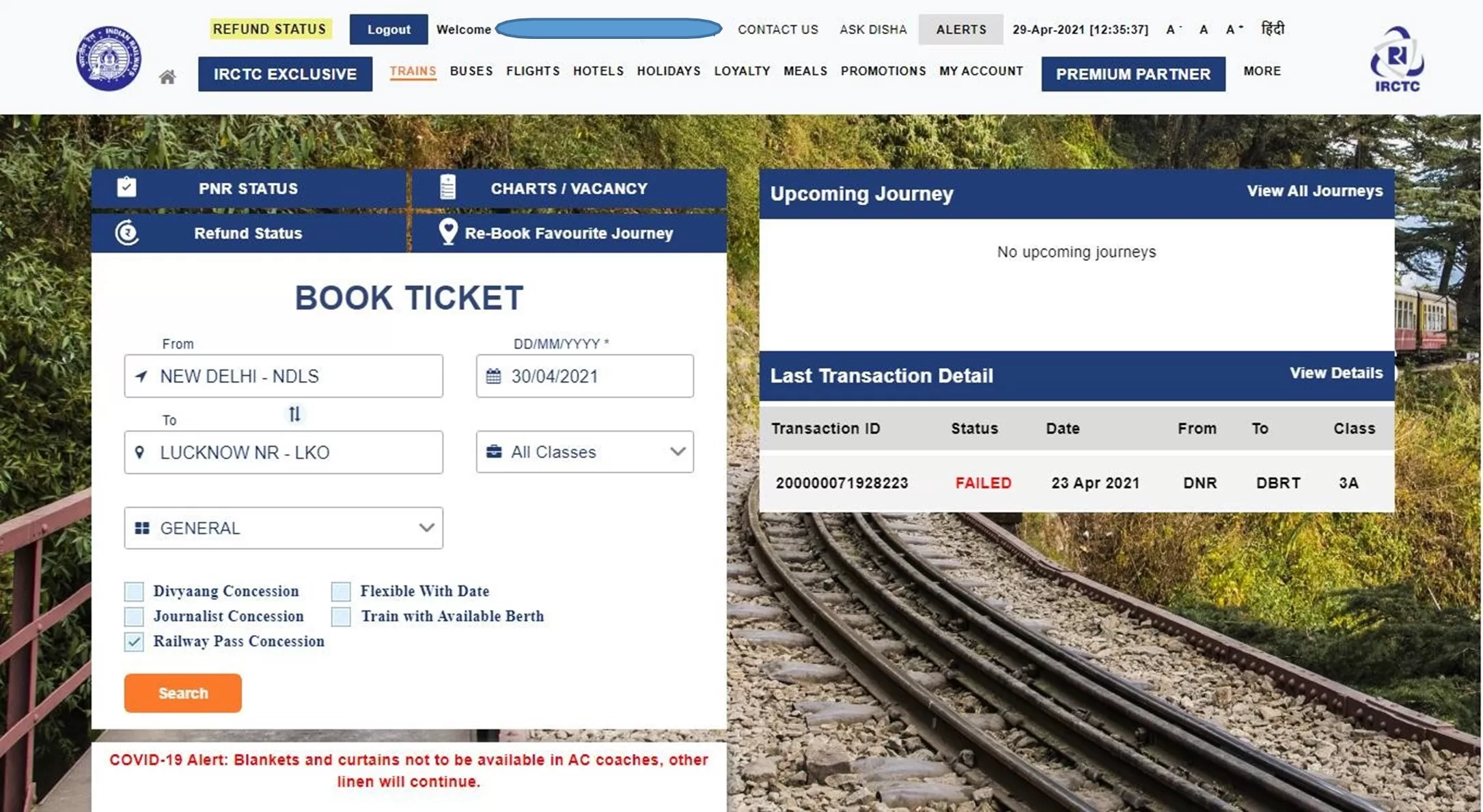
Login to the IRCTC website by clicking on “LOGIN” option provided at the top and enter your registered User ID and Password.
On Book Ticket Page, enter your desired “From station”, “To station”, “Date of Journey”, “Quota” and “Class” of travel.
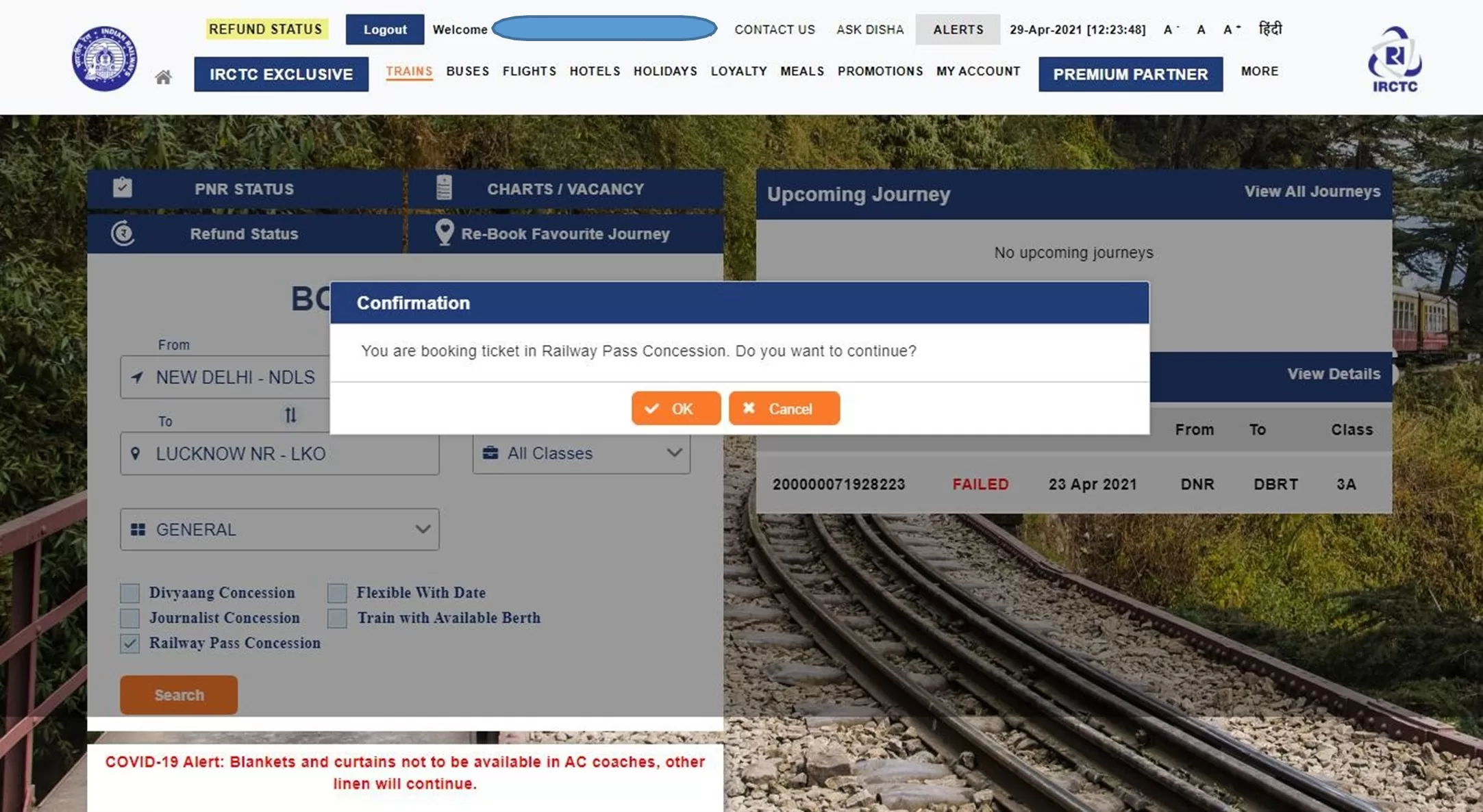
Select the “Railway Pass Concession” checkbox.
A confirmation message will be displayed – “You are booking ticket in Railway Pass Concession. Do you want to continue?” Press “OK” to continue.
In case, you do not have any fixed date of journey, select “Flexible with Date” option.
To find train list, click on “Search” button.
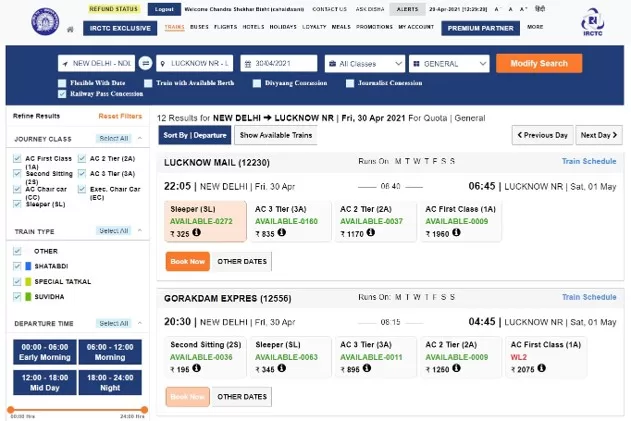
The “List of Trains” will be displayed in next page with class wise availability and fare.
To select the train from the train list, select desired class of travel and click on “Book Now” button.
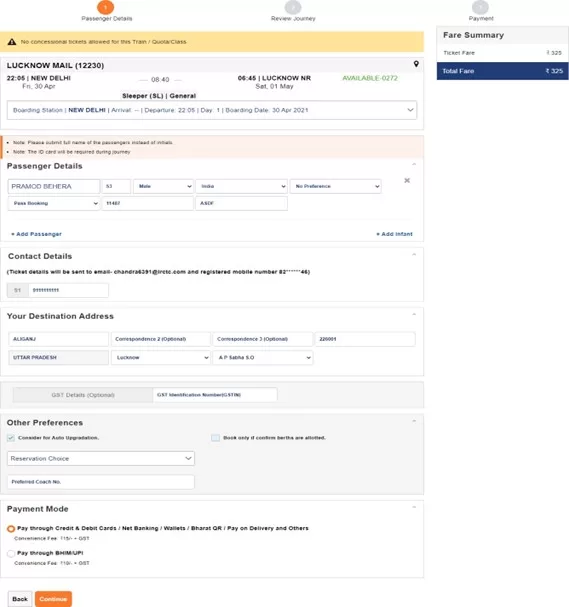
“Passenger Reservation Page” will be displayed in the next page.
For booking a Pass Booking ticket, at least one of the travelling passenger must be pass holder.
Enter “Passenger Name”, “Age”, “Gender” and select concession option as “Pass Booking” for pass holder and provide “Pass Number” and “Pass PIN Code” as per the details available in pass issued.
Additional passenger can be added here by clicking on “Add Passenger” option.
Concession option for general passenger to be selected as “General Booking”.
Destination passenger address will be required to be provided under “Your Destination Address”.
Boarding Station for the journey can be changed by clicking the down arrow button on “Boarding Station” option provided on the Passenger Reservation Page by selecting the desired boarding station name from the drop down list.
After providing Passenger’s Mobile Number and selecting Payment Mode, click on “Continue” button to proceed next and to make any change in journey details “Back” button may be used.
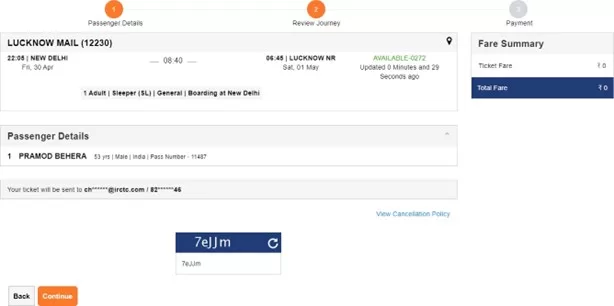
Once the passenger details entered get verified with the details in pass issued, next page will be displayed as “Booking Review Page”.
The ticket details, Total fare, Availability of berths and Pass details will be displayed on the screen.
To make change in journey details, “Back” button may be used.
IRCTC convenience fee will not be levied on tickets booked for only Pass/PTO passengers.
IRCTC Convenience Fee (Rs. 15+GST for SL and 2S and Rs. 30+GST for all other classes) will be charged on tickets accompanying General passengers with PASS/PTO holders.
Travel insurance premium will not be charged for the time being on PASS booking tickets.
After checking all details, enter the captcha and click on “Continue” button.
If total fare to be paid is greater than zero, then payment option page will be displayed to make payment and “PNR number” will be generated after successful payment and successful response from PRS system.
If total fare to be paid is displayed as zero, then on clicking continue button Booking Confirmation Page will be displayed after successful response from the PRS system “PNR number” will be displayed.
“Virtual reservation message” (VRM) in the form of “SMS” will be sent on Registered Mobile Number.
“Booking confirmation mail” will be sent on Registered Email ID.
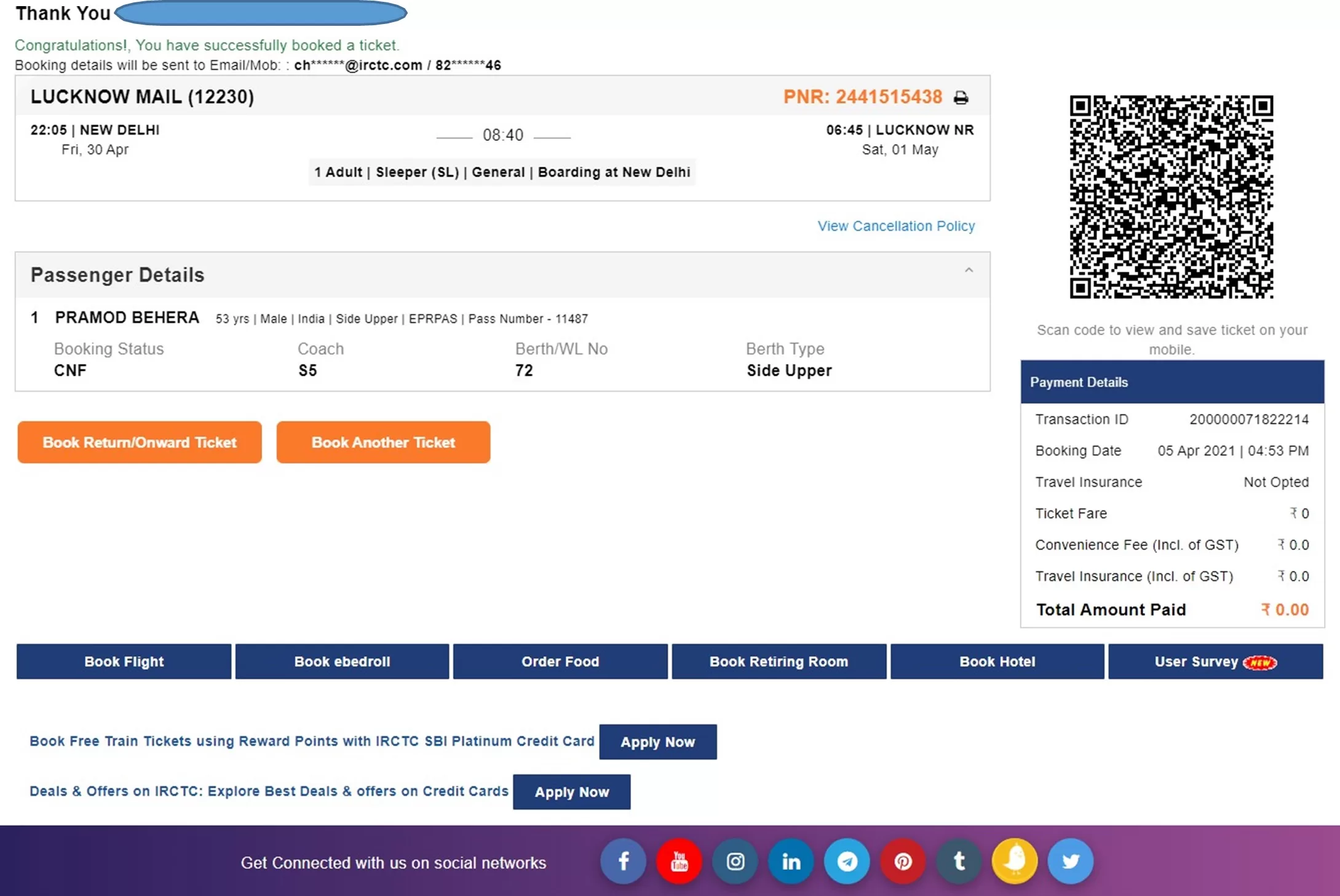
Electronic Reservation Slip (ERS) can be printed by clicking on “Print Ticket” image button provided at next of PNR Number.
To book ticket for Return/Onward Journey, “Book Return/Onward Ticket” button may be used. Using this option will retain the details of Passengers as provided in the current ticket.
To book another ticket, “Book Another Ticket” button may be used.
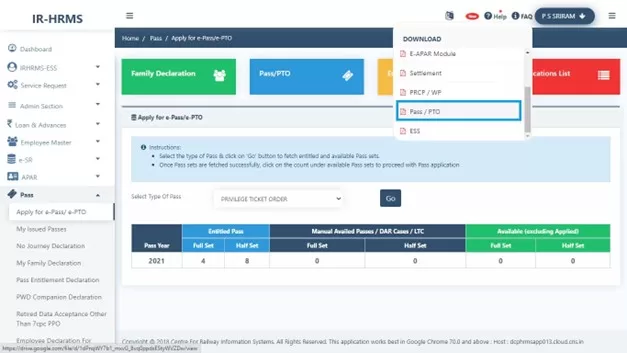
Pass booking related FAQs are provided in HRMS Dashboard. Please refer below screen.
I hope this guide for online train ticket booking on Railway e-PASS is helpful to you. For such content also read below links…
Air Travel Entitlements of Railway officers on Tour and Duty
Railway Board has issued latest Instructions regarding Air Travel Entitlements of Railway officers on Tour/Duty and Delegation of Powers w.r.t. Sanctioning of Air Travel vide Letter No. F(E)I/2025/AL-28/4, Dated 29.04.2025.
Earlier References in this regard: Railway Board’s letters No. F(E)I/2017/AL-28/41, dated 24.04.2018, 08.05.2018 & 10.05.2018 and Board’s letter No. F(E)I/2021/AL-28/47, dated 13.08.2021.
Instructions regarding air travel entitlements of Railway officers on tour/duty and delegation of powers w.r.t. sanctioning of air travel have been issued from time to time. It has now been decided in modification to all the earlier instructions on the subject that the revised instructions regarding air travel on tour/duty will be as following:
I. PHOD/CHOD in Zonal Railways/PUS, CAO/C in Construction Organizations, DGs in CTIs and DRM in Divisional offices may, for officers under their control, sanction travel by air on duty:
(i)Without Finance concurrence for officers in Pay Matrix Level-14 & above.
(ii) With Finance concurrence for officers in Pay Matrix Level-13 & below.
II. In Railway Board, power to sanction air travel on duty by officers shall remain with AMs/PEDs. However, prior Finance concurrence shall be mandatory for air travel on duty by officers below the Director level.
III. Air travel entitlement for officers of Level-13 and below would be in Economy Class and for officers in Level-14 and above would be as per MoF/DoE’s instructions issued vide O.M. No. 19030/1/2017/-E.IV, dated 13.07.2017, i.e., in Business / Club Class.
IV. The officer will have to submit a self-certification in his/her Tour Programme and also with TA/DA claim that no Group C staff is being booked/has travelled on duty with the officer.
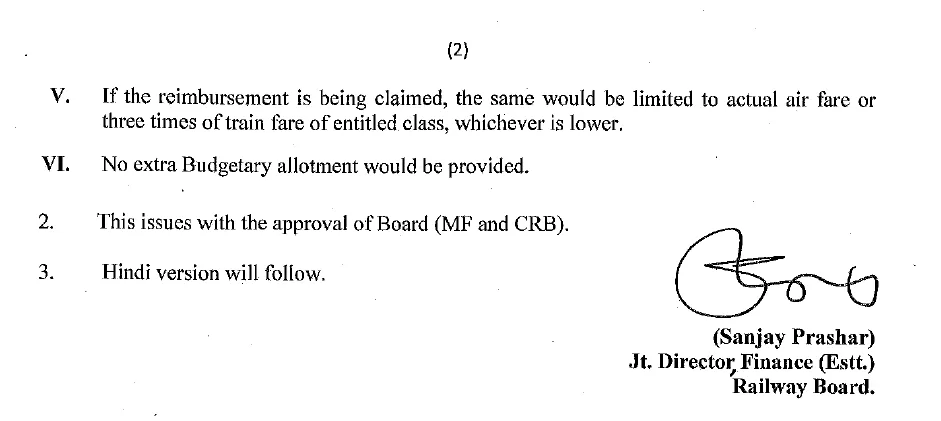
V. If the reimbursement is being claimed, the same would be limited to actual air fare or three times of train fare of entitled class, whichever is lower.
VI. No extra Budgetary allotment would be provided.
This issues with the approval of Board (MF and CRB).
What is new in these instructions on Air Travel Entitlements of Railway officers
Level-14 officers (SAG) and above can travel in Business / Club classes.
There will not be any requirement of sanction from General Managers (GM) for Air travel.
Reimbursement is limited to actual air fare or three times of train fare of entitled class, whichever is lower. This condition of maximum reimbursement can be discussed considering the fare of flights for business class.
Hey! If you’re trying to access RESS (which typically refers to the Railway Employee Self Service portal used by Indian Railways staff), here’s how you can do it on an iPhone (iOS):
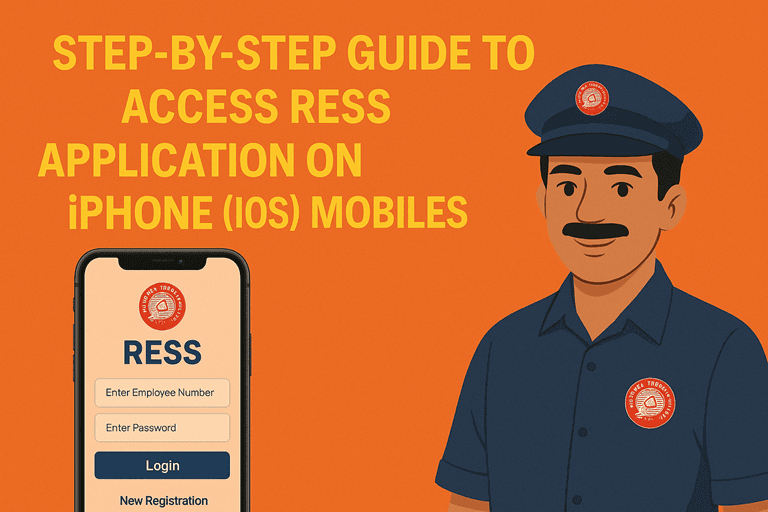
✅ Step-by-Step Guide to Access RESS on iPhone (iOS) users
RESS app is not listed on the Apple App Store for iOS devices. Though, the Railway Employee Self Service (RESS) application developed by the Centre for Railway Information Systems (CRIS) is available for Android devices on the Google Play Store.
However, iPhone users can also access RESS services through the mobile version. Here’s how:
How to use Railway Employee Self Service (RESS) application on iPhone mobiles?
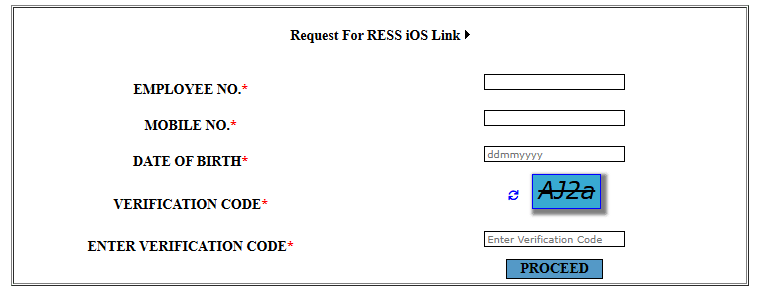
All the fields are mandatory. Please ensure that Mobile number is registered. OTP will be sent on to registered mobile number only. After filling all the details click to PROCEED.
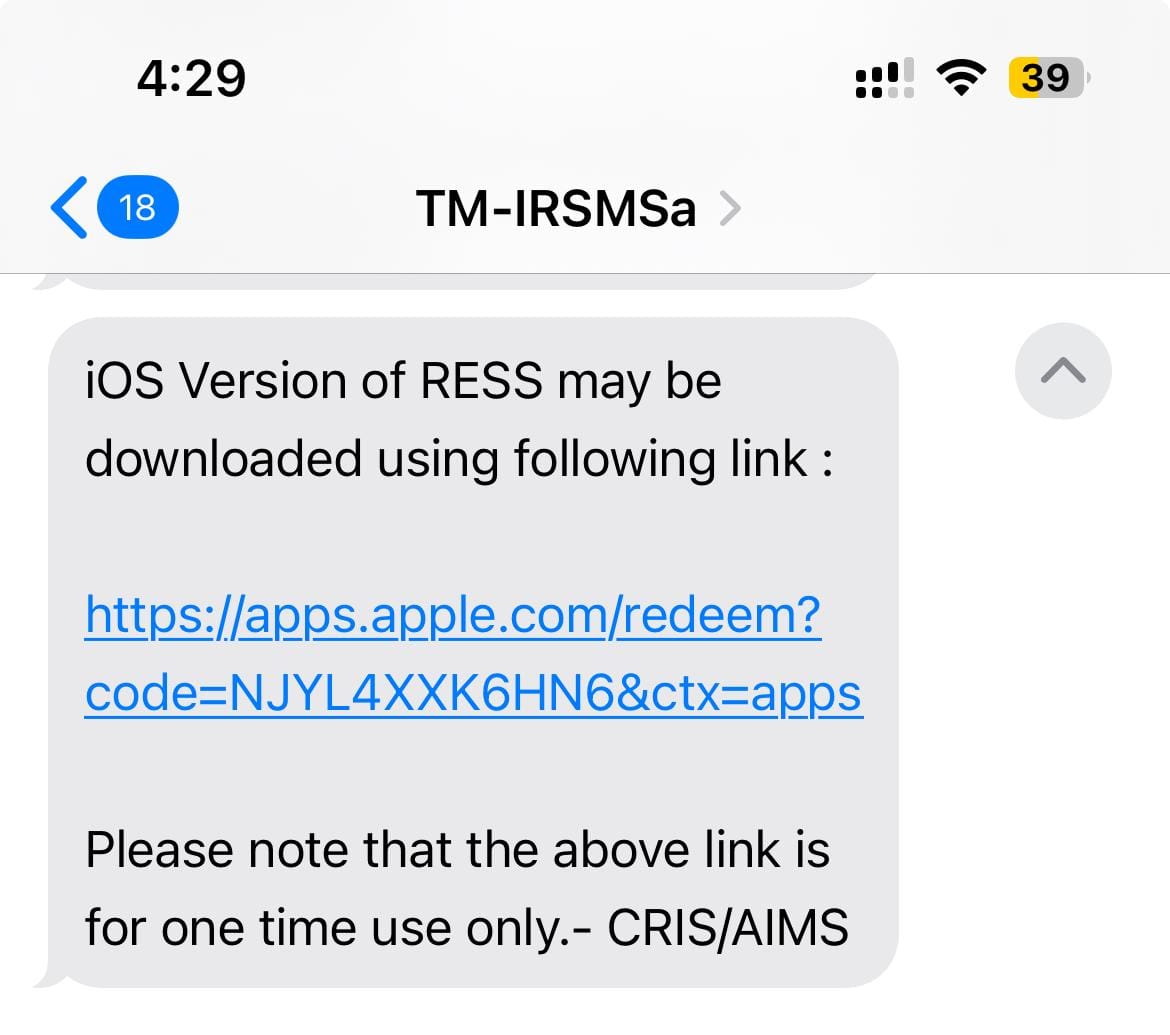
SMS on registered mobile number will be sent with the link to download...
On click of link received through SMS, iOS version app will be installed on your iPhone. Please note that the above link is for one time use only.
Enjoy the RESS app on your iPhone mobiles.
? Tips for Smooth Access
Make sure your mobile number is registered in the HRMS/AIMS database.
Retirement planning is a crucial financial decision. Choosing the right scheme can significantly impact your future security. With evolving policies in 2025, the battle of OPS vs. NPS vs UPS has become more intense. Each scheme comes with unique features. But which one truly offers the best benefits for you? Let’s dive deep into these three schemes to help you make an informed decision about your golden years.
Understanding NPS
In 2004, the National Pension System (NPS) replaced OPS for government employees. It was extended in 2009 to cover private-sector employees, self-employed individuals, and NRIs. Unlike OPS, NPS is a market-linked pension scheme where an individual’s retirement corpus depends on investment performance.
Employees contribute regularly, and upon retirement at 60, 40% of the accumulated corpus can be used for an annuity, and 60% can be withdrawn without the burden of taxation. There is no assured pension amount, as payouts depend on investment performance.
NPS Eligibility Criteria
Open to government and private-sector employees
Available for NRIs and self-employed individuals
Requires mandatory contributions during service
Pros of NPS
Higher returns due to market-linked investments
Partial lump sum withdrawal (60%) allowed at retirement
NPS deduction under Sections 80C, 80CCD (1B), and 80CCD (2)
Flexibility to choose fund managers and investment options
Cons of NPS
Pension is not guaranteed, as it depends on market performance
40% of the corpus must be annuitised, reducing immediate liquidity
Understanding UPS
As you already know, the NPS and OPS full-form now, it’s time to learn what UPS stands for. Introduced in 2024, the Unified Pension Scheme (UPS) aims to provide a guaranteed pension similar to OPS but with a contribution model like NPS. It is currently available to all central government employees and may extend to state government employees.
Employees covered under NPS can switch to UPS, ensuring broader pension coverage. The scheme guarantees a pension amount of 50% of the average basic salary over the last 12 months before retirement for those with at least 25 years of service. Additionally, employees with a minimum of 10 years of service are entitled to a minimum pension of ₹10,000 per month upon superannuation.
In case of the pensioner’s death, their family will receive 60% of the last pension drawn. Employees contribute 10% of their basic salary and DA, while the government contributes 18.5%—a higher share than NPS’s 14%.
UPS Eligibility Criteria
Available to all central government employees (may extend to state employees)
Employees covered under NPS can switch to UPS
Requires 10% employee contribution of basic pay + DA
Pros of UPS
Guaranteed pension amount based on last 12 months’ salary
Higher government contribution (18.5%) compared to NPS (14%)
Family pension provision ensures financial security for dependents
Inflation-linked adjustments protect purchasing power
Gratuity benefits included
Cons of UPS
No lump sum payout at retirement
Taxation details unclear at this stage
It may not provide financial flexibility compared to NPS
OPS vs NPS vs UPS: Decoding the Key Differences
Feature
Old Pension Scheme (OPS)
National Pension System (NPS)
Unified Pension Scheme (UPS)
Type
Defined Benefit Scheme (Guaranteed pension)
Market-linked Investment Scheme
Hybrid Pension Scheme (Guaranteed pension with contribution model)
Applicable To
Central government employees appointed before 22 Dec 2003
Government and private-sector employees, NRIs, self-employed individuals
Central government employees (may extend to state employees)
Employee Contribution
None
10% of basic salary + DA
10% of basic salary + DA
Government Contribution
Fully funded by the government
14% of basic salary + DA
18.5% of basic salary + DA
Pension Calculation
Based on the last drawn basic salary
Depends on investment performance and annuity plan
50% of average basic pay over the last 12 months (for employees with 25+ years of service)
Lump Sum Payout at Retirement
No
60% of corpus (tax-free), 40% annuitised
No
Family Pension
Yes, full pension benefits for the spouse
Depends on the annuity plan chosen
60% of the last pension drawn given to family
Inflation Protection (DA Revisions)
Twice a year
No guaranteed DA revision
Yes, inflation-linked adjustments
Tax Benefits
No tax benefits
Tax deductions under Sections 80C, 80CCD (1B), and 80CCD (2)
Taxation details are yet to be clarified
Risk Factor
No risk, fixed pension
Market-dependent returns, no guaranteed pension
No market risk, assured pension
Gratuity Benefits
Yes
Yes
Yes
Flexibility in Investment
Not applicable
Choice of fund managers and investment options
Not applicable
Sustainability
High burden on the government, increasing pension liabilities
Sustainable, self-funded through investments
Balanced approach with government support
NPS vs UPS: Which One is the Best for You?
Choosing the right pension scheme depends on various factors, including job stability, risk tolerance, and retirement expectations. Here’s a comparative analysis to help you decide:
1. If You Want Flexibility and Market-Linked Growth:
Best Option:NPS
Allows individuals to choose their investment options and fund managers.
Offers tax benefits under Sections 80C, 80CCD (1B), and 80CCD (2).
Suitable for private-sector employees, NRIs, and self-employed individuals.
However, returns are not guaranteed as they depend on market performance.
2. If You Want an Assured Pension with Government Support:
Best Option:UPS
Provides a guaranteed pension amount of 50% of the last 12 months’ average salary (for employees with 25+ years of service).
Ensures an assured family pension and minimum pension.
Government contribution is higher (18.5%) than in NPS.
Ideal for government employees looking for a balance between assured benefits and sustainable funding.
However, the details of the taxation and long-term sustainability remain under review.
Final Verdict
OPS is ideal for those eligible for it, as it offers guaranteed benefits without personal contributions.
NPS suits individuals who are comfortable with investment risks and want tax advantages.
UPS appears to be a middle ground, providing government-backed financial security while ensuring sustainability.
For government employees hired after 2004, UPS might be a better alternative to NPS due to its assured pension benefits. However, private-sector employees and self-employed individuals will still find NPS the only viable option. Ultimately, the best plan depends on your employment type, financial goals, and risk preference.
Conclusion
Selecting the right pension scheme—OPS, NPS, or UPS—depends on your financial goals, job security, employer status and risk appetite. OPS offers lifelong stability but is available only to a limited group. NPS provides flexibility and market-linked returns, making it suitable for private-sector employees and self-employed individuals. UPS, the latest scheme, strikes a balance by offering guaranteed pensions. As pension policies evolve, it’s essential to stay informed about updates and choose the plan that aligns best with your future security needs.
FAQs:
1. What is the difference between OPS and NPS?
OPS provides a guaranteed, lifelong pension based on the last salary drawn, with no employee contributions required. NPS is a market-linked scheme in which employees contribute a portion of their salary, and the pension amount depends on investment returns. OPS ensures financial security, while NPS offers flexibility but lacks guaranteed benefits.
2. Which is better, OPS, NPS, or UPS?
OPS is the best for financial security, as it guarantees a pension without requiring contributions. NPS is suitable for private-sector employees and those preferring investment-linked growth, though it lacks assured returns. UPS balances both, offering a fixed pension with mandatory contributions and making it a structured alternative to NPS.
3. What will happen to NPS after UPS?
UPS is expected to replace NPS for government employees, providing an assured pension model instead of market-dependent returns. Employees under NPS may be able to switch, but details on fund transfers and taxation are yet to be clarified. The transition will impact retirement planning, making it essential to stay updated on policy changes.
4. Is UPS better than OPS?
OPS is fully government-funded and offers a pension based on the last salary drawn, whereas UPS requires employee contributions and calculates pensions based on a 12-month average salary. While UPS aims to be sustainable for the government, OPS provides better financial security for retirees. OPS remains the preferred choice for those eligible due to its non-contributory nature and predictable benefits.
5. What is the new pension scheme for 2025?
The Unified Pension Scheme (UPS) is designed to replace NPS for government employees. It offers a defined pension structure and ensures a minimum pension of ₹10,000 per month, with government contributions set at 18.5%. Unlike NPS, UPS provides guaranteed benefits but may lack lump sum withdrawal options upon retirement.
6. How much pension is available from NPS?
The pension amount in NPS is not fixed, as it depends on the total accumulated corpus and annuity plan chosen at retirement. Upon retirement, 60% of the corpus can be withdrawn tax-free, while the remaining 40% must be invested in an annuity to receive a monthly pension. The exact pension amount varies based on market returns, annuity rates, and individual contributions.
7. Which pension scheme offers the most tax benefits?
NPS offers the most tax benefits, with deductions available under Section 80C (₹1.5 lakh), Section 80CCD(1B) (₹50,000), and Section 80CCD(2) for employer contributions. OPS does not provide tax-saving benefits during service but ensures a tax-free pension in retirement. UPS taxation details are still awaited, but it is expected to follow a structure similar to OPS.
8. Is UPS only for government employees?
In 2024, the Union Cabinet approved the Union Pension Scheme (UPS) to provide a minimum assured pension to central government employees. UPS has been introduced as an optional component within the National Pension System (NPS). It will be available to central government employees already enrolled in NPS and opting for the scheme.