Category Archives: IRCTC

Here are tips & tricks for booking of train tickets.

All India Leave Travel Concession (AILTC) – Explained in Detail

Here’s a summary of All India Leave Travel Concession (AILTC) rules for railway employees (i.e. for Indian Railways officers and staff), covering what it means, who’s eligible, how it works, and key conditions.

AILTC- Railway Board Instructions
RBE No.DateKey Impact
RBE No. 130/201810.09.2018Introduced AILTC against surrender of passes.
RBE No. 74/202031.08.2020Allowed reverting to Passes if AILTC failed (COVID).
RBE No. 83/202111.11.2021Allowed carrying forward unused AILTC to the 5th year.
RBE No. 84/202116.11.2021Defined who can sanction advances.
NF Rly31.08.2022N.F. Railway staff keep their “Extra” pass set.
RBE No. 152/202216.11.2022Return journey allowed in the next year.
RBE No. 165/202221.12.2022PPSC can be issued 2 months in advance.

In this blog post all rules regarding All India Leave Travel Concession (AILTC) for Railway Employees are explained with clarifications

What is AILTC?
  • AILTC is an optional All India Leave Travel Concession scheme — allowing eligible railway employees to travel anywhere in India with leave-travel benefits under the terms of Central Civil Services (Leave Travel Concession) Rules, 1988 (CCS (LTC) Rules).
  • It was introduced for railway employees pursuant to a decision by the Ministry of Railways under RBE 130/2018 (dated 10-Sept-2018).
  • Under AILTC, employees surrender their usual railway “Privilege Passes” for the calendar year and instead avail leave-travel concession — effectively replacing passes with LTC for that year.
Who is eligible for AILTC?

AILTC applies to:

  • Railway servants entitled to Privilege Passes (PP).
  • Other government-department officials on deputation in Railways who are entitled to PPs.
  • Officials of Railway Audit Department (if eligible for PPs).
  • Staff/officers working in Railway’s Board Office (subject to conditions, e.g. minimum service of 4 years for Board staff).

Not eligible:

  • Those undergoing a minor penalty which includes stoppage of even a single Privilege Pass at the time of application.
  • Hometown-LTC / “Home Town LTC or Home-Town converted LTC” is not admissible under AILTC for railway employees.
When & How Often – Block Period?
  • AILTC can be availed once in a block of four years. The blocks began from 2018–2021 onward.
  • It is purely optional — employees are free to choose it (i.e. they are not forced to pick AILTC instead of passes) in any block.
  • If an employee avails AILTC in a given calendar year, they surrender their PPs for that year; they are then excluded from pass benefits for that year.
Procedure to Avail AILTC?

To avail AILTC:

  1. The employee must submit an application opting for AILTC for a particular calendar year.
  2. They must surrender all Privilege Passes (PPs) admissible to them for that calendar year. On surrendering, they get a document called “Privilege Pass Surrender Certificate (PPSC)” — a prerequisite for availing AILTC.
  3. Then apply for leave (of any type) and submit an advance-intimation/declaration letter along with the PPSC to the Establishment / relevant HR/ERB branch.
  4. If needed, AILTC advance (travel advance) may also be requested per procedure.
How to Book Flight Tickets for AILTC

If You Are Traveling by Air, You MUST book flight tickets only through:

  1. Air India website, OR
  2. Authorised travel agencies:

As per CCS (LTC) Rules — mandatory for LTC/AITLC.

❗ You cannot:

  • Book through MakeMyTrip, Yatra, Cleartrip, or private agents
  • Book “cheap” airfare directly from airline unless DGCA fare rules allow it & office permits

For claims reimbursement, keep:

  • Air ticket
  • Boarding pass
  • Invoice from authorised agent
RBE No. 130/2018 – Scheme of Optional AILTC

Scheme of optional ‘All India Leave Travel Concession’ (AILTC) facility, once in a block of four years (i.e. 2018-2021 onwards) on surrender of Privilege Passes (PP).

Railway Board Letter RBE 130/2018 (E(W)2017/PSS-1/3), dated 10.09.2018.

Key Provision: This circular officially allowed Railway employees to opt for the “All India LTC” scheme (governed by CCS LTC Rules, 1988) purely on an optional basis.

Condition: To avail of this, the employee must surrender their Privilege Passes (PP) for that specific calendar year.

Frequency: Permitted once in a block of four years (starting with the 2018–2021 block).

RBE No. 74/2020 – Unblocking of Privilege Pass Account

Modification in the ‘All India Leave Travel Concession’ (AILTC) Scheme to facilitate unblocking of Privilege Pass Account in exceptional circumstances!!!

Ref: Board’s letter No. E(W)2017/PS5-1/3 dated 31.08.2020.

Clarification: Request for cancellation of PPSC and re-opening of PPA will be entertained only in exceptional cases. In such case, the applicant will submit an application to PIA, explaining the reasons for non-availing of AILTC with supporting documents, if any. The application must accompany the original PPSC and a Certificate to the effect that ‘the applicant has not drawn any LTC Advance or returned the advance drawn in full in accordance with the Rules regarding grant of LTC advance and adjustment thereof, as contained in CCS (LTC) Rules, 1988’ from the Section handling LTC Claims.

A decision on the request will be taken on the grounds whether the circumstances stated by the applicant are beyond his/her control or otherwise and by an officer of SAG level in the Personnel Department overseeing the Pass Section as Competent Authority. If approved by the Competent Authority, the PPSC as well as CN (wherever applicable), may be treated as ‘cancelled’ and PPA unblocked/reopened for the respective year.

RBE No. 83/2021 – Carry over of AILTC

Clarification regarding carry over of All India Leave Travel Concession (AILTC) of a block of four years to the first year of next block?

Ref: Railway Board’s letter No. E(W)2020/PS5-1/3 dated 11.11.2021.

Clarification: Clarified that if an employee did not avail of the AILTC during the 4-year block (e.g., 2018–2021), they could carry it forward to the first year of the next block (i.e., 2022), consistent with general Central Government LTC rules.

RBE No. 84/2021 – Competent authority for sanctioning of AILTC?

Reference letter no. E(W)2020/PS5-1/3, dated 16.11.2021

Clarification: The Authorities stipulated therein and in the relevant SOPs as competent to sanction advances, etc. as per Railway Travelling Allowance (TA) Rules, shall be Competent Authorities also for all matters connected with AILTC

Special Provision for N.F. Railway

Surrender of one extra pass for N.F. Railway staff?

Reference Letter No. E(W)2021/PS5-2/8 (dated 31.08.2022)

Clarification: Employees serving in the Northeast Frontier (N.F.) Railway are typically entitled to one additional set of Privilege Passes. This circular clarified that to avail of AILTC, these employees do not need to surrender the additional extra set. They only need to surrender the standard entitlement of passes applicable to all railway employees.

RBE No. 152/2022 – Clarification regarding return journey

Reference: Board’s letter No.2022/E(W)/12/1, dated 16.11.2022

Clarification: Clarified that while the outward journey must commence within the valid calendar year/block, the return journey can be performed in the next calendar year, provided the trip is continuous and completed within a reasonable timeframe (as per CCS LTC Rules).

RBE No. 165/2022 – Advance issue of PPSC for availing AILTC in the next Calendar Year

Reference Railway Board letter 2022/E(W)/12/2, dated 21.12.2022.

Clarification: A PPSC for the upcoming calendar year can be issued up to 2 months in advance (i.e., from 1st November of the current year), enabling employees to book tickets early for travel in the new year.

Also read

How to Authenticate IRCTC User Profile with Aadhaar

Why Authentication of User Profile with Aadhaar is must on IRCTC?

Authenticating the User profile with Aadhaar on IRCTC allows users to:

  • Book Tatkal and Premium Tatkal Tickets.
  • Book up to 24 Tickets in a month.
  • Register for IRCTC e-Wallet.

Please refer following for further details on:

How to Authenticate your IRCTC User Profile with Aadhaar
  • Submit your login credentials and Sign In.
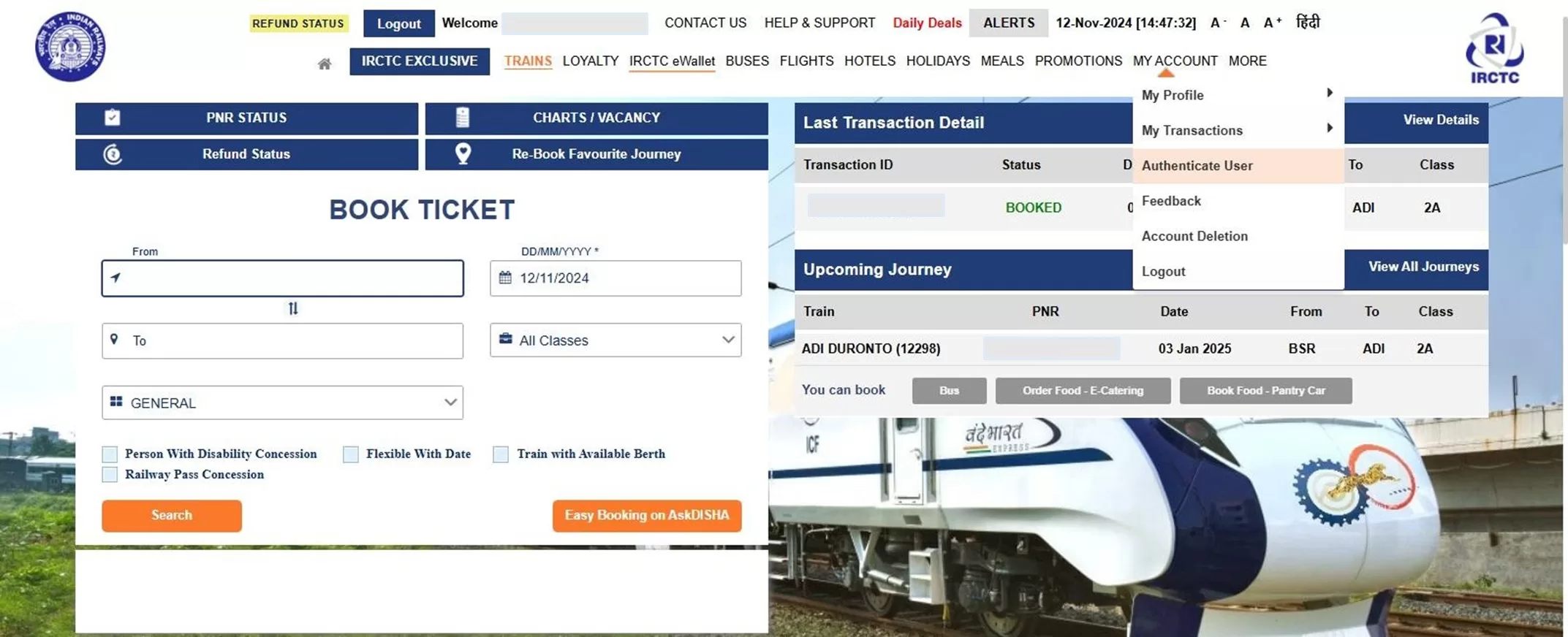
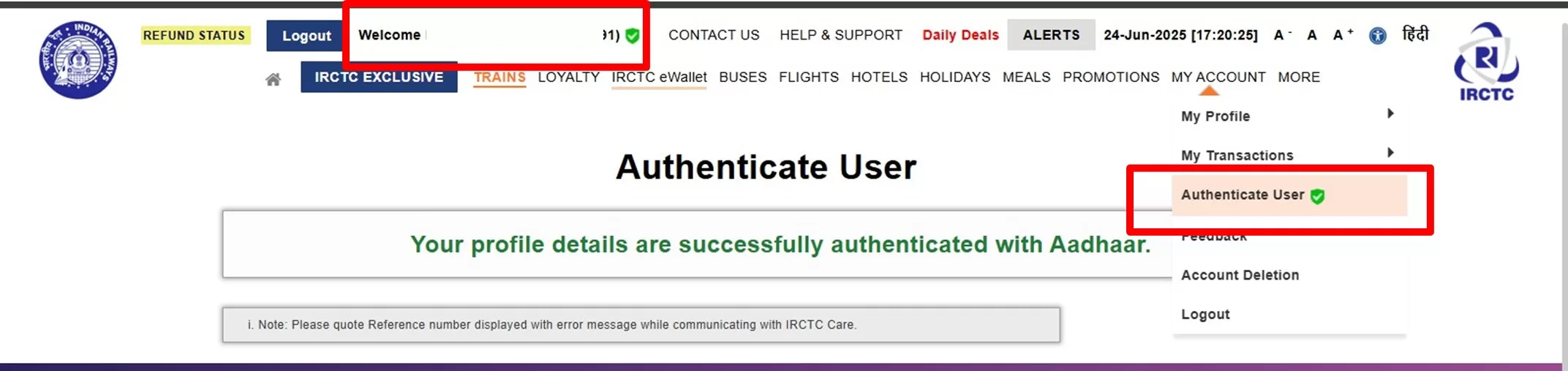
  • Go to MY ACCOUNT tab and select Authenticate User.

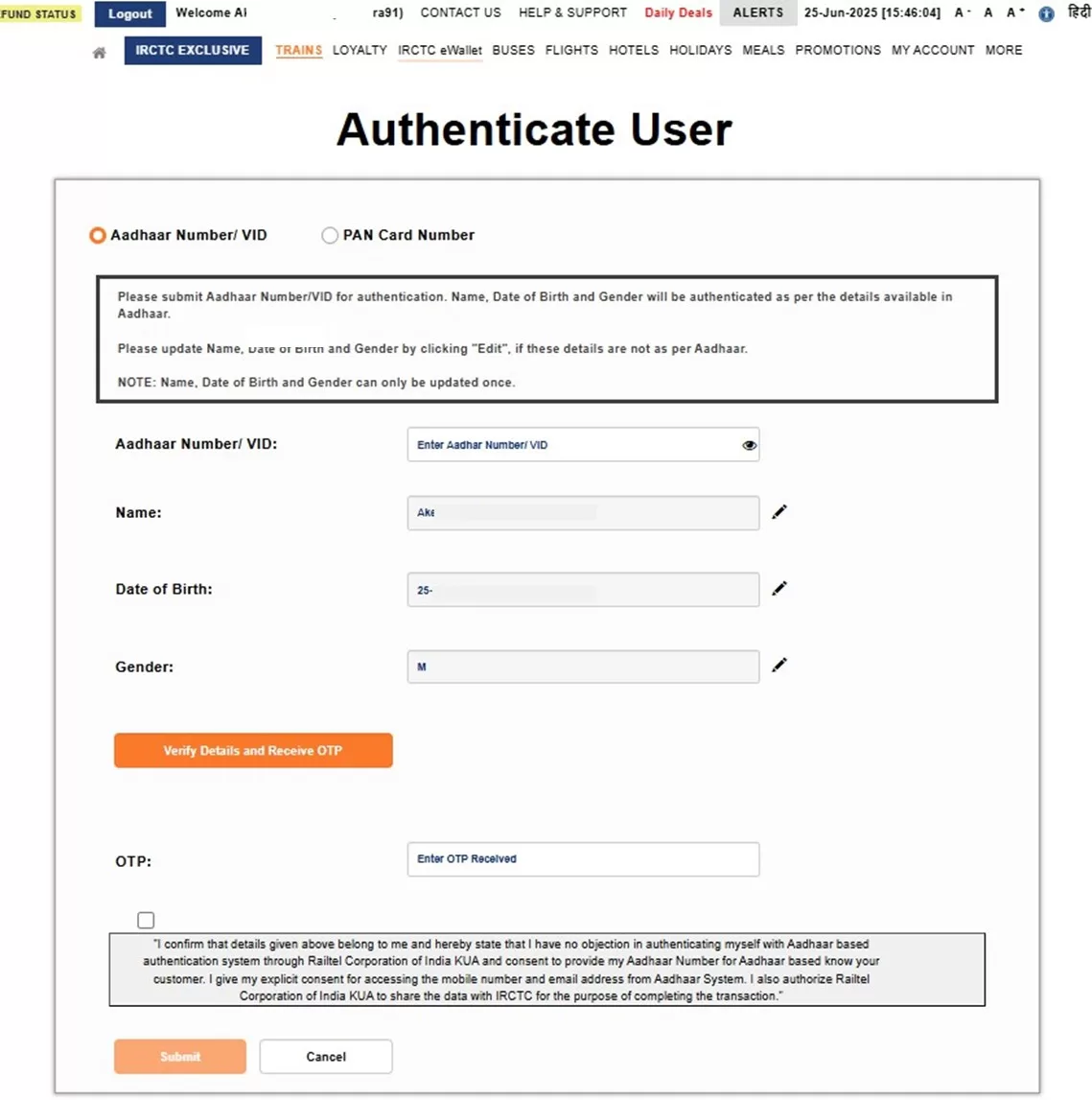
On Authentication page,

  • Submit your Aadhaar Number or Virtual ID
    • Check Name, Date of Birth and Gender displayed on screen before proceeding with authentication. Name, Date of Birth and Gender must be as per Aadhaar.

In case Name, Date of Birth or Gender displayed on screen do not match with Aadhaar, user may click on Edit option  to update the record with correct values.

User guide for updating Name, Date of Birth and Gender

  • Click on “Verify details and receive OTP” button. OTP will be sent on the Mobile Number registered with Aadhaar.
    • Submit OTP in the OTP field
    • Read and agree to the consent displayed in the box.
    • Click on Submit button to complete the Aadhaar authentication process.
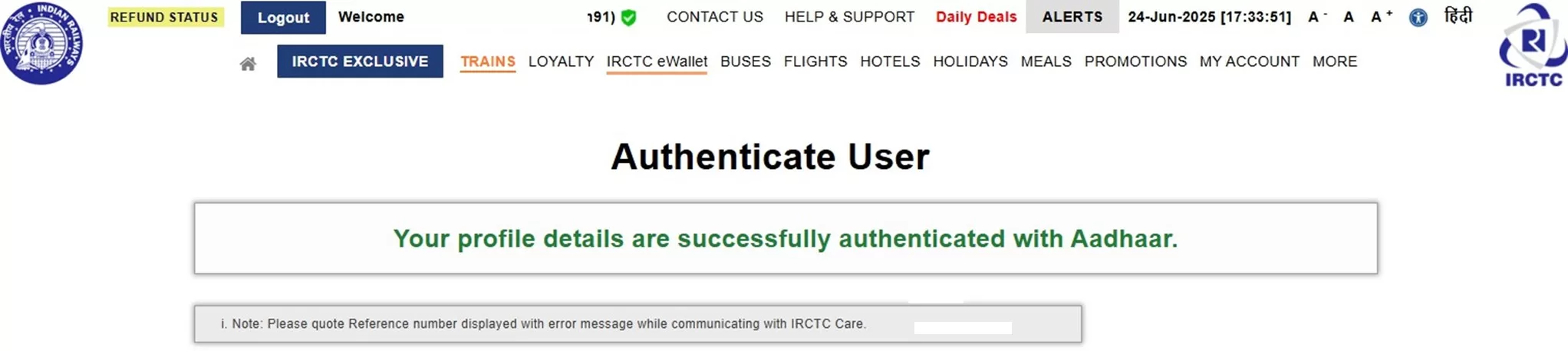
  • After clicking on submit button, below successful authentication page will be displayed.
  • Successful Aadhaar Authentication status can be checked with a green tick at the header page, besides User name and Authenticate User link under MY ACCOUNT tab on top navigation of IRCTC eTicketing website.

How to Authenticate passengers with Aadhaar
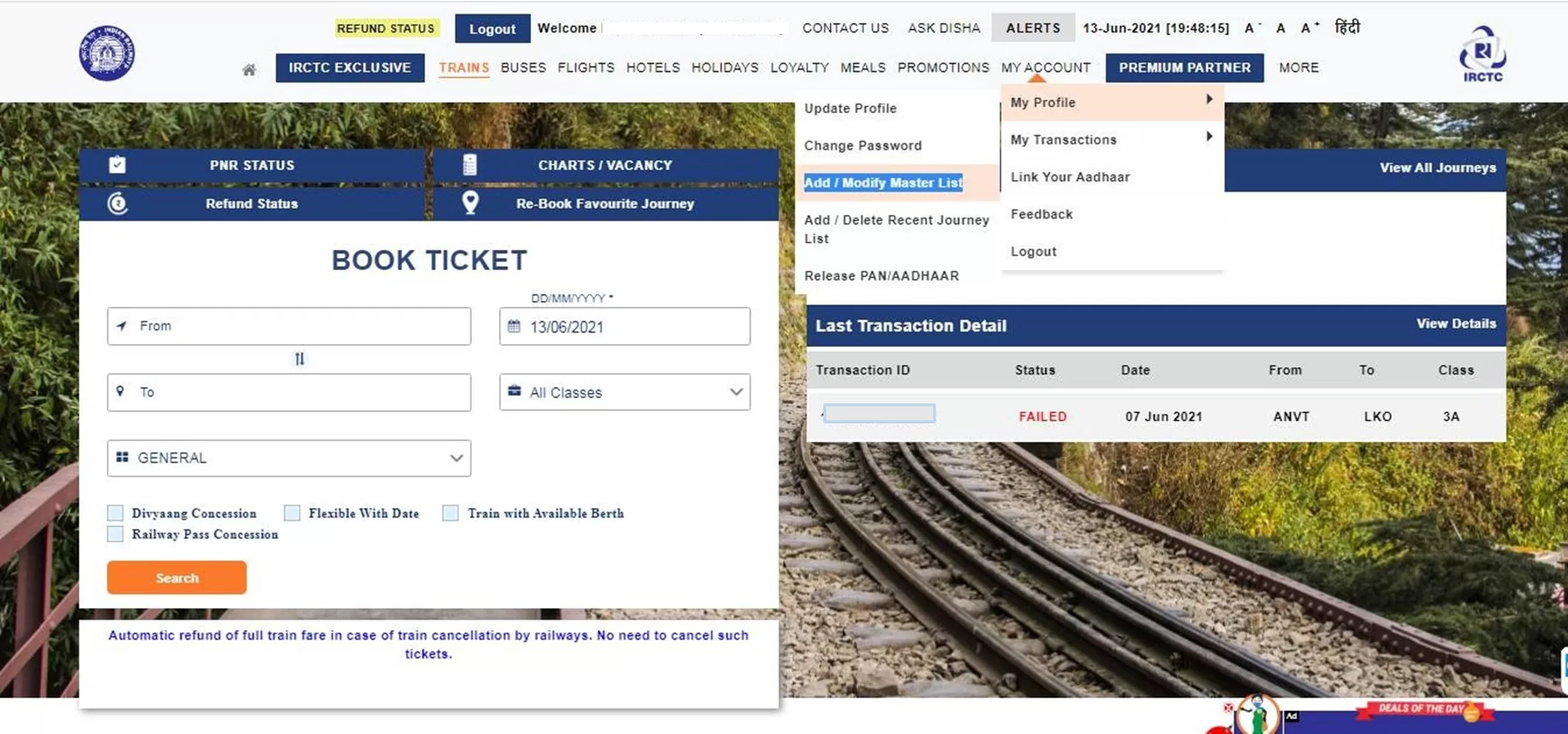
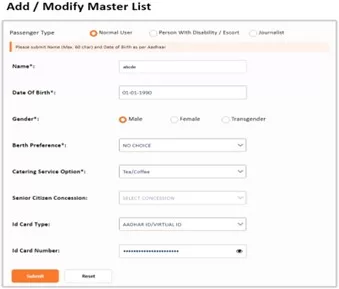
  • After logging in, go to the ‘Add/Modify Master List’ link under ‘My Profile’ in the ‘MY ACCOUNT’ tab on the IRCTC homepage. (MY ACCOUNT >> My Profile >> Add/Modify Master List)
  • On the Add/Modify Master List page, provide all the required details, including Name, Date of Birth, Gender, Berth Preference, Catering Service Option, Senior Citizen Concession (if applicable), ID Card Type, and ID Card Number (Aadhaar Number).

(Name, Date of Birth and Gender of passenger must be as per Aadhaar.)

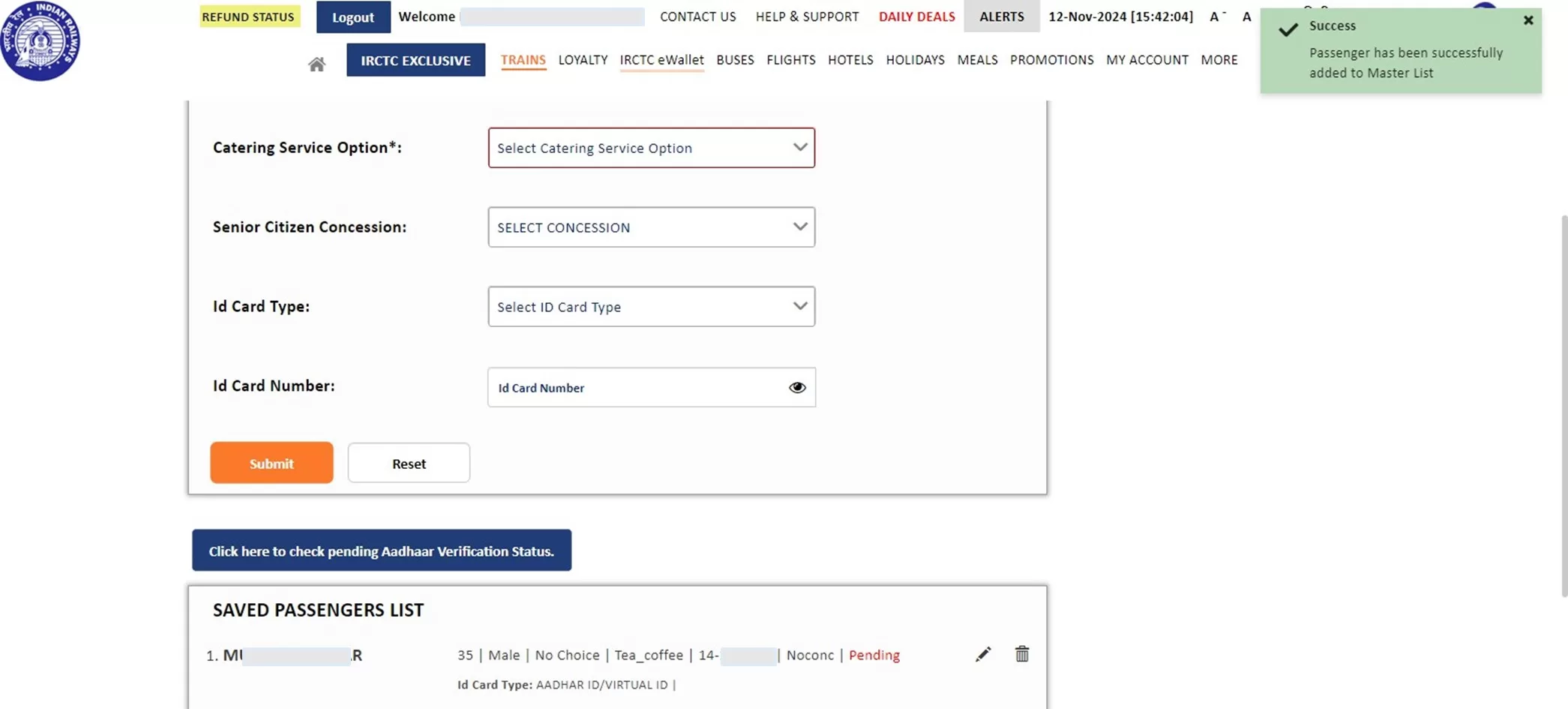
  • Click on Submit button to proceed.
  • The passenger with the provided details will be added to the Master List and can be viewed in the Saved Passenger List
  • To authenticate the Aadhaar details of a passenger, click on ‘Click here to check pending Aadhaar Verification Status.‘ If the details are correct, the verification status will change to ‘Verified’ and a success alert will be displayed on the screen.”

How to book more than 12 tickets in a month

To book more than 12 tickets:

  • The IRCTC user profile must be authenticated with Aadhaar, and at least one of the travelling passengers must also be authenticated with Aadhaar.
  • The user can add an Aadhaar authenticated passenger from the saved Master List at the time of booking to be eligible to book up to 24 tickets in a month.

Steps to avail the facility of booking more than 12 tickets and up to 24 tickets in a month:

  • After successful login, submit the journey details and proceed with booking.
  • On the train list page, select the desired train and class, then click the ‘Book Now’ button to continue with the booking.
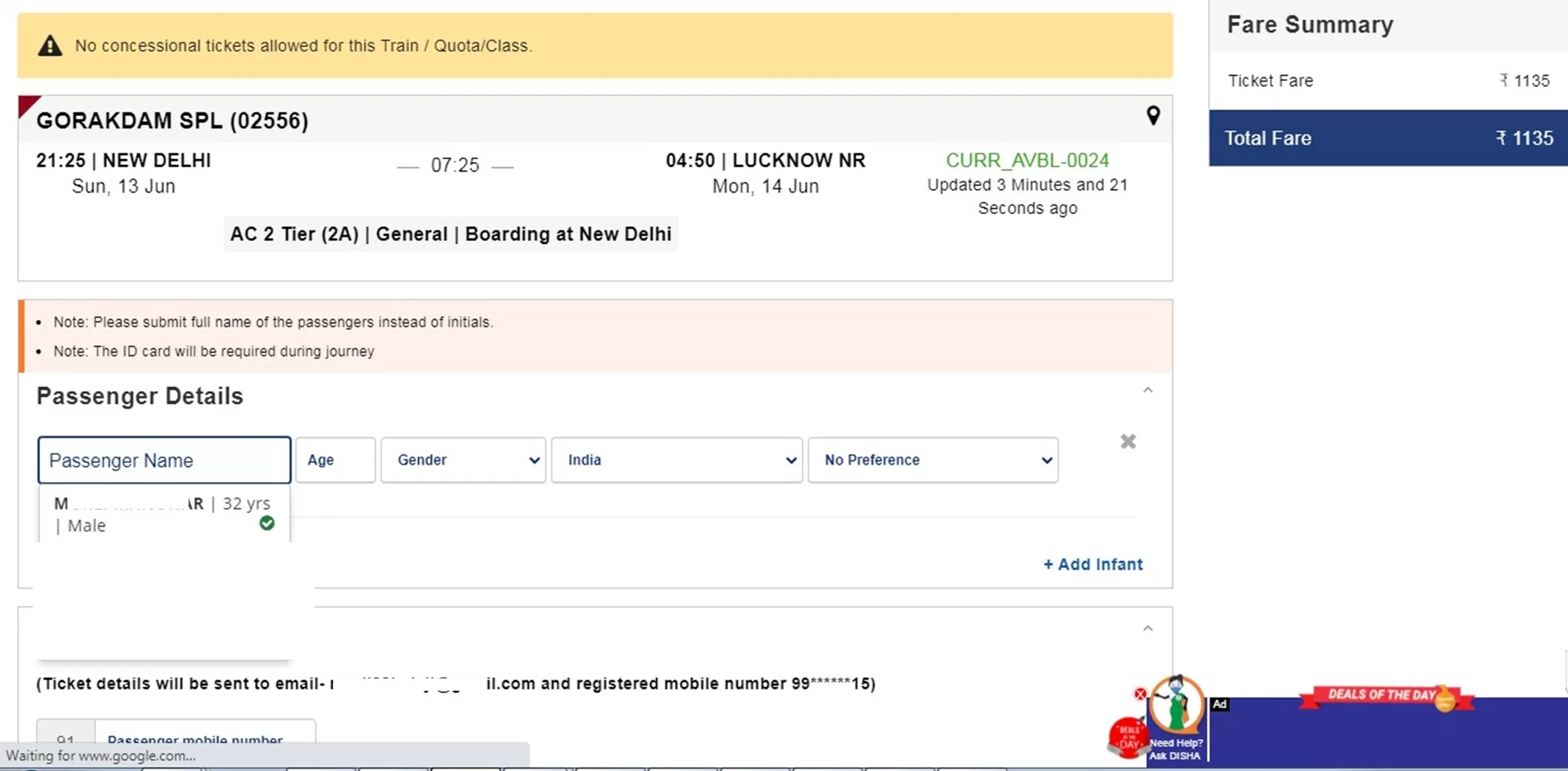
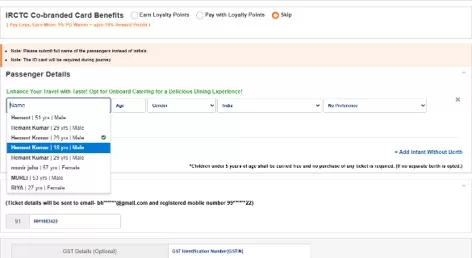
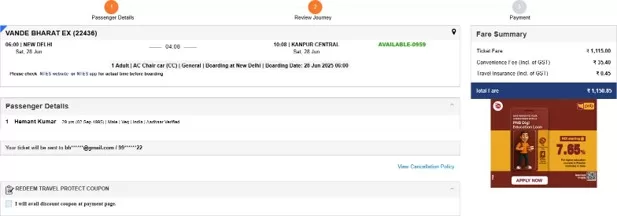
  • On the passenger reservation page, click on ‘PASSENGER NAME’ and select an Aadhaar authenticated passenger (Marked with a Green tick) from the dropdown list. This list displays all passengers saved in the Master List.
  • Aadhaar authenticated Passenger details will be automatically fetched on the Reservation form.
  • After the Aadhaar authenticated passenger details are fetched on the reservation form, details of other passengers may be added from the Master List or can be submitted manually by the user.
  • Continue Booking process.
  • Review the booking details and check the Aadhaar verified text displayed under Travelling Passengers.
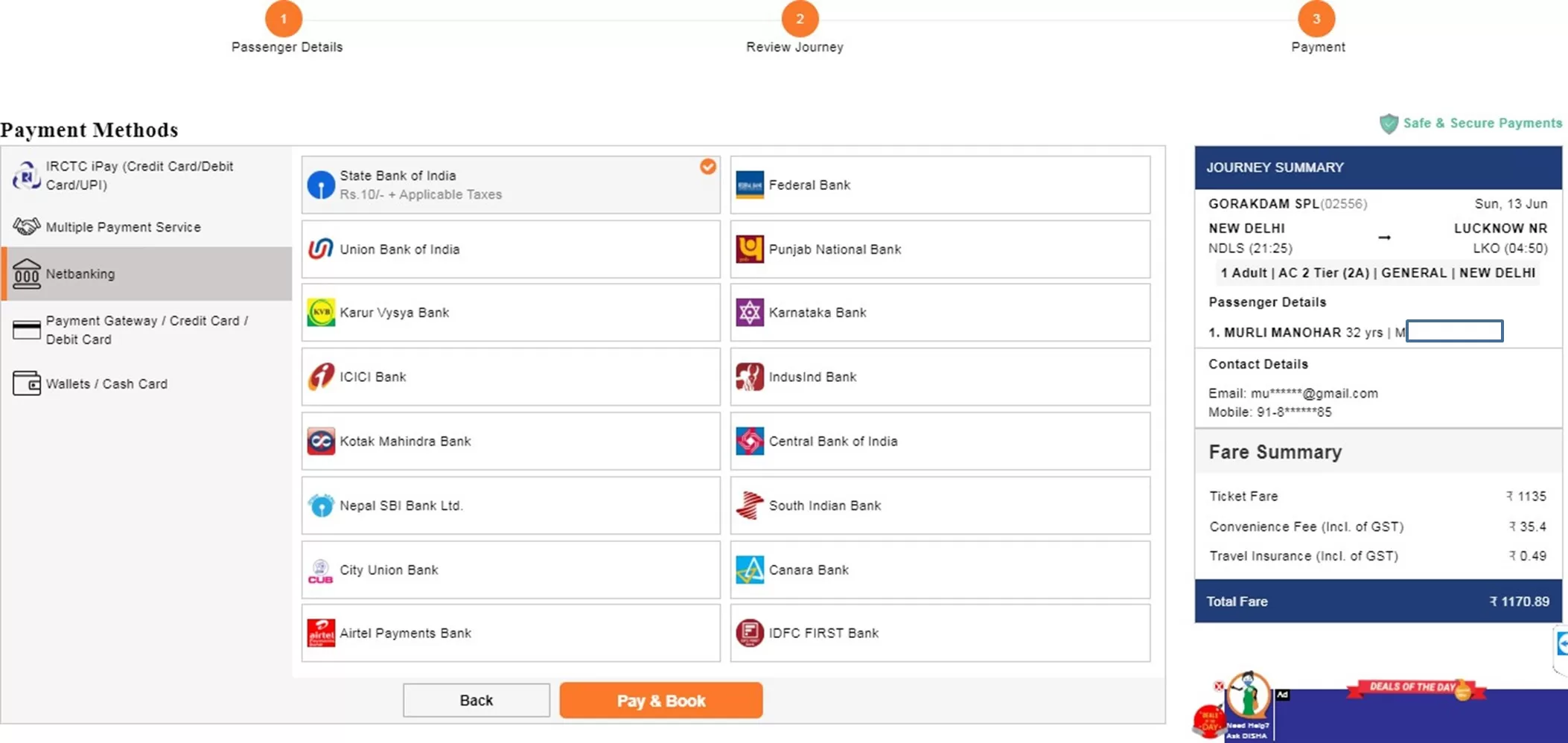
  • Select the payment gateway of your choice and continue to payment page.
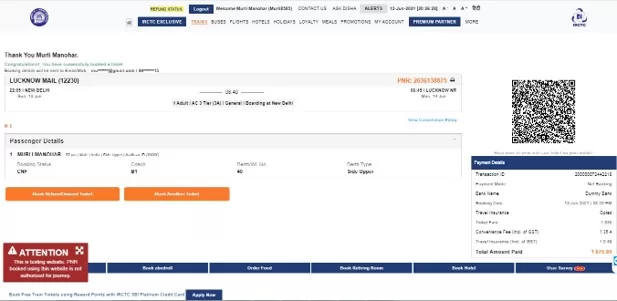
  • Upon successful payment, the ticket will be booked and the booking confirmation page will be displayed.

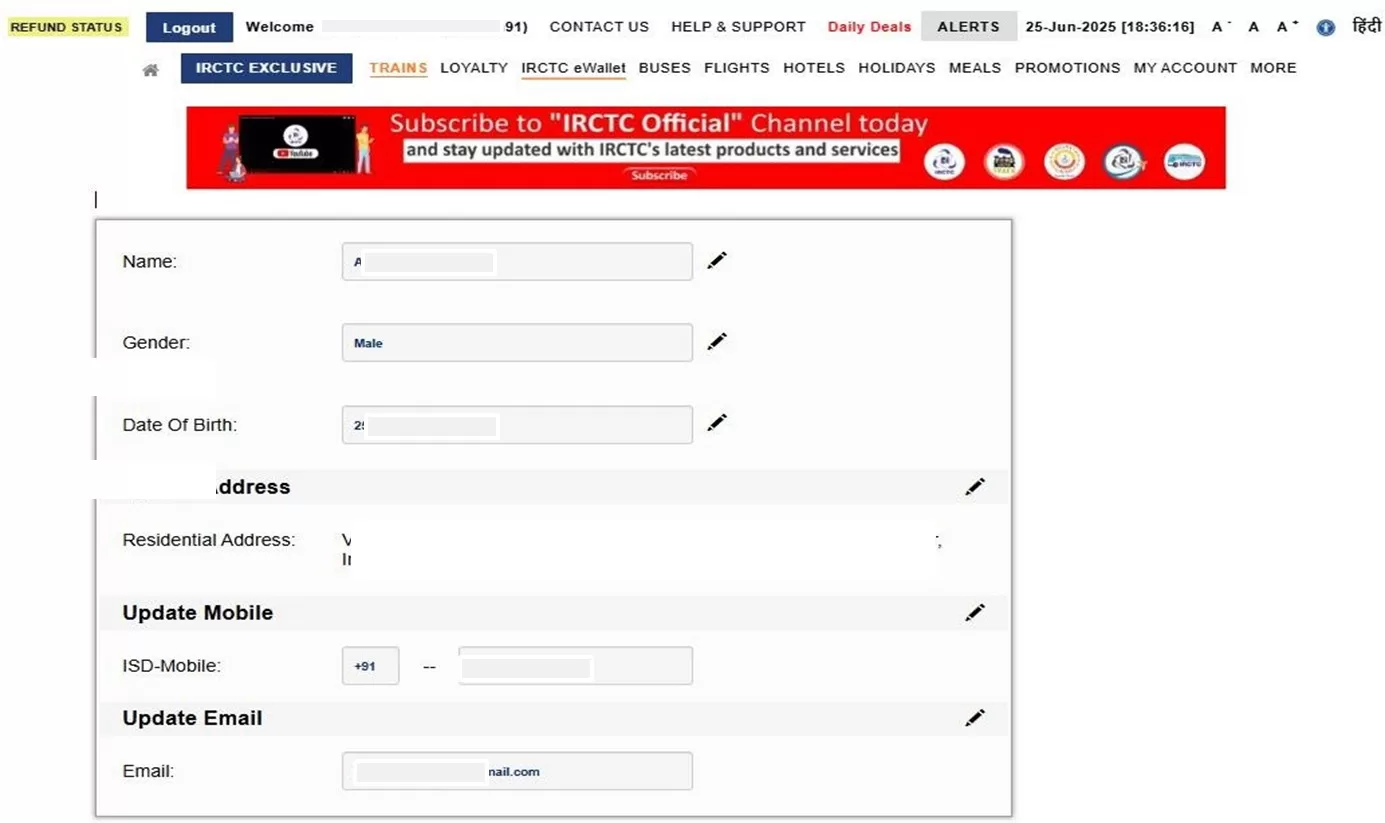
How to update Name, Date of Birth and Gender?

The option to change Name, Date of Birth, or Gender can be accessed from:

  1. My Account >> Authenticate User page
  2. My Account >> My Profile >> Update profile page

Please note: Changing the Name, Date of Birth, or Gender is allowed only for users who have not been authenticated through Aadhaar. Once the user is authenticated through Aadhaar, no further changes in Name, Date of Birth, or Gender are allowed.

Users are requested to provide genuine personal details on the IRCTC website for a seamless authentication process.

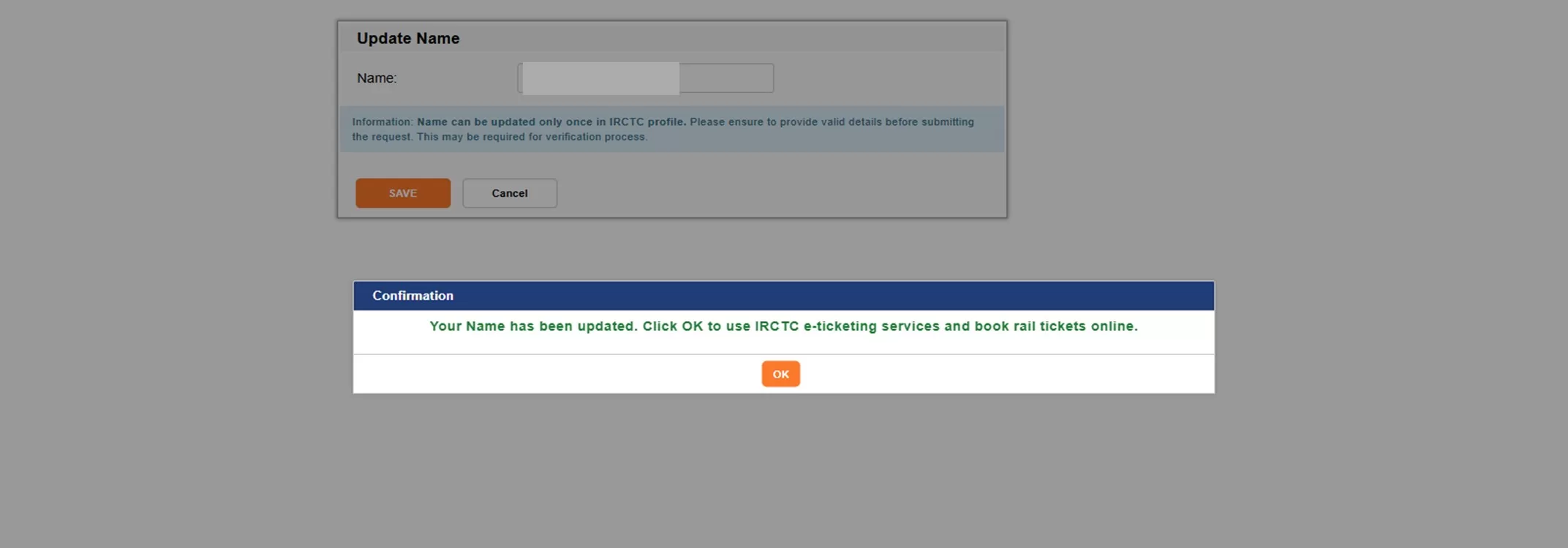
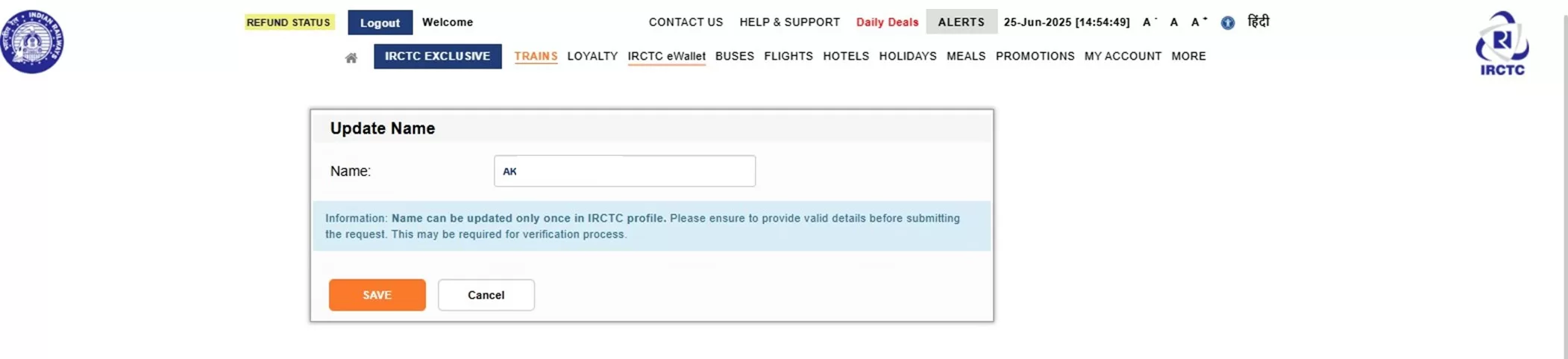
  • Click on Edit icon to update your Name.
  • Submit your Name and click on Save button.
  • Successful Name Updation pop-up confirmation will appear.
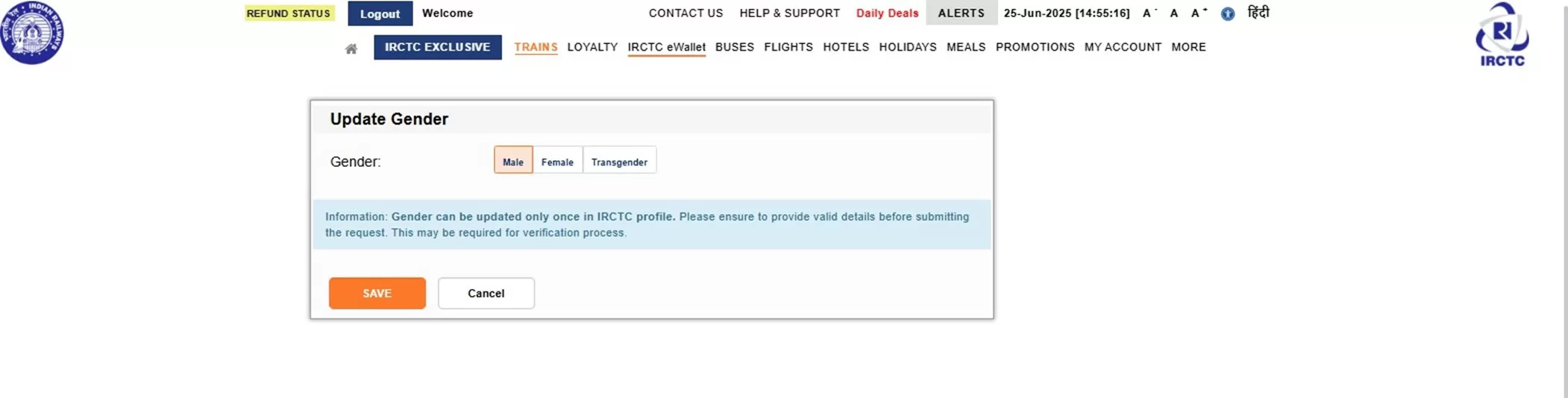
  • Click on Gender edit icon to update Gender.
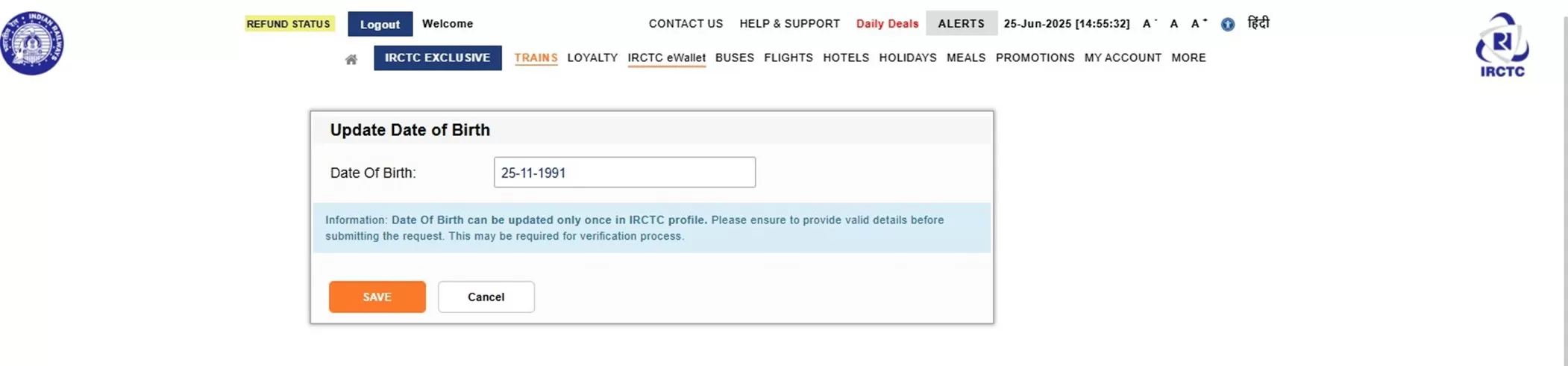
  • Click on Date of birth edit icon to update Date of birth.

Users may contact IRCTC Care on https://enquery.irctc.co.in/ for further assistance.

FAQs on Privilege Pass and PTO for Railway Employees (2025)

Stay updated with the latest rules and procedures for Railway E-Pass and Privilege Ticket Orders (PTO) via Indian Railways’ HRMS platform. Here are the frequently asked questions (FAQs) and answers on Privilege Pass and PTO module of HRMS…

Q1: What is the objective of the Railway Privilege Pass and PTO module?

✅ The goal is to let serving railway employees apply for and use E-Pass or E-PTO online via the HRMS portal and book tickets either through counters or online platforms like IRCTC.

Q2: What are the benefits of E-Pass/E-PTO?

  • Apply from anywhere — no need to visit the pass clerk.
  • Book tickets online (IRCTC) or at counters.
  • Family details auto-verified via HRMS.
  • Supports digital convenience and paperless travel.

Q3: My name/family member’s name is longer than 16 characters. What should I do?

✅ Enter only the first 16 characters, exactly as per HRMS records (including spaces).
❌ Do not use initials or punctuation unless shown in HRMS.
✔️ Example: Amaresh Kumar SrivastavaAmaresh Kumar Sr

Q4: How long is the OTP valid for pass booking?

✅ OTP is valid for 60 minutes (1 hour).

Q5: My OTP expired due to a long queue. What should I do?

✅ You can regenerate OTP via HRMS, even from your smartphone browser.

Q6: Why is OTP needed if I already have the pass number?

✅ OTP adds an extra layer of security — only you have access to your registered mobile.

Q7: I’m getting errors during ticket booking. What’s the solution?

✅ Check the error message carefully. Common issues include:

  • ? Name/Age/Gender mismatch – Match HRMS exactly.
  • ? Expired OTP
  • ? Entitlement issues – Booking class/train not allowed.
  • ? Return journey already completed
  • ? Break station not on train route
  • ? More passengers or berths than entitled
  • ? Journey dates not valid

If unresolved, contact your HRMS coordinator.

Q8: Why must family be updated in HRMS and not just told to the pass clerk?

✅ HRMS family data is used for:

  • Pass issuance
  • SBF scholarships
  • CGA
  • Child Education Allowance (CEA)

That’s why data must be correct and approved in HRMS first.

Q9: A child was born / a family member passed away. What to do?

✅ Update the HRMS family section via ESS module, then resubmit family declaration.

Q10: I’ve been medically decategorized or transferred and need 1st Class Pass. How to update it?

✅ In Pass Declaration Menu, upload supporting documents (transfer/medical) and send to Pass Clerk → PIA → Approval.

Q11: I opted out of widow pass before 30.06.1987. Can I get 6 PTO sets?

✅ Yes, upload your written option document in the Pass Declaration Menu for verification and approval.

Q12: Why can’t I apply for break journey on a PTO?

❌ PRS currently does not support group or break journey on PTOs.

Q13: I want to cancel and rebook a PTO ticket. How?

❌ Rebooking on PTO is not allowed.
✔️ Modification only possible at booking counters.

Q14: Can I cancel a Privilege Pass?

✅ Only in exceptional cases (e.g., natural disaster, leave not sanctioned).
? Submit documentary proof for cancellation.

Q15: I’m in Pay Level 1–4. How to apply for an upgraded pass?

✅ While applying, select the checkbox for “Upgraded Pass” during application.

Q16: How to add an attendant to the pass?

✅ Tick the “Attendant” checkbox during ticket booking.

Q17: Where can I learn the full working of the pass module?

✅ Visit:

Q18: Why can’t I book Chair Car (CC) on Mail/Express trains?

❌ Mail/Express trains do not have CC class entitlement.
✔️ CC class is only valid on Shatabdi or special trains (see RBE 16/19, 120/19).

If you still face issues, contact your department’s HRMS helpdesk or coordinator for assistance.

IR-HRMS Helpdesk

In case of any issues please reach out to HRMS helpdesk:-

Please Note : There are changes in HRMS Helpdesk Mobile no. Zone wise Helpdesk Mobile No is as follows –

  • 1) Mobile no. 9718972731 for SER + ECoR + NFR + RCT
  • 2) Mobile no. 8287998772 for SECR + CR + RDSO + RWF
  • 3) Mobile no. 7838961987 for SR + CORE + CTI + NR
  • 4) Mobile no. 9971535534 for NCR + NER + ER + NFRC
  • 5) Mobile no. 7011532241 for NWR + RWP + SWR + RCF
  • 6) Mobile no. 8375846067 for DMW + SCR + CLW + MCF
  • 7) Mobile no. 7982542883 for METRO + COFMOW + WR + ECR
  • 8) Mobile no. 9971168228 for RB + ICF + WCR + BLW
  • or Raise a service request

Also Read

How to Travel with Pets on Trains (Full Guide – 2025)

Planning to take your furry friend on a train journey? Good news — Indian Railways does allow pets on board, but there are important rules and options you need to know. This comprehensive guide covers how to travel with pets on Indian trains, including ticket booking, compartments allowed, documentation, charges, and more.


? Can You Travel with Pets on Indian Trains?

Yes! Indian Railways permits travel with pets — mainly dogs ? and cats — but only under specific conditions. There are two main ways to travel with your pet:

  1. As Accompanied Luggage in First Class AC or First Class Non-AC Coupé
  2. In the Brake Van (Luggage/Parcel Van) with special booking

Let’s break both down.

1️⃣ Travel with Pets in First Class AC (Coupe)

✅ Allowed In:

  • First Class AC (1A Coupe or Cabin)

? Rules:

  • Pets are allowed only if you book the entire coupe or cabin.
  • No objection from co-passengers is permitted — hence full compartment booking is necessary.
  • Limited to certain trains that have 1A coaches.

? How to Book:

  • Book your 1A tickets through IRCTC or offline at a reservation counter.
  • After ticket confirmation, submit a request to the Chief Reservation Officer (CRO) at the boarding station to allot a full coupe for pet travel.
  • Mention clearly that you are carrying a pet (dog/cat).

? Charges:

  • You must pay pet carriage charges at the parcel office before boarding.
  • Approx. charges for dogs: ₹30–₹60 per kg depending on train and distance.

2️⃣ Travel in Brake Van (Luggage Van)

If you can’t get a 1A Coupe or are traveling in another class:

  • Pets can be booked in the luggage/brake van as parcel luggage.
  • Owners are not allowed to accompany pets in this case.
  • Not suitable for small, sensitive, or nervous pets.

? Important:

  • Provide pet’s vaccination and health certificate.
  • Book pet space at the luggage office on the day of travel.
  • Carry a well-ventilated cage or crate for your pet.

? Documents Required

  1. Vaccination Certificate
  2. Health Certificate from a Registered Vet (issued within 24–48 hours before travel)
  3. Train Ticket (Confirmed Reservation)
  4. Application for coupe allotment (if applicable)
⚠️ Do’s and Don’ts for Pet Train Travel

✅ Do’s:

  • Carry water and food for your pet.
  • Bring a leash and muzzle (mandatory for large dogs).
  • Use absorbent bedding or puppy pads inside crates.
  • Arrive early at the station (especially for brake van bookings).

❌ Don’ts:

  • Don’t try to smuggle pets into Sleeper or AC coaches.
  • Don’t sedate your pet unless advised by a vet.
  • Don’t forget the required paperwork — you may be denied boarding.
?‍⚖️ Penalty for Rule Violation

If you carry a pet without proper booking or try to sneak them into coaches where they aren’t allowed:

  • You may be fined, and
  • The pet may be moved to the luggage van without refund.

? Special Notes

  • Guide dogs for visually impaired passengers are allowed free of cost with certification.
  • Indian Railways does not permit exotic or wild animals under the pet travel category.
? Summary Table
ModeAllowed ClassOwner AccompanimentBooking RequiredNotes
1A Coupe (Full booking)First Class ACYesYesMust book entire cabin or coupe
Brake Van (Parcel Van)Any train with vanNoYesOnly with proper crate & papers

? Final Tips

  • Always plan early — 1A coupes are limited and in high demand.
  • Avoid traveling in peak heat for your pet’s safety.
  • Contact the parcel/luggage office a few days before for clarity on charges and logistics.

? Need Help?

Visit the Chief Parcel Office or Station Manager at your departure station. Or dial the IRCTC helpline: 139.

✍️ Wrapping Up

Traveling with pets on Indian trains is possible — but only if done legally and safely. With proper planning, your dog or cat can join your journey comfortably. Just make sure to follow the rules, carry documentation, and prioritize your pet’s safety.

✅ Pet Travel Checklist for Indian Trains (2025)

?️ Booking & Reservation

☐ Book tickets in First Class AC (1A Coupe/Cabin) if traveling with your pet inside the coach
☐ Submit request for full coupe allotment at the reservation counter (Chief Reservation Officer)
☐ Alternatively, confirm availability of Brake Van (Luggage Van) for pet travel
☐ Check train schedule and class availability in advance

? Documents to Carry

Vaccination Certificate (updated)
Health Certificate from a registered vet (issued within 48 hours of travel)
Train Ticket (Confirmed Reservation)
Coupe Allotment Request Letter (if applicable)
Government-issued ID proof

? Pet Travel Preparation

Crate or Carrier (well-ventilated, comfortable, and secure)
Leash and Muzzle (mandatory for large dogs)
Absorbent bedding or puppy pads
Food and Water bowls and a supply for the trip
Familiar toys/blanket to comfort your pet
Medication, if prescribed
Cleaning supplies (tissues, sanitizer, garbage bags)

? Before Departure

☐ Arrive at the station at least 90 minutes early
☐ Visit the Parcel/Luggage Office to book pet space and pay charges (if brake van)
☐ Collect and keep parcel receipt/slip safely
☐ Ensure your pet is well-fed and hydrated before boarding
☐ Avoid sedatives unless prescribed by a veterinarian

? What NOT To Do

❌ Don’t carry pets in Sleeper, 2A, or 3A coaches
❌ Don’t try to hide pets — this can lead to fines
❌ Don’t forget the documents — boarding can be denied
❌ Don’t sedate your pet without professional guidance

How to Travel with Pets on Indian Trains – FAQ Guide (2025)

Taking your pet along on a train journey in India? Whether you’re relocating or heading out for a holiday, Indian Railways does allow pet travel — but with strict rules. Here’s a complete FAQ-style guide to help you travel with your pet safely and legally.

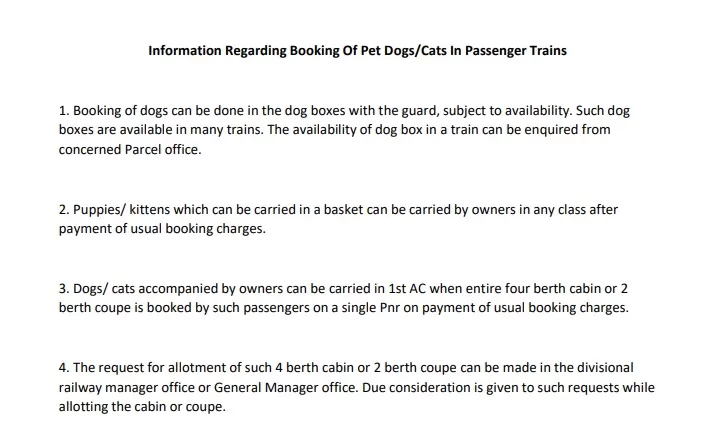
Information Regarding Booking Of Pet Dogs/Cats In Passenger Trains-IRCTC

❓ Does Indian Railways allow pets on trains?

Yes. Pets such as dogs and cats are allowed to travel on Indian trains under certain conditions:

  • In First Class AC (1A) coupe or cabin (only if fully booked by the owner)
  • In the Luggage/Brake Van as registered parcel luggage

❓ Which train classes allow pets inside the coach?

Pets are only allowed inside passenger compartments in:

  • First Class AC (1A) Coupe or Cabin, and only if you book the entire space
  • You must request the Chief Reservation Officer to allot a full coupe

Pets are not permitted in:

  • Sleeper Class
  • 2AC, 3AC, or Executive Chair Car
  • General compartments

❓ Can I book a coupe online through IRCTC?

Yes, you can book First Class AC tickets on IRCTC, but coupe allocation is manual. After booking:

  1. Visit the Chief Reservation Officer at your boarding station.
  2. Submit a written request for coupe allotment, mentioning pet travel.

Coupe is not guaranteed — it depends on availability and discretion.

❓ What if I’m not traveling in First Class AC?

You can still transport your pet in the Brake Van (Luggage/Parcel Van). In this case:

  • Your pet travels alone in a crate or cage.
  • You book your pet as parcel luggage at the parcel office.
  • Not recommended for small, nervous, or sick animals.

❓ What documents are required for pet travel?

? You’ll need:

  • Valid train ticket (confirmed)
  • Vaccination certificate of the pet
  • Health certificate from a registered vet (issued within 48 hours)
  • Owner’s ID proof
  • Request letter for coupe allotment (if applicable)

❓ How much does it cost to carry a pet on a train?

? Charges vary based on the mode:

  • In First Class AC: Around ₹30–₹60 per kg (paid at parcel office)
  • In Luggage Van: Charged as parcel luggage by weight and distance

No online payment is available; you must pay at the station.

❓ Is it safe to transport pets in the Brake Van?

? It’s legal, but not ideal. The Brake Van is noisy, unmonitored, and not climate-controlled. Use it only if:

  • You cannot get a First Class coupe
  • Your pet is in a strong, secure, and ventilated crate
  • The journey is short, and the weather is moderate

❓ Can I travel with more than one pet?

Yes, but only if:

  • You’re traveling in a full coupe/cabin, and
  • There’s enough space for both pets and crate(s)
  • All documents are provided for each animal

Note: Brake Vans may have space limitations.

❓ Are guide dogs allowed?

? Yes, guide dogs for visually impaired passengers are allowed free of cost, regardless of class. You’ll need:

  • Medical documentation
  • A valid ID for the person and the dog

❓ Can pets travel on all trains?

Not all trains have First Class AC or Brake Vans. Before booking:

  • Check whether your selected train has 1A coaches or a luggage compartment
  • Prefer Mail/Express or long-distance trains with suitable accommodations

❓ What items should I pack for my pet?

? Must-haves:

  • Crate or cage (well-ventilated and secure)
  • Leash and muzzle (mandatory for dogs)
  • Food, water bowls, and snacks
  • Absorbent bedding or puppy pads
  • Cleaning supplies
  • Medical kit (if needed)

❓ What happens if I carry a pet without permission?

? You may face:

  • Fines or penalties
  • The pet being moved to the luggage van
  • Possible denial of boarding

Never carry pets in unauthorized compartments or without proper documents.

❓ Tips for Smooth Pet Travel

✅ Do:

  • Plan and book early
  • Visit the station a day before to verify luggage procedures
  • Keep all documents and payment receipts handy
  • Choose cooler travel times for pet comfort

❌ Don’t:

  • Hide or smuggle pets into compartments
  • Forget to inform railway authorities
  • Sedate pets without veterinary advice

Traveling with pets on Indian trains is absolutely possible with the right planning, paperwork, and respect for the rules. With this guide, you can ensure your pet travels comfortably and legally.

Also Read

Counter Ticket Cancellation Rules Explained-2025

? Indian Railways- Rules for Counter Ticket Cancellation in 2025
If you booked a train ticket from the counter and gave your mobile number, you can now cancel your ticket online too! But there are a few rules and conditions you must follow. In this guide, we explain how and when you can cancel a PRS (Passenger Reservation System) counter ticket and how to collect your refund.

Read here the PROCEDURE for Cancellation of Counter Ticket Online through IRCTC website.

Counter Ticket Cancellation Rules in 2025

Who Can Cancel Counter Tickets Online?

  • Only those who gave a valid mobile number at the time of booking.
  • Cancellation is allowed only in normal situations, not when:
    • The train is running late, or
    • The train is fully cancelled.

Time Limit for Online Cancellation

  • Confirmed Tickets:
    • Cancel up to 4 hours before the train’s scheduled departure.
  • RAC/Waitlisted Tickets:
    • Cancel up to 30 minutes before departure.

? Refund Rules

  • Refund can be collected from any PRS counter by surrendering the original ticket if cancelled within the allowed time.
  • If you miss the online cancellation window, you must collect your refund:
    • From the journey starting station, or
    • From nearby satellite PRS locations, as identified by Indian Railways.

? Tip: Before cancelling your ticket, check if you’ll be able to visit the journey-starting station to collect your refund.

? Special Time Windows for Refund Collection

  1. Trains departing between 6:01 PM and 6:00 AM:
    Refund available during first 2 hours of PRS counters opening on the next day.
  2. Trains departing between 6:01 AM and 6:00 PM:
    Refund allowed up to 4 hours after scheduled departure, during working hours.

? What Happens When You Cancel Online?

  • Passenger and journey details are shown on IRCTC or 139 before cancellation.
  • Once confirmed:
    • PNR is marked as “Cancelled but not Refunded”.
    • Seat is released.
    • Refund amount is displayed.

? Special Ticket Types (Passes & PTOs)

  • Privilege/Complimentary Passes:
    • Can be cancelled online.
    • Zero refund, but pass must be re-validated at the counter for future use.
  • PTO Tickets (Privilege Ticket Orders):
    • Charged at 1/3rd fare.
    • Normal cancellation charges apply.
    • Often, the refund is less than cancellation charges, so cancelling may not be beneficial.
    • Still, cancellation is allowed online.

Indian Railways is making it easier to cancel counter tickets online, but the process still involves time-sensitive rules and manual refund collection. Always check the timing and station policies before cancelling.

Also Read

?️ Counter Ticket Cancellation Rules– Frequently Asked Questions (FAQs)

1. Can I cancel a counter ticket online?

Yes, you can cancel a counter ticket online only if you provided a valid mobile number at the time of booking.

2. When can I cancel a counter ticket online?

  • Confirmed Tickets: Up to 4 hours before the train’s scheduled departure.
  • RAC/Waitlisted Tickets: Up to 30 minutes before departure.

3. Can I cancel a counter ticket online if the train is delayed or cancelled?

No, online cancellation is not allowed in case of:

  • Train running late, or
  • Train fully cancelled.

You must visit the station counter for cancellation in such cases.

4. How do I get a refund after online cancellation of a counter ticket?

You must physically collect the refund by surrendering the original ticket at:

  • Any PRS counter (if cancelled within allowed time), or
  • Journey commencing station or nearby satellite PRS location (if time limit is exceeded).

Always check if you can reach the station to collect the refund before cancelling online.

5. What if my train departs at night or early morning?

  • If train departs between 6:01 PM and 6:00 AM:
    Refund can be collected during the first two hours of PRS counter opening on the next day.

6. What if my train departs during the day?

  • If train departs between 6:01 AM and 6:00 PM:
    Refund can be collected within 4 hours after the scheduled departure, during PRS working hours.

7. What happens after I cancel a counter ticket online?

  • Your passenger and journey details are shown before final confirmation.
  • After cancellation:
    • The PNR is marked “Cancelled but not Refunded”.
    • Seat/berth is released.
    • Refund amount is displayed on the website.

8. Can I cancel Privilege Pass, Complimentary Pass, or PTO tickets online?

✅ Yes, here’s how it works:

  • Privilege/Complimentary Pass Tickets:
    • Can be cancelled online.
    • No refund is given.
    • To reuse the pass, you must visit the counter to get it revalidated.
  • PTO Tickets (Privilege Ticket Order):
    • Issued at 1/3rd fare.
    • Normal cancellation charges apply.
    • Sometimes, cancellation charge > ticket value, so no refund.
    • Still, online cancellation is permitted.

9. Can I collect the refund from any PRS counter?

Yes, if the cancellation is done within the allowed time limits.
If the time limit has passed, you must go to the journey starting station or a designated satellite location.

10. Is cancellation allowed through phone as well?

Yes, you can cancel counter tickets by calling Railway inquiry number 139, provided your mobile number was registered at the time of booking.

Here is link for Cancellation of Counter Ticket Online through IRCTC Website.

Counter Ticket Cancellation Online in 1 minute, How?

Earlier, if you booked your train ticket from a Passenger Reservation System (PRS) counter, the only way to cancel it was:

  • By physically visiting the station, and
  • Surrendering the original ticket at the same or another PRS location
    This posed serious challenges:
  • ❌ Not possible for passengers out of town
  • ❌ Difficult for working professionals
  • ❌ Risk of missing the cancellation deadline and losing the refund.

But now, Indian Railways has introduced an online counter ticket cancellation facility via the IRCTC website, eliminating the need to visit a railway station at that moment.

Here is a simplified step-by-step guide for the Counter Ticket Cancellation online through IRCTC website in just a minute time.

Counter Ticket Cancellation Online through IRCTC website
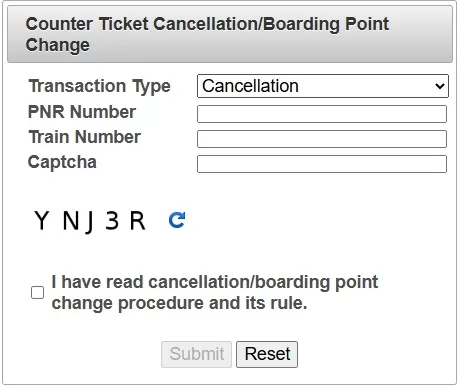
  1. Visit the Official page of IRCTC Website for cancellation.
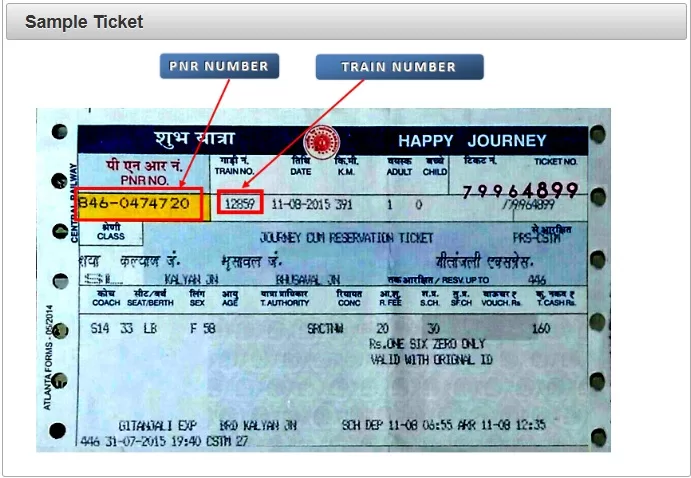
  2. Enter the following details:
    • PNR Number
    • Train Number
    • Captcha Code
  1. Read the Rules and Procedures and check the confirmation box.
  2. Click ‘Submit’.

? OTP Verification

  • An OTP will be sent to the mobile number given at the time of booking.
  • Enter the OTP and click ‘Submit’.
  • After successful validation, PNR details will be displayed.

? Ticket Cancellation

  • Verify the ticket details.
  • Click on ‘Cancel Ticket’ for full cancellation.
  • The refund amount will be displayed.
  • You will receive an SMS like: “Your PNR xxxxxxxxxx has been cancelled. Collect refund amt ₹xxxxx from journey commencing station or nearby satellite PRS locations. Ref. Terms & conditions”

? Refund Collection Guidelines

  • Carry the original ticket to claim refund at PRS counters.
  • Refund can be collected from any PRS counter or designated satellite PRS locations.

Time Limits for Ticket Cancellation

Confirmed TicketsUp to 4 hours before departure
RAC/Waitlisted TicketsUp to 30 minutes before departure

Refund Timing After Departure

  • For Trains Departing between 18:01 hrs – 06:00 hrs:
    Refund allowed during first two hours of PRS counter opening next day.
  • For Trains Departing between 06:01 hrs – 18:00 hrs:
    Refund allowed up to 4 hours after departure during PRS working hours.

⚠️ Important Notes

  • Refund beyond these time limits can be collected only at journey commencing station or its nearby designated PRS locations.
  • Always verify station convenience before proceeding with cancellation.

Also Read

Tatkal Booking Rules and Timings: The 2025 Guide to Fast Train Reservations

Need to book a last-minute train ticket? Welcome to the world of Tatkal bookings — Indian Railways’ emergency ticketing system. Whether you’re a frequent traveler or caught in a spontaneous travel plan, understanding Tatkal rules and timings can help you book tickets faster and smarter in 2025.

In this guide, we’ll walk you through everything you need to know about Tatkal ticket bookings on IRCTC — from timings and charges to smart tips and changes made in 2025.

? What is the Tatkal Scheme?

Tatkal (meaning “immediate”) is a premium ticketing system launched by Indian Railways to allow passengers to book tickets at short notice. A limited number of seats are reserved in almost all express trains under this scheme.

⏰ Tatkal Booking Timings in 2025

Indian Railways maintains separate booking windows for different travel classes:

  • AC Classes (1A, 2A, 3A, CC, EC):
    ? Opens at 10:00 AM, one day before the train’s departure from the origin station.
  • Non-AC Classes (SL, 2S):
    ? Opens at 11:00 AM, one day before departure.

Note: The booking date is calculated from the origin station, not your boarding station.

? Example of Tatkal Booking Date

If a train leaves from its origin at 11:00 PM on 15th June, then Tatkal booking opens at:

  • 10:00 AM on 14th June for AC classes
  • 11:00 AM on 14th June for Non-AC classes

? Tatkal Charges (Fare Structure 2025)

Tatkal tickets are priced higher than normal tickets due to premium charges. Here’s a breakdown:

AC Classes:

  • 2A: ₹400 extra
  • 3A: ₹300 extra
  • CC (Chair Car): ₹300 extra
  • EC (Executive Class): ₹400-500 extra

Non-AC Classes:

  • Sleeper (SL): ₹100-150 extra
  • Second Sitting (2S): ₹10-20 extra

Charges may vary slightly based on distance and route.

✅ Tatkal Booking Rules in 2025

Here are the latest rules updated for 2025:

  1. One ID per booking:
    The primary passenger must carry the same ID proof used while booking.
  2. No waitlisting:
    Tatkal tickets are issued only if seats are available. No waitlisted Tatkal tickets are allowed.
  3. Partial cancellation allowed:
    In case of group bookings, some passengers can cancel without affecting others.
  4. Refund on cancellation:
    • Confirmed Tatkal ticket: No refund on cancellation by the passenger.
    • Waitlisted Tatkal ticket (if booked): Standard cancellation rules apply.
    • Train cancelled by Railways: Full refund issued.
  5. Only one Tatkal ticket per user ID per train:
    Limits bulk or automated bookings to ensure fairness.
  6. No agent booking during first 30 minutes:
    IRCTC restricts travel agents from booking Tatkal tickets between 10:00–10:30 AM for AC and 11:00–11:30 AM for Non-AC.

? Pro Tips to Book Tatkal Tickets Faster

  1. Login early: Be ready 5–10 minutes before the booking opens.
  2. Use IRCTC Fast Booking: Save passenger and payment info in advance.
  3. Enable Auto-fill extensions: Use tools like Magic Autofill or browser form savers (carefully).
  4. Prefer UPI or IRCTC Wallet for payment: They’re faster and reduce transaction failures.
  5. Use multiple devices: For high-demand trains, keeping backup logins helps.
  6. Check train from source: Sometimes, selecting the source station improves ticket availability.

? Use the IRCTC SwaRail App

IRCTC’s new SwaRail App supports fast Tatkal bookings with integrated payment options and PNR alerts.

Bonus: The app uses AI to suggest alternative routes and trains in case your first choice is unavailable.

? Documents Required for Tatkal Booking

Keep one of the following ID proofs ready while booking and traveling:

  • Aadhaar Card
  • Voter ID
  • PAN Card
  • Driving License
  • Passport
  • Student ID (for students)

ID details must match exactly, or you may face penalties.

? Common Mistakes to Avoid

  • Booking Tatkal ticket for wrong date/time (from source station!)
  • Using slow or failing payment methods
  • Entering incorrect passenger details
  • Refreshing the page mid-booking (you’ll get logged out)

Tatkal ticket booking doesn’t have to be stressful — if you know the tatkal rules & timings and prepare in advance. In 2025, with real-time apps like SwaRail, faster payments, and smarter booking logic, passengers have a better shot at snagging those last-minute seats.

Just remember:
? Be fast, stay calm, double-check your details, and use verified platforms like IRCTC only.

Safe travels, and may the Tatkal odds be ever in your favor! ?

How to Book Train Tickets Without Hassle: 7 IRCTC Tips for 2025

How to Book Train Tickets Without Hassle: 7 IRCTC Tips for 2025

Booking train tickets in India can sometimes feel like a race against time—especially during peak travel seasons or when snagging those elusive Tatkal tickets. But don’t worry! With a few smart strategies and the right tools, you can breeze through the booking process like a pro in 2025. IRCTC ticket booking tips will surely help you in booking your train tickets in 2025.

Here are 7 must-know IRCTC tips that will help you book your train tickets without breaking a sweat.


IRCTC ticket booking tips 2025: Step-by-Step guide

1. Register and Verify Your IRCTC Account Early

If you haven’t signed up on IRCTC’s official website yet, now’s the time! Make sure you complete your KYC verification early — this unlocks faster payment options and smoother booking flows.

Why bother? Verified accounts help reduce payment failures and save time when seats are selling out fast. Plus, IRCTC prioritizes verified users for some services.


2. Download and Use the Official SwaRail App

In 2025, IRCTC rolled out the brand-new SwaRail app — your all-in-one railway assistant. This app is a game-changer: it lets you book tickets, track your PNR status, check coach positions, and even lodge complaints — all from a single platform.

The AI-powered features give personalized train and seat recommendations, so you can find the best options without endless scrolling.

Pro tip: Keep the app updated regularly for the latest features and bug fixes!


3. Choose Fast and Reliable Payment Methods

Nothing’s worse than losing your seat because your payment got stuck! Link your account with fast payment options like UPI, net banking, or IRCTC’s own e-wallet for quicker transactions.

Saving your payment details securely on the app or website can save valuable seconds during checkout—perfect for Tatkal bookings!


4. Set Alarms for Tatkal Booking Time

Tatkal tickets open sharp at 10 AM for AC classes and 11 AM for non-AC classes, and millions of users flood the site the moment bookings open.

Make sure to set alarms or reminders, log in a few minutes early, and keep all your passenger info handy. If you want to get serious, practice filling the form beforehand to avoid errors that cost you precious seconds.

You can learn more about Tatkal booking rules and timings here.


5. Use Auto-Fill Browser Extensions — But With Caution

Auto-fill extensions can speed up form filling, but don’t rely on them blindly. Double-check all passenger details before submission to avoid mistakes that might lead to ticket cancellations.

Never use auto-fill for OTPs or Captchas — these must be entered manually.


6. Stay Flexible: Check Alternate Trains and Routes

If your favorite train is full, don’t panic! Use IRCTC’s “Book from Calendar” feature to check availability up to 120 days ahead.

Also, explore alternate trains or nearby stations that might get you to your destination almost as fast. Sometimes a little flexibility goes a long way — and you might discover better travel options!


7. Review Everything Before You Hit ‘Pay’

Almost done? Pause for a moment and double-check:

  • Train number and date
  • Passenger names and ages
  • Class of travel
  • Payment amount

Mistakes at this stage can mean cancellations or refund headaches later. Once confirmed, save your e-ticket and note your PNR number — it’s your travel lifeline.


Bonus Tip: Use Multiple Devices and Browsers

For high-demand bookings like Tatkal, some travelers keep multiple devices or browsers open to increase their chances. Just make sure not to spam the system — IRCTC may block suspicious activity.


Wrapping Up – IRCTC ticket booking tips 2025

Booking train tickets in 2025 has never been easier thanks to IRCTC’s digital upgrades. Whether you’re a frequent traveler or planning your first long-distance journey, these tips will save you time, stress, and maybe even money.

Start by setting up your verified IRCTC account, get familiar with the SwaRail app, and plan ahead. With a bit of preparation, you’ll be zooming down those railway tracks in no time.

Happy and hassle-free travels!

Also Read

Online train ticket booking on Railway e-PASS: IRCTC

Here’s a user-friendly User Guide for E-PASS Booking on IRCTC:

User Guide: for online train ticket booking on Railway e-PASS on IRCTC

This guide will walk you through the process of online booking railway tickets using an e-PASS on the IRCTC platform (website or mobile app).

Step-by-Step Instructions

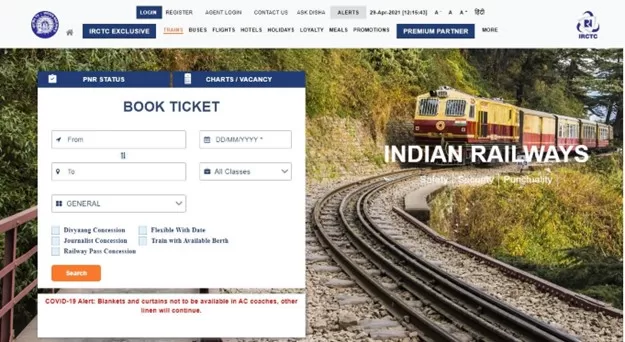
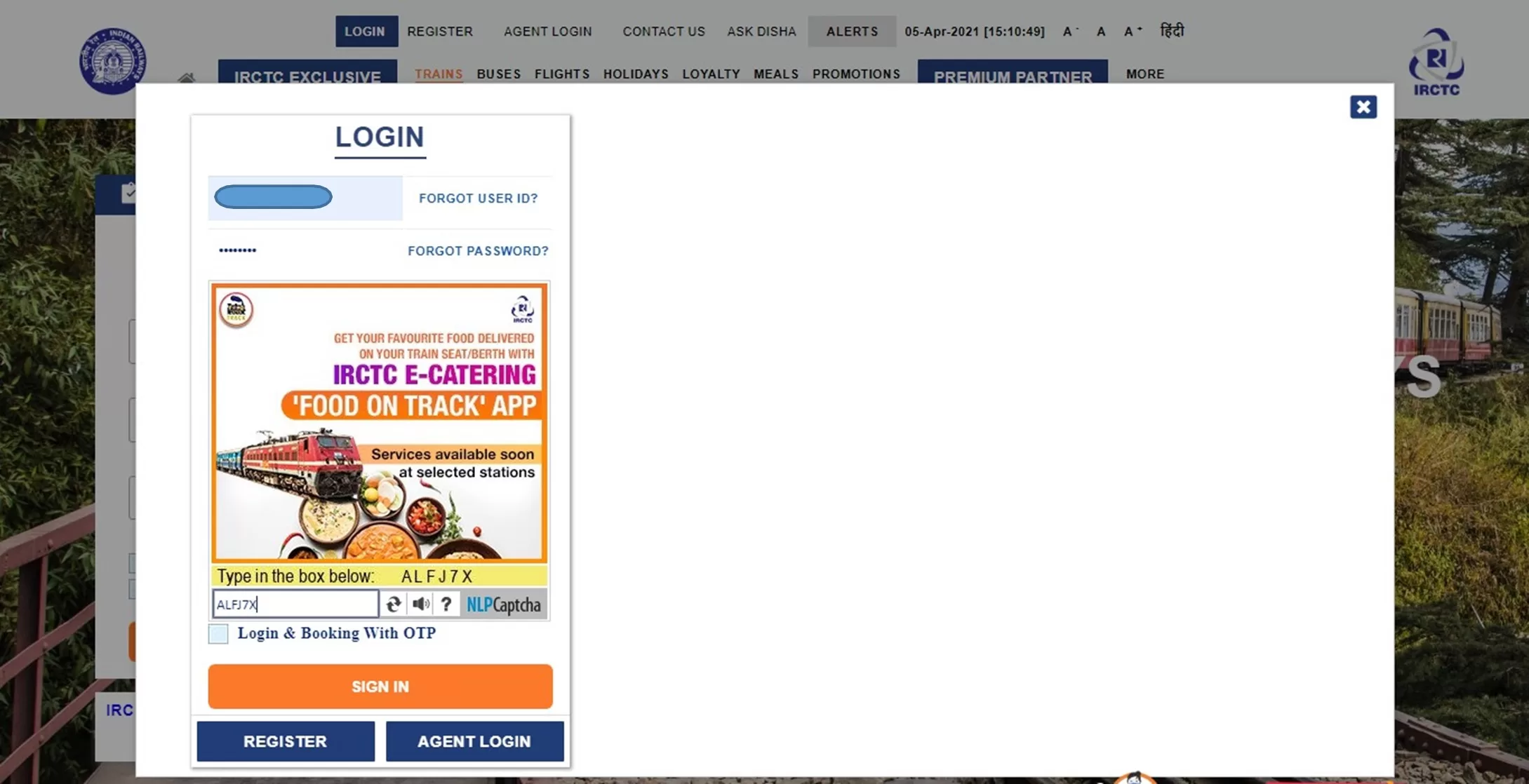
1. Access the IRCTC Portal

  • Go to the IRCTC website: www.irctc.co.in
  • Click on the “LOGIN” button at the top.
  • Enter your registered User ID and Password to sign in.

2. Begin Booking Your Journey

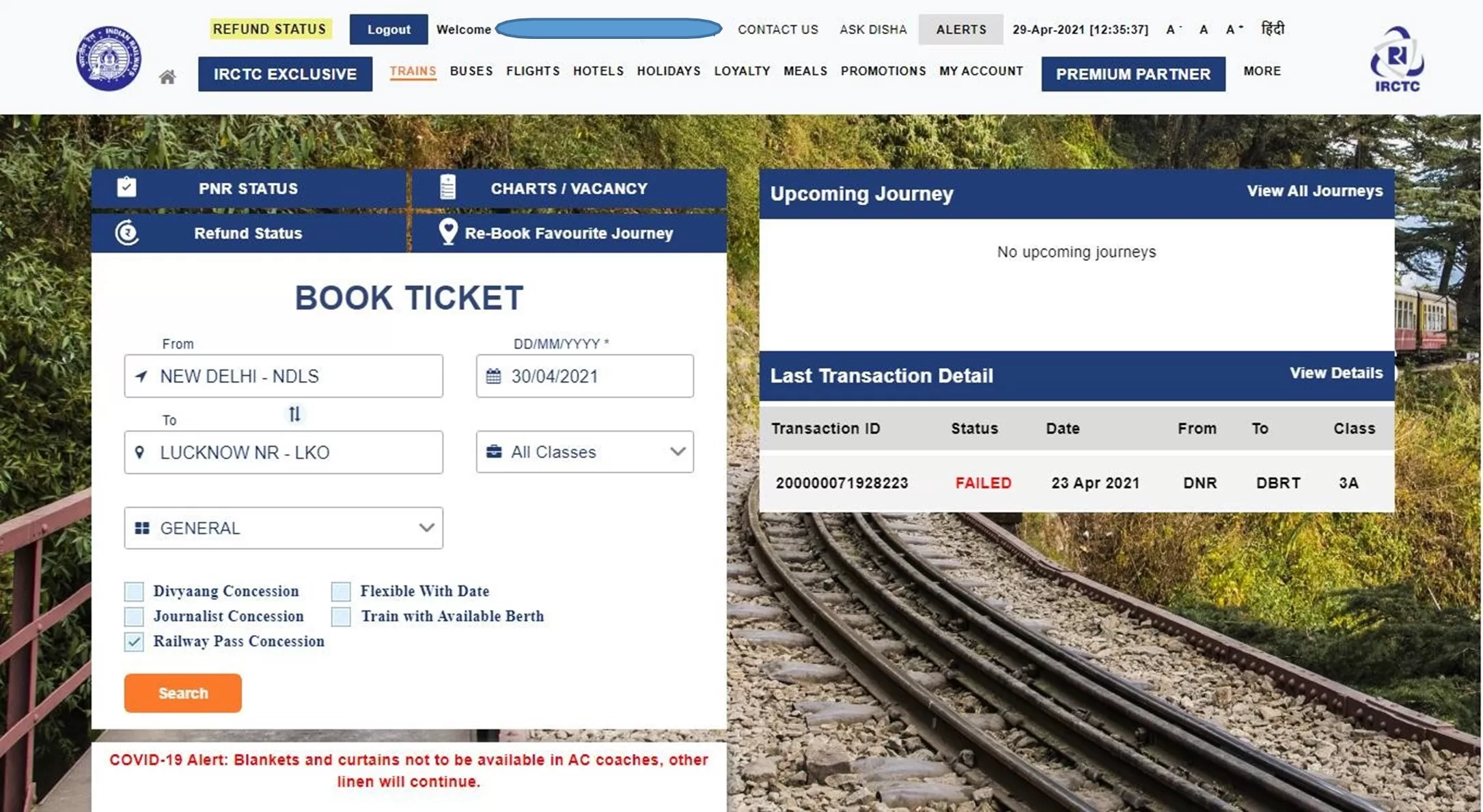
  • On the Book Ticket page, fill in:
    • From Station
    • To Station
    • Date of Journey
    • Quota
    • Class of Travel
  • Check the “Railway Pass Concession” checkbox.

3. Confirm Concession Booking

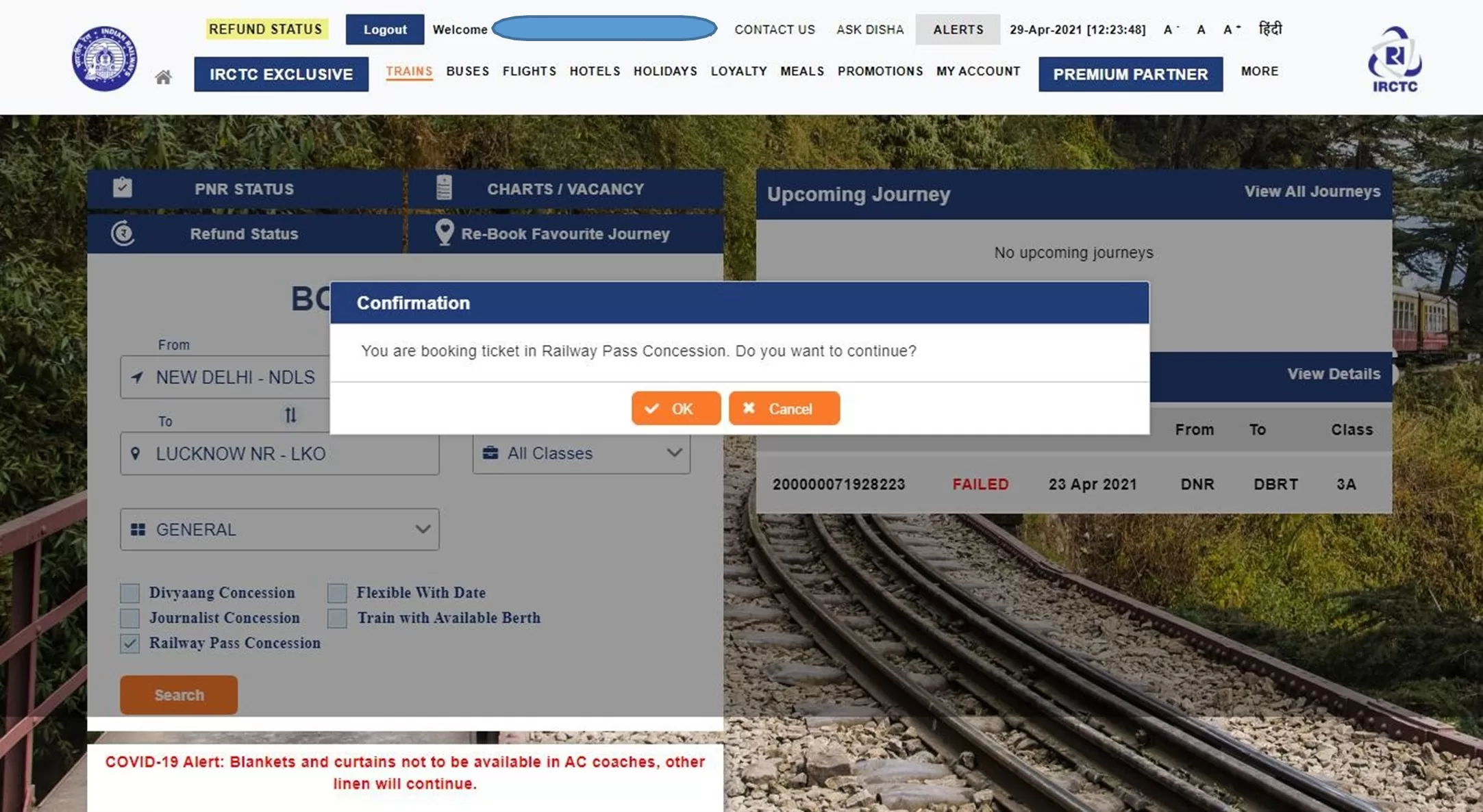
  • A message will appear:
    “You are booking ticket in Railway Pass Concession. Do you want to continue?”
  • Click “OK” to proceed.

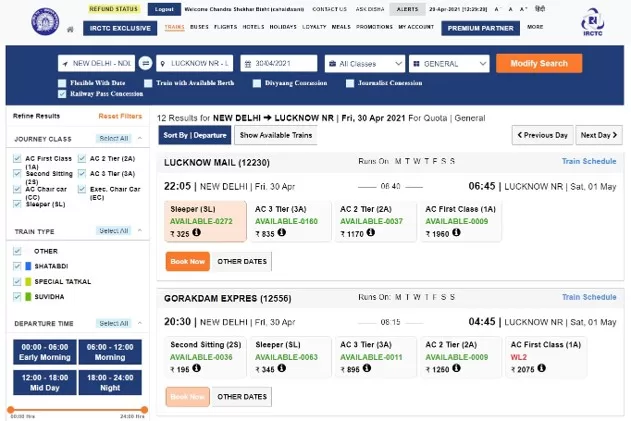
4. Search Trains

  • Optionally, check “Flexible with Date” if your journey date is not fixed.
  • Click “Search” to view train options.
  • On the next screen, you’ll see a list of available trains with class-wise seat availability.
  • Select the desired class and click “Book Now”.

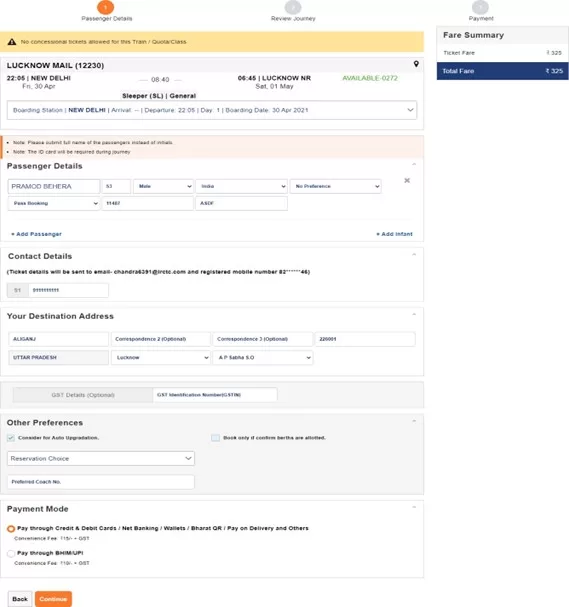
5. Enter Passenger Details

  • On the Passenger Reservation Page:
    • At least one passenger must be a Pass holder.
    • Enter:
      • Passenger Name
      • Age
      • Gender
      • For Pass holders:
        Select “Pass Booking” and enter:
        • Pass Number
        • Pass PIN Code
      • For non-pass holders, choose “General Booking”.
  • Add additional passengers using the “Add Passenger” option.
  • Enter Destination Address.
  • Modify Boarding Station if needed using the dropdown menu.
  • Provide Mobile Number and select Payment Mode.
  • Click “Continue” to proceed.

6. Review Booking

  • On the Booking Review Page, you will see:
    • Ticket details
    • Total fare
    • Berth availability
    • Pass information
  • Use the “Back” button if changes are needed.
  • Note:
    • No IRCTC convenience fee for tickets with only Pass/PTO passengers.
    • Fee applies for mixed bookings:
      • ₹15 + GST for SL and 2S
      • ₹30 + GST for other classes
    • Travel insurance is not available for pass bookings.
  • Enter the captcha and click “Continue”.

7. Payment and Confirmation

  • If the fare > ₹0:
    • Proceed to payment.
    • On success, PNR Number is generated.
  • If fare = ₹0:
    • Click “Continue”.
    • Booking is confirmed and PNR is generated.

8. Post-Booking

  • You will receive:
    • SMS (VRM) on your registered mobile number.
    • Booking Confirmation Email.
  • You can:
    • Print Electronic Reservation Slip (ERS) by clicking on the “Print Ticket” button next to PNR.
    • Use “Book Return/Onward Ticket” to reuse current passenger details.
    • Click “Book Another Ticket” for a fresh booking.

User guide in detail: Online train ticket on Railway e-pass
  • Login to the IRCTC website by clicking on “LOGIN” option provided at the top and enter your registered User ID and Password.
  • On Book Ticket Page, enter your desired “From station”, “To station”, “Date of Journey”, “Quota” and “Class” of travel.
  • Select the “Railway Pass Concession” checkbox.

A confirmation message will be displayed – “You are booking ticket in Railway Pass Concession. Do you want to continue?” Press “OK” to continue.

  • In case, you do not have any fixed date of journey, select “Flexible with Date” option.

To find train list, click on “Search” button.

  • The “List of Trains” will be displayed in next page with class wise availability and fare.
  • To select the train from the train list, select desired class of travel and click on “Book Now” button.
  • Passenger Reservation Page” will be displayed in the next page.
  • For booking a Pass Booking ticket, at least one of the travelling passenger must be pass holder.
  • Enter “Passenger Name”, “Age”, “Gender” and select concession option as “Pass Booking” for pass holder and provide “Pass Number” and “Pass PIN Code” as per the details available in pass issued.
  • Additional passenger can be added here by clicking on “Add Passenger” option.
  • Concession option for general passenger to be selected as “General Booking”.
  • Destination passenger address will be required to be provided under “Your Destination Address”.
  • Boarding Station for the journey can be changed by clicking the down arrow button on “Boarding Station” option provided on the Passenger Reservation Page by selecting the desired boarding station name from the drop down list.
  • After providing Passenger’s Mobile Number and selecting Payment Mode, click on “Continue” button to proceed next and to make any change in journey details “Back” button may be used.
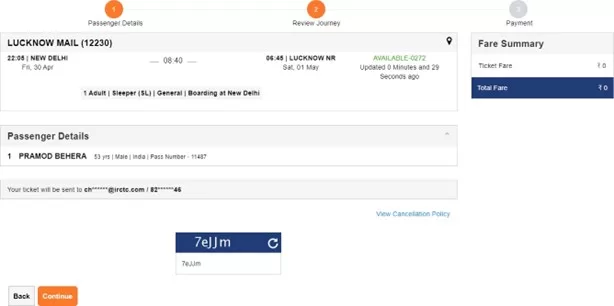
  • Once the passenger details entered get verified with the details in pass issued, next page will be displayed as “Booking Review Page”.
  • The ticket details, Total fare, Availability of berths and Pass details will be displayed on the screen.
  • To make change in journey details, “Back” button may be used.
  • IRCTC convenience fee will not be levied on tickets booked for only Pass/PTO passengers.
  • IRCTC Convenience Fee (Rs. 15+GST for SL and 2S and Rs. 30+GST for all other classes) will be charged on tickets accompanying General passengers with PASS/PTO holders.
  • Travel insurance premium will not be charged for the time being on PASS booking tickets.
  • After checking all details, enter the captcha and click on “Continue” button.
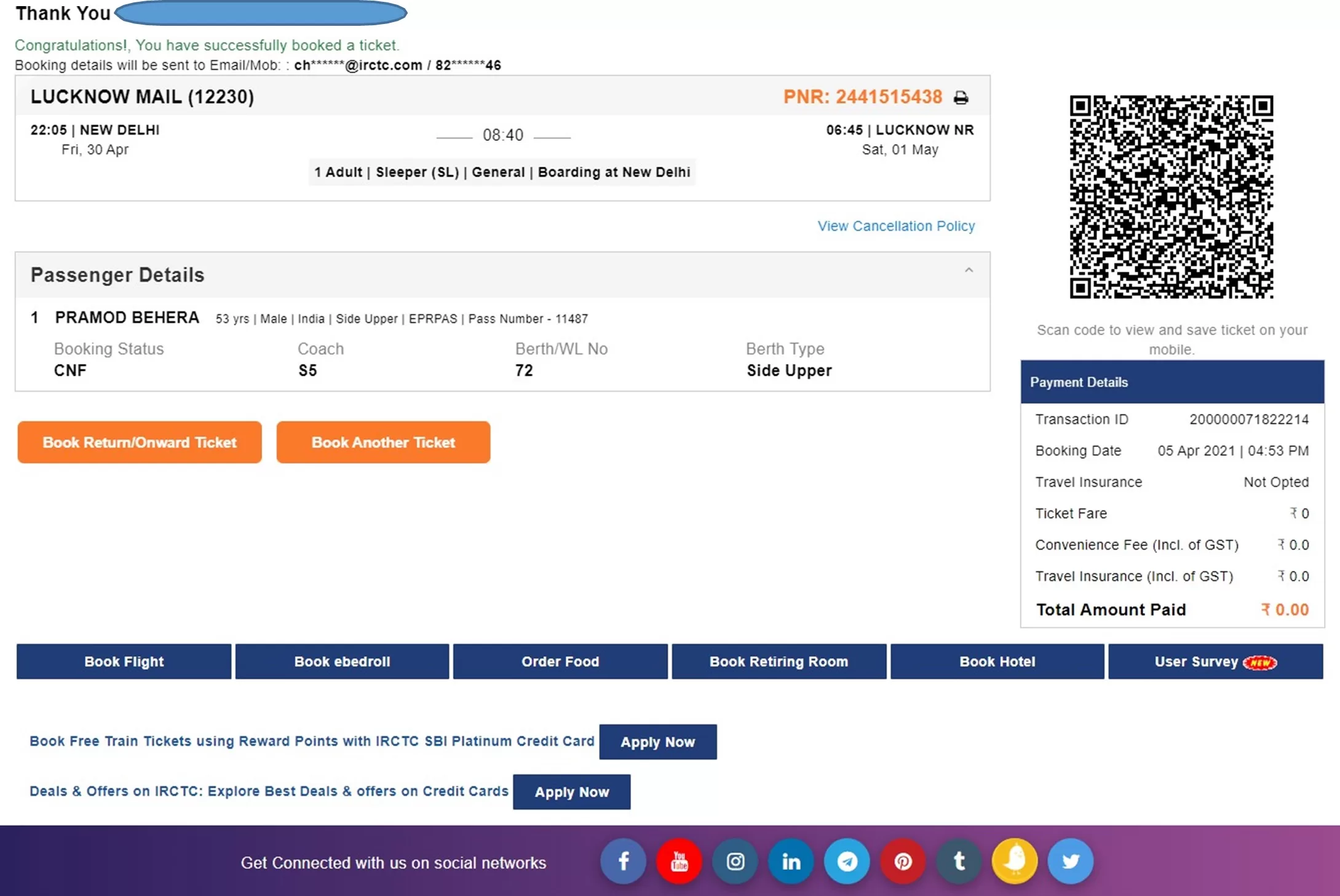
  • If total fare to be paid is greater than zero, then payment option page will be displayed to make payment and “PNR number” will be generated after successful payment and successful response from PRS system.
  • If total fare to be paid is displayed as zero, then on clicking continue button Booking Confirmation Page will be displayed after successful response from the PRS system “PNR number” will be displayed.
  • “Virtual reservation message” (VRM) in the form of “SMS” will be sent on Registered Mobile Number.
  • Booking confirmation mail” will be sent on Registered Email ID.
  • Electronic Reservation Slip (ERS) can be printed by clicking on “Print Ticket” image button provided at next of PNR Number.
  • To book ticket for Return/Onward Journey, “Book Return/Onward Ticket” button may be used. Using this option will retain the details of Passengers as provided in the current ticket.
  • To book another ticket, “Book Another Ticket” button may be used.
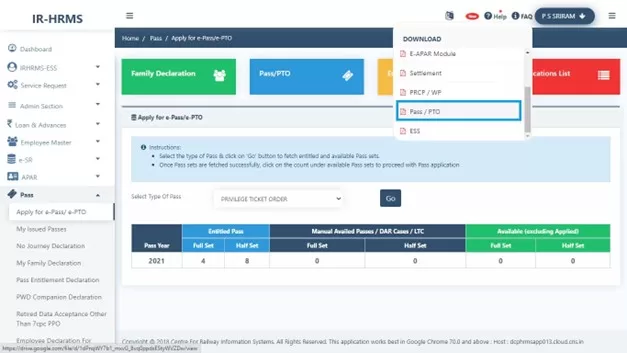
  • Pass booking related FAQs are provided in HRMS Dashboard. Please refer below screen.

I hope this guide for online train ticket booking on Railway e-PASS is helpful to you. For such content also read below links…

Also Read

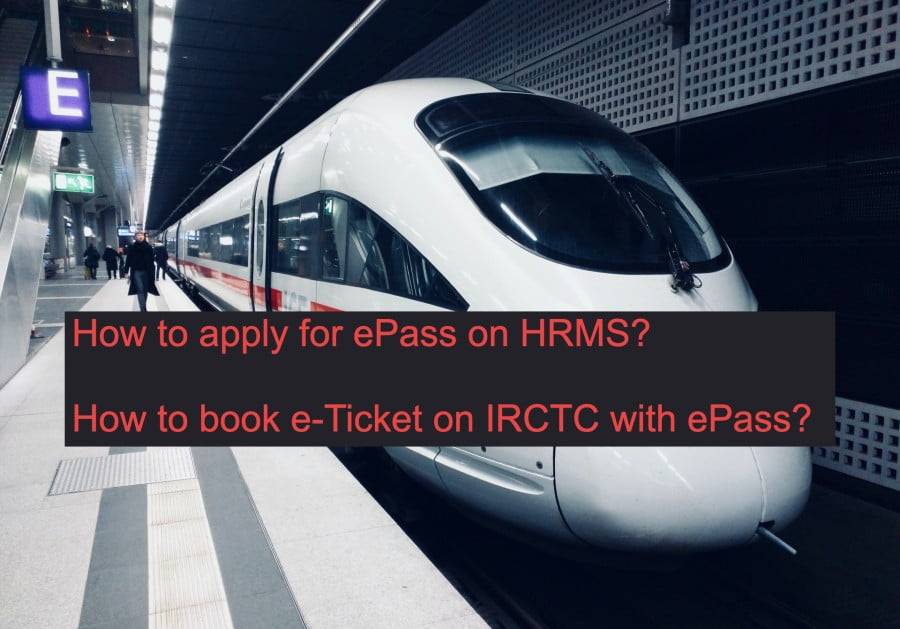
How to apply for Railway Pass online and How to book e-Ticket on IRCTC with ePass

Tutorial for Pass Admin in ePass on HRMS

This is the Tutorial for Pass Admin on how to create user for Pass clerks and Pass Issuing Authorities and tagging them with the employees in ePass Module of HRMS. In this video Sh. Swapnil, OS, Personnel Department, Asansol Division has explained all the steps for creating user for Pass clerks and Pass Issuing Authorities (PIA).

Tutorial for Pass Clerk & Employee in ePass on HRMS

This tutorial covers how the Pass Clerk will feed the manual pass & PTO availed by an employee and how the Employee will confirm the details and submit pass declaration. website:- hrms.indianrail.gov.in/HRMS.

1. How to apply for ePass on HRMS?
2. How to book eTicket on IRCTC using ePass.

In this video, it has been demonstrated how an employee will apply for ePass, how the Pass Clerk will process the application before the PIA issues the pass and how to book a eTicket in IRCTC using the ePass. This video has been prepared jointly by the PC, PIA and the employee all of whom has been inspired by the Unit Admin or DPO(IC)/ASN.

If you don’t know How to Login on HRMS, then read How to Login on HRMS Railway Employee Mobile App and Website guide.
Source:

HRMS e-PASS Module

Settlement Module

Office Order Module

APAR Module