Tag Archives: IRCTC

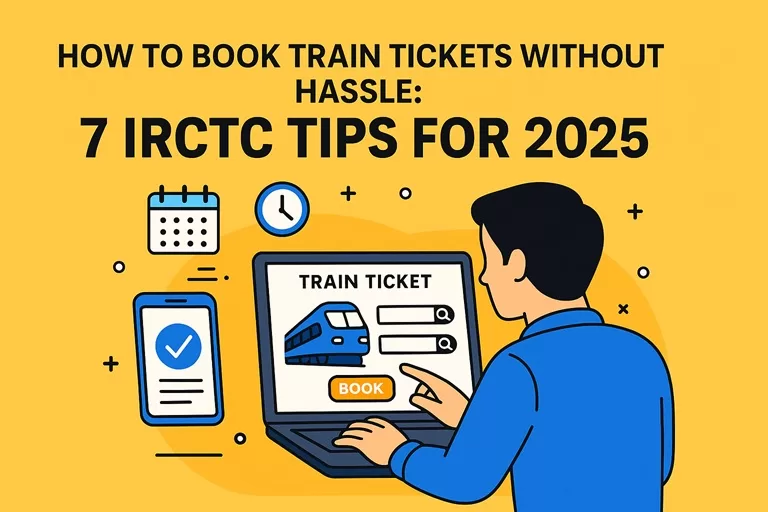
How to Book Train Tickets Without Hassle: 7 IRCTC Tips for 2025

How to Book Train Tickets Without Hassle: 7 IRCTC Tips for 2025

Booking train tickets in India can sometimes feel like a race against time—especially during peak travel seasons or when snagging those elusive Tatkal tickets. But don’t worry! With a few smart strategies and the right tools, you can breeze through the booking process like a pro in 2025. IRCTC ticket booking tips will surely help you in booking your train tickets in 2025.

Here are 7 must-know IRCTC tips that will help you book your train tickets without breaking a sweat.


IRCTC ticket booking tips 2025: Step-by-Step guide

1. Register and Verify Your IRCTC Account Early

If you haven’t signed up on IRCTC’s official website yet, now’s the time! Make sure you complete your KYC verification early — this unlocks faster payment options and smoother booking flows.

Why bother? Verified accounts help reduce payment failures and save time when seats are selling out fast. Plus, IRCTC prioritizes verified users for some services.


2. Download and Use the Official SwaRail App

In 2025, IRCTC rolled out the brand-new SwaRail app — your all-in-one railway assistant. This app is a game-changer: it lets you book tickets, track your PNR status, check coach positions, and even lodge complaints — all from a single platform.

The AI-powered features give personalized train and seat recommendations, so you can find the best options without endless scrolling.

Pro tip: Keep the app updated regularly for the latest features and bug fixes!


3. Choose Fast and Reliable Payment Methods

Nothing’s worse than losing your seat because your payment got stuck! Link your account with fast payment options like UPI, net banking, or IRCTC’s own e-wallet for quicker transactions.

Saving your payment details securely on the app or website can save valuable seconds during checkout—perfect for Tatkal bookings!


4. Set Alarms for Tatkal Booking Time

Tatkal tickets open sharp at 10 AM for AC classes and 11 AM for non-AC classes, and millions of users flood the site the moment bookings open.

Make sure to set alarms or reminders, log in a few minutes early, and keep all your passenger info handy. If you want to get serious, practice filling the form beforehand to avoid errors that cost you precious seconds.

You can learn more about Tatkal booking rules and timings here.


5. Use Auto-Fill Browser Extensions — But With Caution

Auto-fill extensions can speed up form filling, but don’t rely on them blindly. Double-check all passenger details before submission to avoid mistakes that might lead to ticket cancellations.

Never use auto-fill for OTPs or Captchas — these must be entered manually.


6. Stay Flexible: Check Alternate Trains and Routes

If your favorite train is full, don’t panic! Use IRCTC’s “Book from Calendar” feature to check availability up to 120 days ahead.

Also, explore alternate trains or nearby stations that might get you to your destination almost as fast. Sometimes a little flexibility goes a long way — and you might discover better travel options!


7. Review Everything Before You Hit ‘Pay’

Almost done? Pause for a moment and double-check:

  • Train number and date
  • Passenger names and ages
  • Class of travel
  • Payment amount

Mistakes at this stage can mean cancellations or refund headaches later. Once confirmed, save your e-ticket and note your PNR number — it’s your travel lifeline.


Bonus Tip: Use Multiple Devices and Browsers

For high-demand bookings like Tatkal, some travelers keep multiple devices or browsers open to increase their chances. Just make sure not to spam the system — IRCTC may block suspicious activity.


Wrapping Up – IRCTC ticket booking tips 2025

Booking train tickets in 2025 has never been easier thanks to IRCTC’s digital upgrades. Whether you’re a frequent traveler or planning your first long-distance journey, these tips will save you time, stress, and maybe even money.

Start by setting up your verified IRCTC account, get familiar with the SwaRail app, and plan ahead. With a bit of preparation, you’ll be zooming down those railway tracks in no time.

Happy and hassle-free travels!

Also Read

Online train ticket booking on Railway e-PASS: IRCTC

Here’s a user-friendly User Guide for E-PASS Booking on IRCTC:

User Guide: for online train ticket booking on Railway e-PASS on IRCTC

This guide will walk you through the process of online booking railway tickets using an e-PASS on the IRCTC platform (website or mobile app).

Step-by-Step Instructions

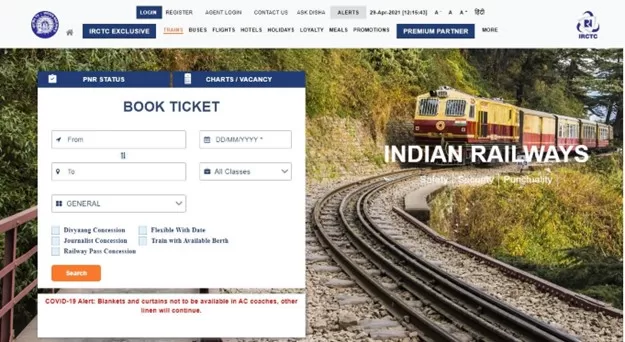
1. Access the IRCTC Portal

  • Go to the IRCTC website: www.irctc.co.in
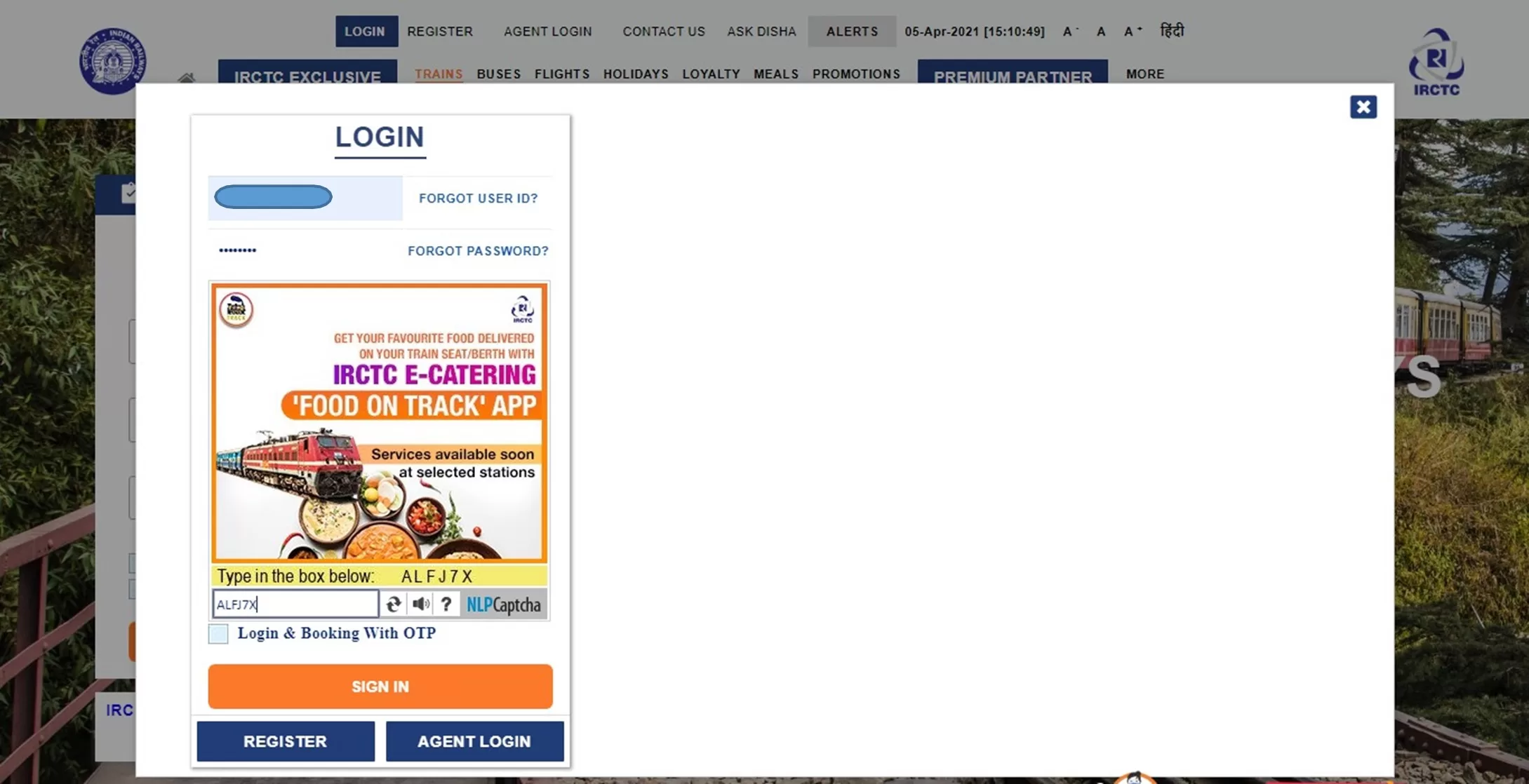
  • Click on the “LOGIN” button at the top.
  • Enter your registered User ID and Password to sign in.

2. Begin Booking Your Journey

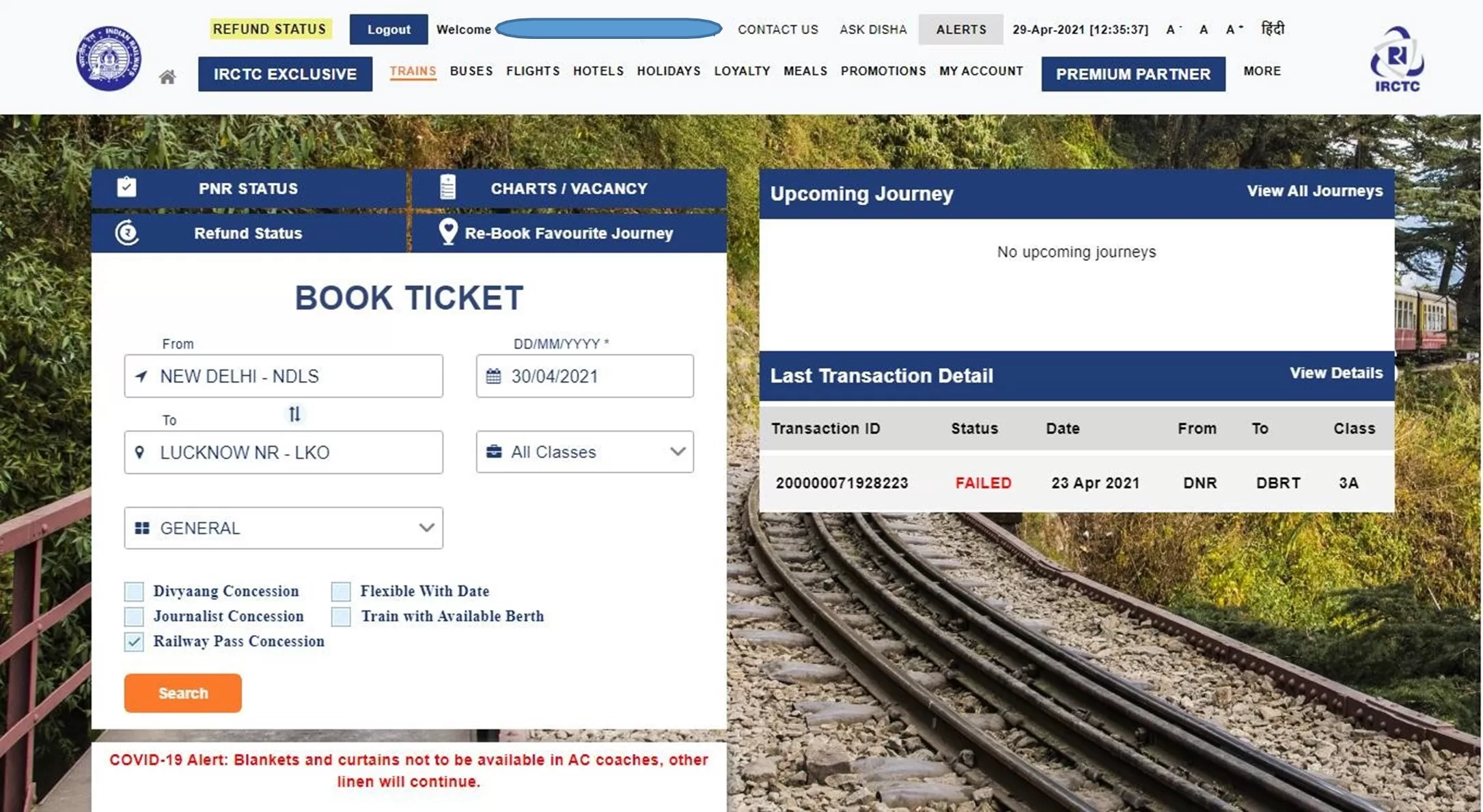
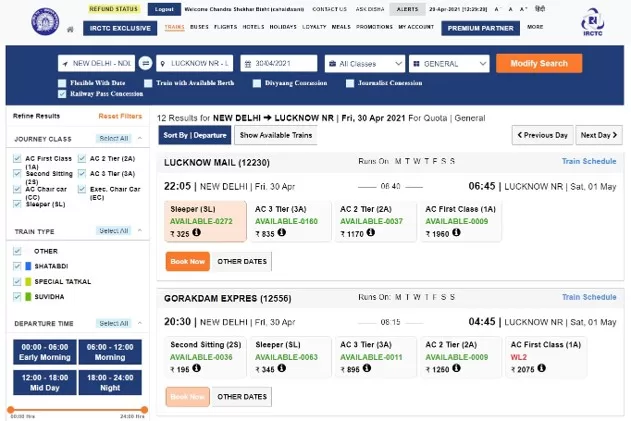
  • On the Book Ticket page, fill in:
    • From Station
    • To Station
    • Date of Journey
    • Quota
    • Class of Travel
  • Check the “Railway Pass Concession” checkbox.

3. Confirm Concession Booking

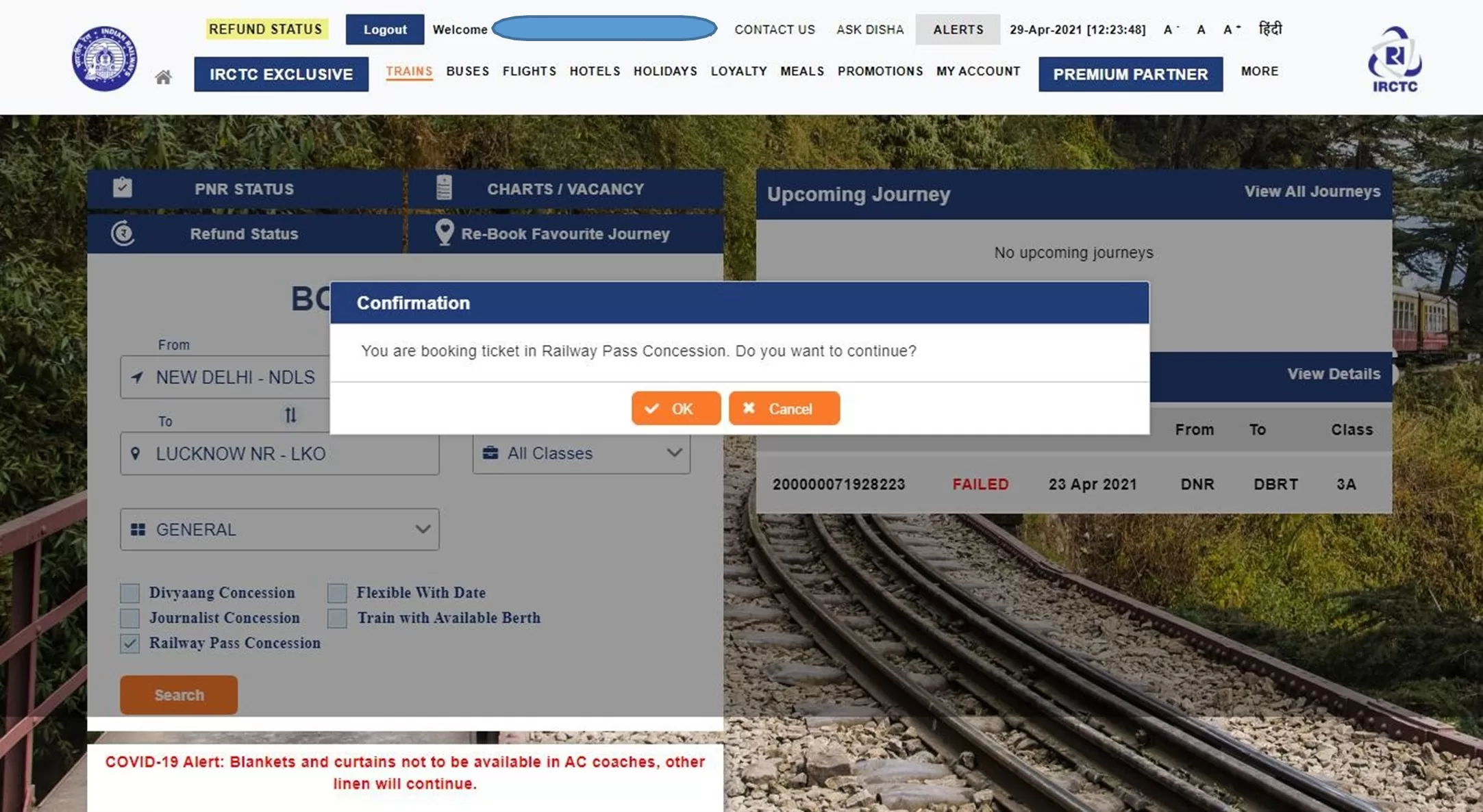
  • A message will appear:
    “You are booking ticket in Railway Pass Concession. Do you want to continue?”
  • Click “OK” to proceed.

4. Search Trains

  • Optionally, check “Flexible with Date” if your journey date is not fixed.
  • Click “Search” to view train options.
  • On the next screen, you’ll see a list of available trains with class-wise seat availability.
  • Select the desired class and click “Book Now”.

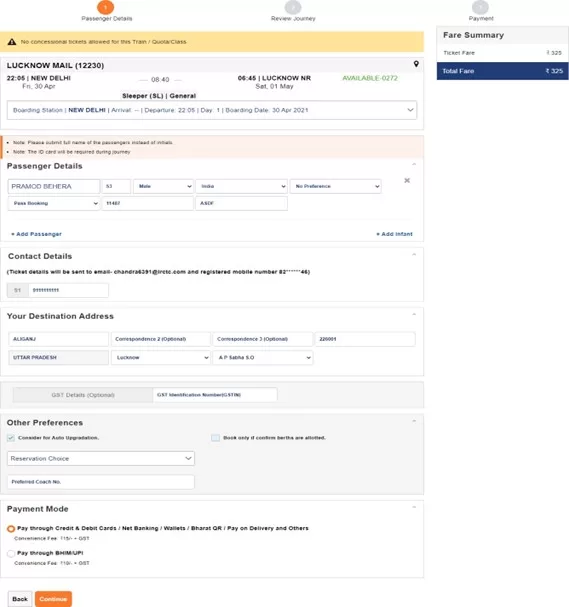
5. Enter Passenger Details

  • On the Passenger Reservation Page:
    • At least one passenger must be a Pass holder.
    • Enter:
      • Passenger Name
      • Age
      • Gender
      • For Pass holders:
        Select “Pass Booking” and enter:
        • Pass Number
        • Pass PIN Code
      • For non-pass holders, choose “General Booking”.
  • Add additional passengers using the “Add Passenger” option.
  • Enter Destination Address.
  • Modify Boarding Station if needed using the dropdown menu.
  • Provide Mobile Number and select Payment Mode.
  • Click “Continue” to proceed.

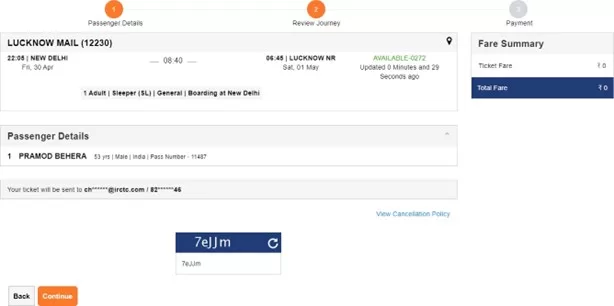
6. Review Booking

  • On the Booking Review Page, you will see:
    • Ticket details
    • Total fare
    • Berth availability
    • Pass information
  • Use the “Back” button if changes are needed.
  • Note:
    • No IRCTC convenience fee for tickets with only Pass/PTO passengers.
    • Fee applies for mixed bookings:
      • ₹15 + GST for SL and 2S
      • ₹30 + GST for other classes
    • Travel insurance is not available for pass bookings.
  • Enter the captcha and click “Continue”.

7. Payment and Confirmation

  • If the fare > ₹0:
    • Proceed to payment.
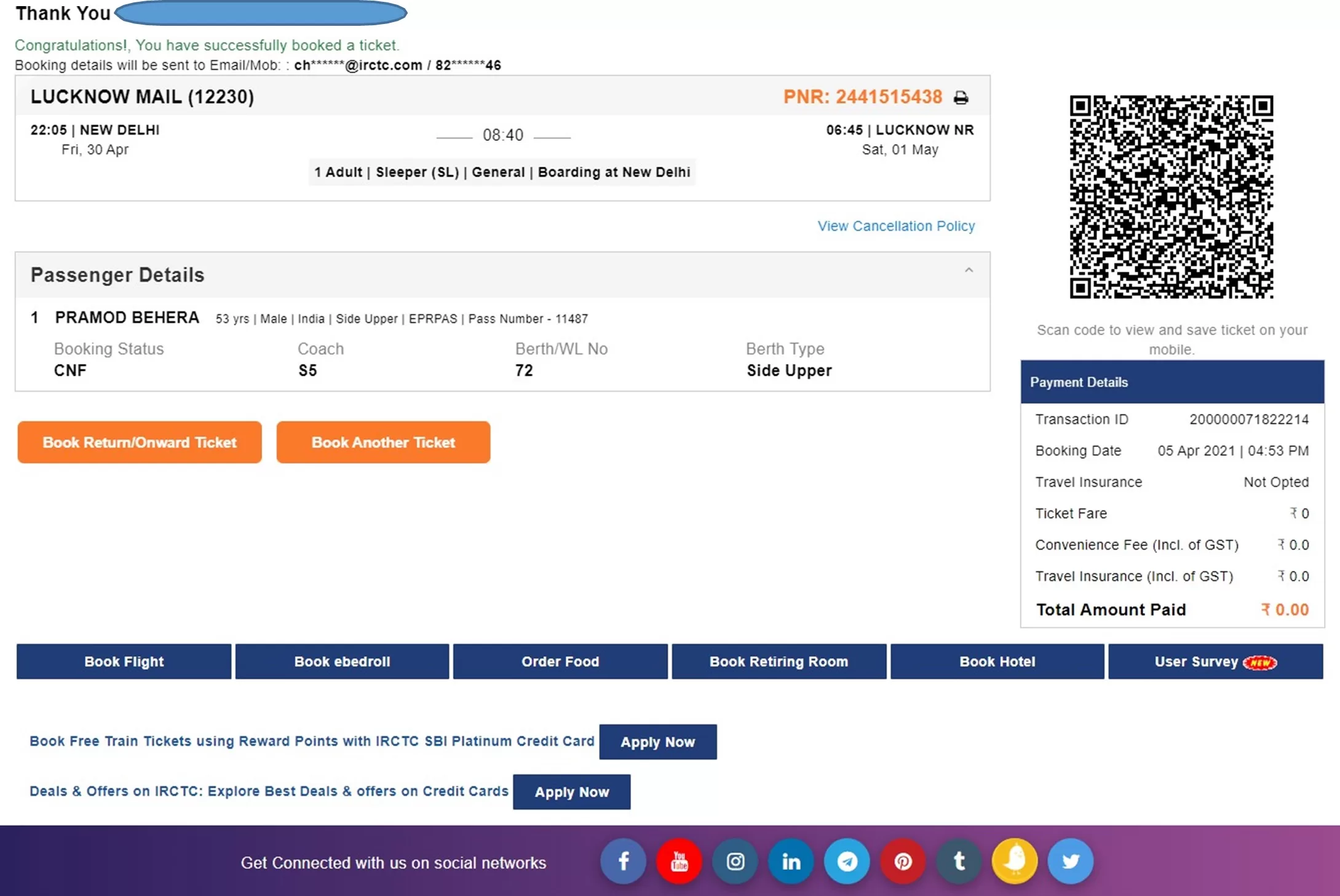
    • On success, PNR Number is generated.
  • If fare = ₹0:
    • Click “Continue”.
    • Booking is confirmed and PNR is generated.

8. Post-Booking

  • You will receive:
    • SMS (VRM) on your registered mobile number.
    • Booking Confirmation Email.
  • You can:
    • Print Electronic Reservation Slip (ERS) by clicking on the “Print Ticket” button next to PNR.
    • Use “Book Return/Onward Ticket” to reuse current passenger details.
    • Click “Book Another Ticket” for a fresh booking.

User guide in detail: Online train ticket on Railway e-pass
  • Login to the IRCTC website by clicking on “LOGIN” option provided at the top and enter your registered User ID and Password.
  • On Book Ticket Page, enter your desired “From station”, “To station”, “Date of Journey”, “Quota” and “Class” of travel.
  • Select the “Railway Pass Concession” checkbox.

A confirmation message will be displayed – “You are booking ticket in Railway Pass Concession. Do you want to continue?” Press “OK” to continue.

  • In case, you do not have any fixed date of journey, select “Flexible with Date” option.

To find train list, click on “Search” button.

  • The “List of Trains” will be displayed in next page with class wise availability and fare.
  • To select the train from the train list, select desired class of travel and click on “Book Now” button.
  • Passenger Reservation Page” will be displayed in the next page.
  • For booking a Pass Booking ticket, at least one of the travelling passenger must be pass holder.
  • Enter “Passenger Name”, “Age”, “Gender” and select concession option as “Pass Booking” for pass holder and provide “Pass Number” and “Pass PIN Code” as per the details available in pass issued.
  • Additional passenger can be added here by clicking on “Add Passenger” option.
  • Concession option for general passenger to be selected as “General Booking”.
  • Destination passenger address will be required to be provided under “Your Destination Address”.
  • Boarding Station for the journey can be changed by clicking the down arrow button on “Boarding Station” option provided on the Passenger Reservation Page by selecting the desired boarding station name from the drop down list.
  • After providing Passenger’s Mobile Number and selecting Payment Mode, click on “Continue” button to proceed next and to make any change in journey details “Back” button may be used.
  • Once the passenger details entered get verified with the details in pass issued, next page will be displayed as “Booking Review Page”.
  • The ticket details, Total fare, Availability of berths and Pass details will be displayed on the screen.
  • To make change in journey details, “Back” button may be used.
  • IRCTC convenience fee will not be levied on tickets booked for only Pass/PTO passengers.
  • IRCTC Convenience Fee (Rs. 15+GST for SL and 2S and Rs. 30+GST for all other classes) will be charged on tickets accompanying General passengers with PASS/PTO holders.
  • Travel insurance premium will not be charged for the time being on PASS booking tickets.
  • After checking all details, enter the captcha and click on “Continue” button.
  • If total fare to be paid is greater than zero, then payment option page will be displayed to make payment and “PNR number” will be generated after successful payment and successful response from PRS system.
  • If total fare to be paid is displayed as zero, then on clicking continue button Booking Confirmation Page will be displayed after successful response from the PRS system “PNR number” will be displayed.
  • “Virtual reservation message” (VRM) in the form of “SMS” will be sent on Registered Mobile Number.
  • Booking confirmation mail” will be sent on Registered Email ID.
  • Electronic Reservation Slip (ERS) can be printed by clicking on “Print Ticket” image button provided at next of PNR Number.
  • To book ticket for Return/Onward Journey, “Book Return/Onward Ticket” button may be used. Using this option will retain the details of Passengers as provided in the current ticket.
  • To book another ticket, “Book Another Ticket” button may be used.
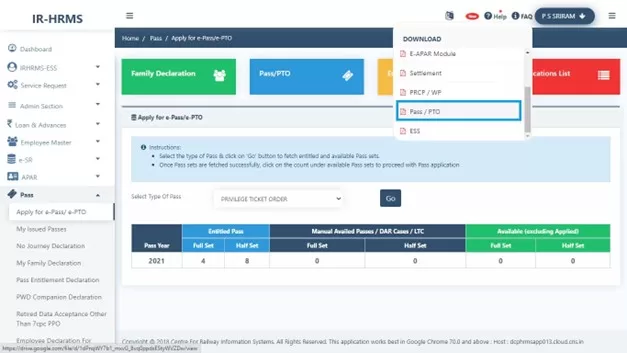
  • Pass booking related FAQs are provided in HRMS Dashboard. Please refer below screen.

I hope this guide for online train ticket booking on Railway e-PASS is helpful to you. For such content also read below links…

Also Read

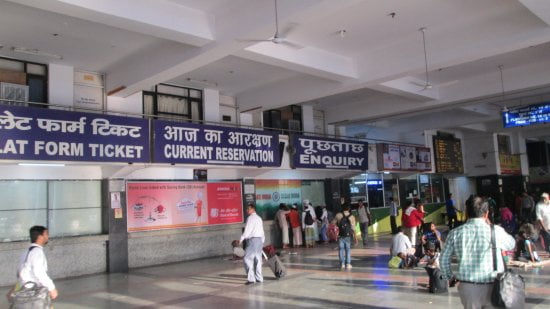
Train ticket through reservation counters resumed from May’22

Indian Railways is going to open reservation counters for booking of reserved tickets in a phased manner.

  • Zonal Railways have been instructed to decide and notify the opening of reservation counters in a phased manner tomorrow along with dissemination of information about their locations and timings as per local needs and conditions
  • Opening of booking centers will mark an important step in graded restoration of passenger railway services.

Indian Railways has also allowed booking of Reservation Tickets through the Common Service Centers and Ticketing agents w.e.f 22.05.2020. Running of Shramik Special trains will continue to be handled by local State Governments as per the existing protocols. Zonal railways may adhere to standard social distancing guidelines and observe the hygiene protocols in view of the ongoing COVID-19 pandemic.

Source: PIB Release dtd 21.05.2020